內容簡介
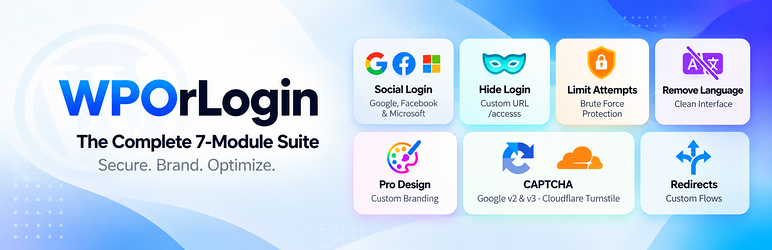
WPOrLogin 是一款全面的 WordPress 登入頁面安全與品牌化外掛,提供社交登入、限制登入嘗試、隱藏登入頁面及 reCAPTCHA 等功能,旨在提升網站安全性與使用者體驗,減少使用者對密碼的困擾。
【主要功能】
• 社交登入模組:支援 Google 一鍵登入,提升轉換率
• 隱藏登入模組:自訂登入網址,防止機器人攻擊
• 限制登入嘗試:自動鎖定多次失敗的 IP
• 視覺設計與品牌模組:使用原生自訂器設計登入頁面
• 完整身份同步:從 Google 匯入姓名,個性化問候
• 智能帳號連結:防止重複帳號的安全連結
外掛標籤
開發者團隊
② 後台搜尋「WPOrLogin – Custom Login, Social Login, CAPTCHA & Security」→ 直接安裝(推薦)
📦 歷史版本下載
原文外掛簡介
WPOrLogin combines custom login page design, social login and WordPress login security features in one plugin. Enable only the modules you need. Configure settings from the WordPress administration area.
Social Login: Google, Facebook and Microsoft
Let visitors sign in using their Google, Facebook or Microsoft accounts.
Enable each provider independently using its own application credentials.
Allow WordPress account registration through a supported provider when site registration is permitted.
Use provider account identifiers and email information to recognize existing WordPress users. When account confirmation is required, visitors can confirm using a permitted login method.
Support existing Google sign-ins when upgrading from previous versions.
Display a provider profile picture when available and enabled, without requesting social account passwords.
Optionally hide the standard WordPress registration form while keeping login available to existing users.
Customize the WordPress Login Page
Choose from eight layouts: Basic, Standard and six Premium designs.
Customize logos, colors, typography, fields, buttons, form spacing and backgrounds using the WordPress Customizer.
Choose static background images, rotating slideshows or video backgrounds (YouTube, Vimeo or Media Library MP4).
Configure overlays and a fallback background image for mobile devices.
Preview designs across different screen sizes.
CAPTCHA Protection: reCAPTCHA and Turnstile
Choose Google reCAPTCHA v2 checkbox, Google reCAPTCHA v3 or Cloudflare Turnstile.
Configure site and secret keys for the selected service.
Enable protection separately for login, registration and password recovery forms.
Only the selected CAPTCHA service is used for protected forms.
Limit Login Attempts
Restrict repeated failed password login attempts by IP address.
Configure attempt limits and temporary lockout duration.
Review login attempt activity, blocked addresses and related details in the administrator report.
Manage allowed IP addresses and unblock addresses when appropriate.
Hide Login URL
Replace the public WordPress login URL with a custom path, for example /access.
Choose how requests to the original login URL are handled.
Preserve password recovery links and the WordPress authentication process.
If you use a caching plugin, exclude your custom login path from caching.
Login and Logout Redirects
Configure where users go after login and logout.
Use available role-specific settings to redirect users to appropriate pages.
Remove Login Language Selector
Optionally hide the WordPress language selector on the login screen.
Getting started: Activate WPOrLogin, open its settings, enable the modules you want, and save their settings. For social login or CAPTCHA, add credentials from the corresponding provider. Test login and password recovery before using a custom login URL on a live site.
External Services and Privacy
WPOrLogin contacts external services only when their related features are used. Website administrators choose which integrations to enable and should disclose them in their privacy information as appropriate.
Google Login (optional): On sign-in, Google handles OAuth authentication. WPOrLogin requests the permitted identity information needed for login or account linking, such as an identifier, email, name and avatar. Privacy | Terms.
Facebook Login (optional): Meta handles OAuth authentication and provides permitted identity information for login or linking. Privacy | Terms.
Microsoft Login (optional): Microsoft handles OAuth authentication and may provide identity information and an avatar with the granted permissions. Privacy | Terms.
Google reCAPTCHA (optional): Google scripts are loaded on protected forms, and a security token is sent to Google’s verification endpoint. Google may process browser and security information. Privacy | Terms.
Cloudflare Turnstile (optional): The official Turnstile script is loaded on protected forms, and a challenge token is sent to Cloudflare for verification. Privacy | Terms.
Video backgrounds (optional): If an administrator configures YouTube or Vimeo, visitors loading that background may contact those services. YouTube privacy | Vimeo privacy.
IP lookup links (optional): Administrators can choose to open an IP address on WhatIsMyIPAddress. The external site is contacted when that link is clicked.
WPOrLogin stores relevant WordPress account information and provider identifiers locally to support sign-in and account linking. It does not request social account passwords. Site administrators control credentials and enabled features.