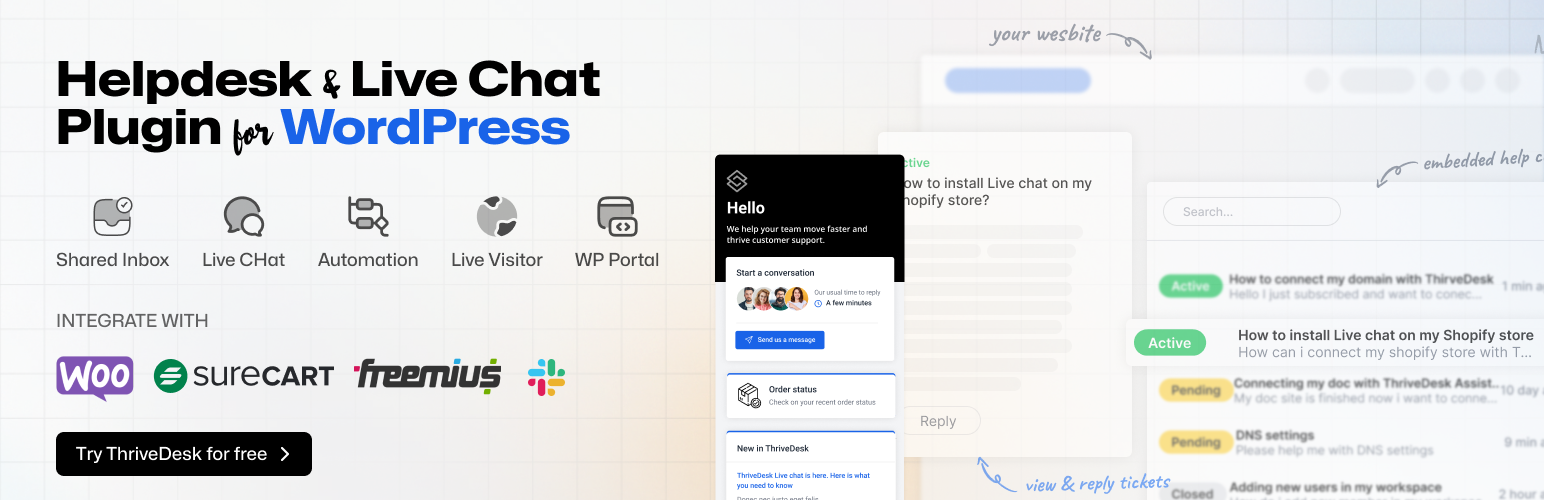
內容簡介
WordPress 即時聊天外掛程式
ThriveDesk 可能是最適合 WordPress 的最佳即時聊天軟件。它簡單直接,易於使用,是最輕巧、最快速的即時聊天助手,能夠吸引客戶而不會減緩您的網站速度。
我們設計 ThriveDesk 即時聊天以保護使用者的隱私,符合 GDPR 規定。
💬 即時聊天功能
聊天機器人
主動傳訊
離線傳訊
引導收集
自動回復知識庫
聯絡表單
連結
檔案共享
Zoom 和 Google Meet 整合
分析及見解
與其他 CRM 的無縫整合
等等...
WordPress 幫助中心及支援票證外掛程式
透過 Thrivedesk 共用收件匣(即票證系統)來管理所有客戶對話,共用收件匣是裝置所有票證、即時聊天和查詢的地方,團隊可以共同合作,提供更好的客戶支援體驗。
ThriveDesk 讓您的團隊可以輕鬆透過單一共用收件匣管理電子郵件。
🤔 為什麼要使用共用收件匣?
✅ 更好的組織
✅ 常規任務的自動化
✅ 更好的工作流程管理
✅ 更容易進行績效追蹤
✅ 更佳的協作
✅ 可信報告
✅ 更好的整合
✅ 無縫客戶體驗
🌟 幫助中心功能
指派任務
衝突偵測
常用回覆
垃圾郵件篩選
自動回覆
自動 BCC
預設狀態更新
私人備註
回覆撤銷
強大的搜尋
通知
聯絡歷史記錄
先前的對話紀錄
滿意度調查
報告
與 WooCommerce、Easy Digital Downloads、Envato 等更多整合
等等...
建立驚人的知識庫,以擴展客戶支援(即將推出)
利用文章庫幫助客戶找到解決問題的答案,減少票證變化,避免重複事件記錄,促進自助式存取,並改善解決時間。
知識庫是一個自助式系統,與即時聊天和票證系統完美搭配。
WooCommerce 整合
如果您透過 WooCommerce 銷售您的產品,沒有比 Thrivedesk 更好的方法來無縫處理所有客戶票證。
您可以在 ThriveDesk 對話頁面中檢查訂單總數、訂單詳情及運送信息。
🎁 更多整合
WooCommerce
Easy Digital Downloads
Gravity Form
Fluent CRM
Fluent Form
WPForms
Contact Form 7
Appsero
Slack
Stripe(即將推出)
Paddle(即將推出)
自定應用程式
高級報告
Thrivedesk 的報告工具可幫助您做出數據驅動的決策來支援和取悅您的客戶。
📈 報告功能
對話報告
公司報告
滿意度分數
排行榜
代理商表現
等等...
外掛標籤
開發者團隊
② 後台搜尋「Agentic Help Desk Plugin for WordPress – Live Chat, AI Chatbot & Ticketing – ThriveDesk」→ 直接安裝(推薦)
📦 歷史版本下載
原文外掛簡介
The ridiculously simple, and remarkably productive, customer support software for WordPress — a complete help desk with shared inbox, ticketing system, live chat, and AI customer support, built for WooCommerce and ecommerce businesses.
ThriveDesk puts all your customer conversations in one place — email, live chat, and support tickets. Your team replies faster. Nothing gets missed.
For WooCommerce stores, it goes further. Agents can view order history, check shipping status, issue refunds, and manage subscriptions — all from inside the support ticket. No tab switching. No extra plugins.
Trusted by 2,000+ startups and growing businesses worldwide.
Start your 7-day free trial — no credit card required.
🤔 Why WordPress Businesses Choose ThriveDesk
Most help desk tools are built for big SaaS companies. WordPress support is an afterthought for them. ThriveDesk is different — we built native WordPress and WooCommerce support from day one.
When a customer asks “where is my order?”, your agent sees everything: order details, shipping status, payment method, and purchase history — right inside the ticket. No switching to WooCommerce admin. No copying order IDs. Just instant context.
ThriveDesk is more than a WooCommerce help desk. It’s a full customer support platform for WordPress — with a shared inbox, ticketing system, live chat, AI customer support, knowledge base, automation, reporting, and mobile apps. Everything in one place, without the enterprise price tag.
🛒 WooCommerce Support, Done Right – Built-In, Not Bolted On
ThriveDesk’s WooCommerce integration was built by our own engineers. It’s not a third-party connector. That means it’s fast, reliable, and built into how your team works every day. Add AI customer support, a WordPress ticketing system, and a WooCommerce help desk — and you have a complete ecommerce support setup in one tool.
What your agents can do from inside every support ticket:
📦 View complete order history — see every order the customer has placed
🚚 Check real-time shipping status — no need to open a tracking link
💸 Cancel or refund orders — process refunds without leaving ThriveDesk
✏️ Add, edit, or remove order items — modify orders from the ticket view
🔄 Manage subscriptions — add, change, or cancel plans on the spot
👤 View customer lifetime value — know who you’re talking to before you reply
No customer data is stored on ThriveDesk servers. Everything syncs via API and is cached locally. Your data stays yours.
WooCommerce My Account — Embedded Support Portal
With WPPortal, you can embed a full support portal inside your WooCommerce My Account page. Customers can view their tickets, read your knowledge base, and start new conversations — without leaving your store. No external links. No confusion.
Granular Agent Permissions
Not every agent should be able to refund orders or cancel subscriptions. ThriveDesk lets you control exactly what each agent can do. Your operations stay protected. Your team stays empowered.
Works with WooCommerce Subscriptions
Running a subscription store? ThriveDesk handles it natively. Agents can view subscription status, upcoming billing dates, and plan details — and modify or cancel subscriptions right from the ticket. No extra steps.
⚡ A Complete Help Desk — Not Just a WooCommerce Plugin
ThriveDesk gives your support team everything they need in one clean, fast, affordable platform.
📬 Shared Inbox & Ticketing System
Stop losing emails in personal inboxes. ThriveDesk’s shared inbox for WordPress pulls all your support channels — email, live chat, and more — into one support ticket system. Every message becomes a trackable ticket. Nothing slips through.
Key features:
Collision detection — stops two agents from replying to the same ticket
@Mentions — tag a teammate inside any conversation
Private Notes — internal comments that customers never see
Canned Responses — save your best replies and reuse them in seconds
Tags and Labels — organize tickets for routing and reporting
Custom Fields — collect structured info per ticket: dropdowns, text, toggles
Snooze Conversations — set a reminder: “follow up tomorrow at 3pm”
Schedule Reply — write now, send later
Undo Send — 5–30 second window to cancel a reply before it goes out
Split Conversations — break one ticket into two when topics diverge
Merge and Bulk Actions — merge duplicates, bulk-assign, bulk-close
Each inbox is fully independent. Keep sales, billing, and technical support completely separate.
💬 Live Chat for WordPress & WooCommerce
ThriveDesk’s live chat widget installs on any WordPress site or WooCommerce store in minutes. No coding needed.
Multiple agents can help one customer at the same time
Shareable chat links — hand off a conversation without starting over
Custom contact form fields — collect the right info before chat begins
Audio notifications — agents never miss a new chat
Firebase push notifications — reliable alerts across multiple agents
Works on all devices — fully mobile-responsive
Drag-and-drop file attachments — customers can share screenshots in chat
Agents see full conversation history and customer details in the chat panel. WooCommerce stores also see the customer’s order history — right there.
📚 Knowledge Base — Help Customers Help Themselves
A good knowledge base reduces support tickets by up to 70%. ThriveDesk’s knowledge base is fast to build and easy to keep current.
What you can build:
A public help center with your own domain and branding
Internal docs for your support team
In-app help embedded in your live chat widget
WPPortal — a full help center on any WordPress page
The editor makes writing fast:
AI-assisted editing — write docs 3x faster
Toggle blocks — collapsible sections for long articles
Stepper blocks — numbered steps for tutorials
Media manager — add images and videos to any article
Drag-and-drop ordering and nested categories
Autosave with version history — never lose your work
The search is AI-powered. It understands what a customer means, not just what they typed. Someone searching “can’t log in” finds your password reset article — even if it’s not titled that way.
🤖 AI Customer Support — Honest and Effective
ThriveDesk’s AI assistant, NEO, learns from your own knowledge base, documents, and website. It handles common questions automatically so your team can focus on harder ones.
NEO can:
Auto-reply to customer questions on its own
Suggest draft replies for agents to review
Tag and prioritize incoming tickets automatically
Hand off to a human agent with full context preserved
Update instantly when you add new training content
AI Copilot helps your human agents too:
Summarizes long threads in seconds
Generates a full draft reply from conversation history
Suggests next steps without being asked
We’re upfront about AI performance. In the first few months, resolution rates are typically 20–45%. With a well-trained setup, ThriveDesk AI can handle up to 90% of first-tier requests. But we’ll never claim AI solves everything — it supports your team, it doesn’t replace them.
Powered By AI, Support By Human. That’s the right balance.
⚙️ Automation — Let the Routine Run Itself
Set up simple rules and let ThriveDesk handle the repetitive work. No code. Just if/then logic. It’s especially useful for ecommerce support — where refund requests, shipping questions, and order emails follow the same patterns every day.
What you can automate:
Routing — send tickets to the right team based on content or custom fields
Tagging — auto-tag refund, billing, and shipping tickets by keyword
Assignment — assign tickets by rules or round-robin
Escalation — flag tickets that haven’t been answered after a set time
Notifications — alert a senior agent when a VIP customer writes in
SLA tracking — set and enforce response time targets
Examples your team can use today:
Subject contains “refund” → tag Billing → assign to Billing team
Email matches VIP list → add note → assign to senior agent
No reply in 4 hours → tag Urgent → notify team lead
Contact form = “Subscription” → route to Subscription team
Order status email detected → tag → move to Order Updates folder
📊 Reporting — See What’s Actually Happening
Stop guessing. ThriveDesk’s dashboards show you how your support team is doing.
Four dashboards:
Conversations Dashboard — volume, open vs. closed, trends over time
Happiness Dashboard — CSAT scores and satisfaction trends
Leaderboard Dashboard — agent performance, response times, resolution rates
Company Dashboard — team results measured against your goals
Your CSAT score is shareable. Display it as a badge on your website to build trust with new customers.
🔌 SmartApp — Bring Your Own Data
Every business has unique data. SmartApp is a no-code drag-and-drop builder that connects ThriveDesk to any external API. Pull in CRM records, subscription data, billing history — whatever your agents need — right into the ticket view. No more switching tools.
📱 Mobile Apps — Support from Anywhere
iOS App (v2.0):
Redesigned ticket list for fast triage
Quick Action Bar — assign, tag, change status, or reply in one tap
Full conversation history while you compose
Android App:
View, reply, and forward tickets
@Mention teammates in notes
Swipe actions for quick ticket management
Live chat support
Dark mode
Real-time updates via WebSocket
🔗 Integrations Built for WordPress
ThriveDesk connects with the tools WordPress and WooCommerce businesses already use.
E-Commerce & Payments
WooCommerce — Orders, refunds, subscriptions, and customer history — all inside tickets
Easy Digital Downloads (EDD) — Digital product purchase history in every ticket
SureCart — All-in-one digital product platform data
Freemius — Real-time customer and license data
Stripe — Customer billing details and transaction history
Paddle — Subscription status, billing dates, and payment methods
Developer Integrations
API & Webhooks — Build custom integrations (Plus plan and above)
SmartApp — Connect any external API via drag-and-drop — no code needed
GitHub — See repo names, issue titles, and status inside tickets
WordPress Forms — Works with any WordPress form builder for ticket creation
🔒 The WordPress Plugin — Fast, Lightweight, GDPR-Ready
The ThriveDesk plugin is small and fast. It adds no extra database queries and won’t slow down your site. Setup takes under 5 minutes.
What’s included:
WPPortal — embed your help center on any WordPress page or WooCommerce My Account page using a shortcode
Live chat widget — add chat to your site in minutes
Form builder support — connect any WordPress contact form to create tickets automatically
GDPR-compliant — nonce verification and secure form handling built in
Auto-cache clearing — settings updates clear the cache on their own
Works with any WordPress theme. No page builder required.
🚚 Free Migration — Switching Is Easy
Already on Zendesk or Help Scout? We’ll move everything over for free.
From Zendesk — all conversations, contacts, and history fully preserved
From Help Scout — full 1:1 migration with conditions matched
Zero data loss. Our team handles it. No extra charge.
💬 What ThriveDesk Customers Say
“Many businesses think only big companies offer premium support tools. We found ThriveDesk and it’s been a game changer.”
— Mohammad Zannatun Nime, Support Executive, Themesgrove
Switched from Help Scout. Saved $4,200 per year.
“We needed to serve our premium customers first. ThriveDesk made that possible.”
— Mehedi Hasan, CEO, Themefisher
Switched from Zendesk. Increased sales with customer prioritization.
❓ Frequently Asked Questions
Does ThriveDesk slow down my WordPress site?
No. The plugin is lightweight — no extra database queries, no render-blocking scripts. Your site speed stays the same.
Does ThriveDesk store WooCommerce customer data?
No. WooCommerce data syncs via API and is cached locally. It’s never stored permanently on ThriveDesk servers.
Can I manage WooCommerce subscriptions from ThriveDesk?
Yes. Agents can view subscription status, billing dates, and plan details — and modify or cancel subscriptions right from the ticket.
Can I embed a support portal in my WooCommerce My Account page?
Yes. WPPortal adds a full support portal — ticket history, knowledge base, and new ticket form — to any WordPress page. No coding needed.
Can I use ThriveDesk with Easy Digital Downloads?
Yes. ThriveDesk shows EDD purchase history in real-time inside every ticket. Your agents know what the customer bought before they reply.
What happens to my data when I migrate from Help Scout or Zendesk?
Nothing is lost. All conversations, contacts, and ticket history are fully preserved. Migration is free and our team handles it.
Does ThriveDesk work with other tools?
Yes. ThriveDesk connects with Stripe, Paddle, SureCart, Freemius, EDD, and GitHub. Plus plan and above includes full API and webhook access.
How does the AI work?
NEO is trained on your knowledge base, documents, and website. It can auto-reply, suggest drafts, and classify tickets. New content takes effect instantly — no delay.
What is the realistic AI resolution rate?
In the first months: 20–45%. Fully trained, ThriveDesk AI can handle up to 90% of first-tier requests. Deflected by AI is not the same as resolved by AI — and we’ll always be honest about that.
Is ThriveDesk GDPR-compliant?
Yes. The plugin uses nonce verification and secure form handling. ThriveDesk is GDPR-ready.
Do you offer a free trial?
Yes — 7 days, no credit card required.
Can I test the AI before going live?
Yes. The AI Playground lets you test NEO’s replies and refine them before turning on auto-reply for customers.
Does ThriveDesk work with my WordPress theme?
Yes. ThriveDesk works with any theme that follows WordPress standards. No page builder needed.
What is the best help desk plugin for WordPress?
ThriveDesk is built specifically for WordPress and WooCommerce — not ported from a generic tool. It combines a shared inbox, ticketing system, live chat, AI support, and a knowledge base in one plugin. For WooCommerce stores, it’s the only help desk with native order management, refunds, and subscriptions built directly into the ticket view.
Can I use ThriveDesk as a ticketing system?
Yes. Every email, live chat, or contact form creates a trackable support ticket. Agents can assign, tag, prioritize, snooze, and resolve tickets. Automation routes them to the right team automatically.
Does ThriveDesk support email ticketing?
Yes. Connect your support email and every message becomes a ticket in your shared inbox. Canned responses speed up replies. Automation handles routing. No manual forwarding needed.
Is ThriveDesk a good Zendesk alternative for WordPress?
Yes — and it’s 45% cheaper. Migration from Zendesk is free and preserves everything. ThriveDesk is built for WordPress and WooCommerce, so you get ecommerce features that Zendesk can’t match without expensive add-ons.
Is ThriveDesk a Help Scout alternative?
Yes. Customers save up to $4,200 per year switching from Help Scout. …