內容簡介
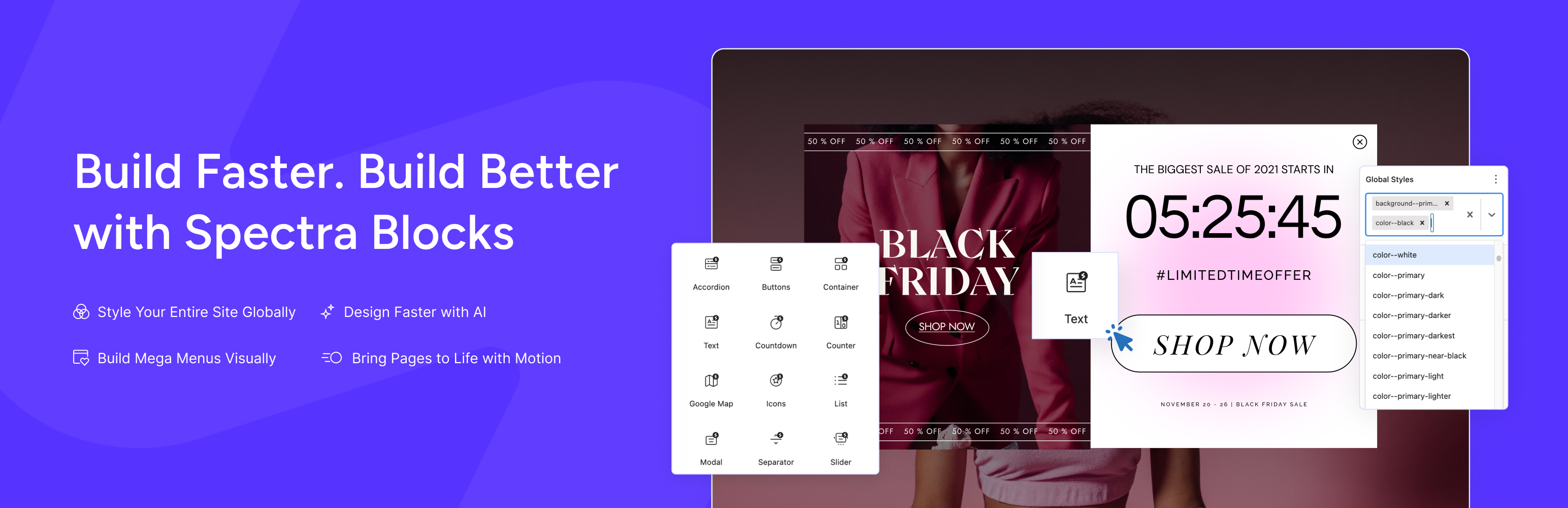
Spectra Blocks 是一款基於 WordPress 現代核心區塊 API 重建的 AI 網站建構器,直接整合於區塊編輯器中。透過 Zip AI,使用者可以快速生成完整頁面草稿,提升網站建置效率。
【主要功能】
• 根據文字提示生成完整頁面
• 生成單獨區塊(如:英雄區、定價、常見問題等)
• 改寫或改善現有頁面的內容
• 將現有 HTML 頁面轉換為原生 Spectra 區塊
• 使用原生區塊編輯器微調每個區塊
外掛標籤
開發者團隊
② 後台搜尋「Spectra Blocks – AI Website Builder for the Block Editor」→ 直接安裝(推薦)
原文外掛簡介
Spectra Blocks is a complete rebuild of Spectra on WordPress’s modern core-block APIs – an AI website builder built directly into the Block Editor.
Describe the page you want. Zip AI, our AI companion plugin, generates a complete first draft using Spectra blocks right inside the Block Editor. You install and connect it in a couple of clicks from the AI area in the Spectra Blocks dashboard. From there, you edit everything the normal way – no separate builder, no proprietary layout system, no plugin you have to keep forever just to keep your site working.
That’s the whole idea: get the speed of an AI builder without giving up the editor WordPress already gives you.
If you’re already using the original Spectra plugin, it hasn’t gone anywhere – it’s now called Spectra Legacy, and it keeps working and keeps getting maintenance updates. Spectra Blocks is a separate, new plugin. You move to it whenever it makes sense, not because you have to.
What you can do with it
Generate a full page from a text prompt
Generate individual sections (hero, pricing, FAQ, testimonials, etc.) instead of a whole page
Rewrite or improve copy on an existing page
Convert an existing HTML page into native Spectra blocks
Fine-tune every block afterward using the native block editor — colors, spacing, typography, layout
Why Spectra Blocks
Rebuilt on core, not built around it. Spectra Legacy was one of the first block plugins ever built – before many of today’s WordPress APIs existed, so it had to build a lot of that groundwork itself. Spectra Blocks takes the opposite approach: it’s built directly on WordPress’s modern core-block APIs, so it naturally stays in step with WordPress as the platform evolves.
AI where it actually helps. Zip AI removes the blank-page problem. You still make the final call on every layout, section, and line of copy – the AI gets you a strong starting point, not a locked-in template.
Composable, not bloated. Instead of dozens of single-purpose blocks, Spectra Blocks gives you a smaller set of flexible blocks plus Extensions that add advanced design controls on top of them. Fewer moving parts, less to maintain, more design freedom.
Native by design. Everything is built and edited in the WordPress Block Editor, and your content is stored as standard block markup: no shortcodes, no proprietary page format, no separate interface to learn.
Key Features
AI page generation – describe a page, get a full first draft in native blocks
AI section generation – generate individual sections instead of full pages
AI content rewriting – improve or rewrite existing copy in place
HTML-to-blocks conversion – turn an existing HTML page into native Spectra blocks
Extensions – advanced spacing, border, shadow, and responsive controls for Spectra blocks
Container block – build any custom layout by nesting core, Spectra, or third-party blocks inside it
Design Library – ready-made patterns (info boxes, testimonials, pricing tables, comparisons, and more) built entirely from Spectra blocks, so you’re not starting from scratch
Global Styles – set colors, typography, and spacing once, apply them site-wide
Popup Builder – build popups using the same native blocks
Animations – fade, slide, zoom, flip, and more, applied directly to blocks
Build with Zip AI
Zip AI is the AI companion for Spectra Blocks, and it’s how most people will start a page. You install and connect it from the AI area in the Spectra Blocks dashboard, then generate right inside the editor.
Here’s what it actually does:
Full-page generation – give it a prompt, get a complete page draft
Section generation – generate just a hero, pricing table, FAQ, or any other section
Content improvement – ask it to tighten, rewrite, or expand existing copy
HTML conversion – upload an existing HTML page and get it back as native blocks
Global Styles setup – when you build with AI, Zip AI sets up your site’s colors, typography, and spacing as Global Styles automatically, so everything stays organized and editable afterward
Every layout Zip AI produces is made entirely of Spectra Blocks. That means it’s fully editable afterward – nothing is locked behind an AI-only interface.
A note on pricing: the core plugin, all blocks, and all Extensions are completely free and don’t require an account. AI features come from Zip AI, a separate free plugin you install and connect from the Spectra Blocks dashboard. Using AI requires a ZipWP account and runs on credits, including for Spectra Blocks Pro users. AI requests are processed by the ZipWP service. See ZipWP’s terms of service and privacy policy.
How Spectra Blocks Works
Spectra Blocks doesn’t ship dozens of single-purpose blocks the way Spectra Legacy did. Instead, it gives you a focused set of flexible blocks, plus Extensions that add advanced design controls to WordPress’s own core blocks.
Text and Buttons are Spectra’s own content blocks. The Text block handles everything from headings (H1 to H6) to paragraphs, and the Buttons block creates fully customizable button groups.
Extensions for core blocks add advanced spacing, border, shadow, and responsive controls to the core blocks you already use, like Image. You keep WordPress’s own blocks and get more design power on top.
Container is the foundation for custom layouts — nest any block inside it, including core WordPress blocks and other plugins’ blocks.
Layout and content blocks include Accordion, Tabs, Slider, List, Icon, Separator, and Google Map.
Dynamic and engagement blocks include Post (grid, masonry, and carousel layouts), Countdown, Counter, Modal, and Popup Builder.
Design Library provides pre-built patterns for testimonials, info boxes, pricing tables, and comparisons, all built from Spectra Blocks.
Missing a block you used in Spectra Legacy? It’s probably not gone – it’s just built differently now. A testimonial is a Container with an Image, Text, and Buttons inside it. A pricing table works the same way. If you’d rather use the original dedicated block exactly as it was, Spectra Legacy still has it.
Compatibility
Works well with these themes:
Astra
Spectra One
Kadence
GeneratePress
Blocksy
Neve
Flatsome
Works well with these plugins:
WooCommerce
SureCart
Gravity Forms
Fluent Forms
LearnDash
Tutor LMS
Yoast SEO
The Events Calendar
GiveWP
PrestoPlayer
SureMembers
MemberPress
Easy Digital Downloads
Spectra Blocks works with any standards-compliant WordPress theme. It has been tested for compatibility with WPML.
Coming from Spectra Legacy?
Spectra Legacy (the original plugin, published as “Ultimate Addons for Gutenberg”) isn’t going anywhere — it keeps getting maintenance updates, compatibility fixes, and security patches.
Spectra Blocks is a separate new plugin, not an update to your existing install. Running both side by side is normal during a transition: existing pages keep working on Legacy while you build new ones in Blocks. Once no pages use Legacy blocks, you can deactivate it.
A few things to know when you move:
Global Colors, Typography, and default block settings are not shared between the two plugins — you’ll set them up fresh in Spectra Blocks.
Custom CSS written for Legacy block classes will need updating for any sections you rebuild in Spectra Blocks. Legacy pages are unaffected as long as Legacy stays active.
Rebuilding a page doesn’t change its URL, so links and SEO stay intact.
There’s no deadline. For new projects, start with Spectra Blocks — it’s the actively developed version.
Support
Need help? We’re here for it.
Support forum: use the Support tab on this page
Documentation: available from your WordPress dashboard once the plugin is installed
Community: Facebook Group – Web Creators by Astra
Found a security issue? Please report it responsibly through our security disclosure process rather than in a public forum post – see the FAQ below for details.
Source Code
This plugin’s JavaScript and CSS are built from source files using standard WordPress build tools.
Plugin Source
Block source files are located in the src/ directory (excluded from the distribution zip for size).
Admin dashboard source files are located in admin/assets/src/ (also excluded from distribution).
The compiled, production-ready assets are in build/ and admin/assets/build/ respectively.
Source code is available on GitHub: https://github.com/brainstormforce/wp-spectra-blocks
To build from source:
npm install && npm run build — compiles block JavaScript and CSS.
cd admin && npm install && npm run build — compiles the admin dashboard React app.
Third-Party Libraries
The following pre-compiled third-party libraries are bundled in assets/:
Swiper (slider functionality) — Source: https://github.com/nolimits4web/swiper — License: MIT
AOS (Animate on Scroll) — Source: https://github.com/michalsnik/aos — License: MIT
Bundled Library Source
Source code for each bundled library and third-party utility used by this plugin:
lib/gutenberg-templates/dist/ and lib/gutenberg-templates/inc/block/dist/ — Source: https://github.com/brainstormforce/bsf-gutenberg-templates (build: npm install && npm run build)
lib/nps-survey/dist/ — Source: https://github.com/brainstormforce/bsf-nps-survey (build: npm install && npm run build)
lib/zipwp-images/dist/ — Source: https://github.com/brainstormforce/bsf-zipwp-images (build: npm install && npm run build)
lib/astra-notices/ — Source: https://github.com/brainstormforce/astra-notices (plain PHP, ships unbuilt)
vendor/enshrined/svg-sanitize/ — Source: https://github.com/darylldoyle/svg-sanitizer (plain PHP, ships unbuilt)
admin/assets/build/dashboard-app.js — bundles the @bsf/force-ui admin UI components — Source: https://github.com/brainstormforce/bsf-admin-ui (build: npm install && npm run build in the admin/ directory)
External Services
This plugin connects to the following third-party services under certain conditions:
Google Maps (maps.google.com)
The Google Map block embeds a map on the frontend using the public Google Maps embed URL (https://maps.google.com/maps?q=...&output=embed). No API key is required and no data is sent from the server. The request is made by the visitor’s browser each time a page containing the block is rendered; the address entered in the block is included in the URL so Google can return the matching map tile.
Service URL: https://maps.google.com/maps
Terms of Service | Privacy Policy
ZipWP API
When the AI features are enabled and authorized, the plugin communicates with the ZipWP API for AI-powered content generation and template library features. User site URL and content prompts are sent to generate suggestions.
Service URL: https://api.zipwp.com/
Terms of Service | Privacy Policy
ZipWP (app.zipwp.com)
When the user clicks “Authorize”, “Sign Up”, “Manage Plan”, or “Buy Credits” in the Spectra Blocks AI dashboard, the browser is redirected to the ZipWP web app for authentication, account management, or billing. The redirect is user-initiated; no plugin-originated data is sent until the user interacts with the linked pages. Data sent includes only what the user enters on the ZipWP web app itself (login credentials, billing details); the plugin passes a site identifier in the return URL so the ZipWP dashboard can complete the round-trip after sign-up.
Service URL: https://app.zipwp.com/
Terms of Service | Privacy Policy
Starter Templates Credit Server
When AI features are enabled, the plugin checks the credit balance for AI content generation features.
Service URL: https://credits.startertemplates.com/
Terms of Service | Privacy Policy
Brainstorm Force Store
When the “Get Spectra Blocks Pro” upsell is displayed in the admin dashboard, pricing information is fetched from the Brainstorm Force store. This request is made by the administrator’s browser, not the plugin server.
Service URL: https://store.brainstormforce.com/
Terms of Service | Privacy Policy
Unsplash
When using the AI-powered image library, images may be fetched from Unsplash. The bundled ZipWP Images library downloads free stock photos based on user-selected keywords. Image URLs and attribution data are retrieved from the Unsplash API.
Service URL: https://unsplash.com/
Terms of Service | Privacy Policy
WordPress.org
When installing recommended plugins or themes from the admin dashboard, the plugin uses the standard WordPress.org API to download packages.
Service URL: https://downloads.wordpress.org/
Privacy Policy
WebsiteDemos.net
When the Starter Templates library is enabled, template data may be synced from the WebsiteDemos.net service.
Service URL: https://websitedemos.net/
Terms of Service | Privacy Policy
YouTube
The admin dashboard settings page embeds tutorial videos from YouTube using the privacy-enhanced mode (youtube-nocookie.com). Videos are loaded only when a user clicks play on the admin dashboard. No user data is sent until playback is initiated.
Service URL: https://www.youtube-nocookie.com/
Terms of Service | Privacy Policy
BSF Analytics
When the user opts in to share anonymous usage data, the bundled BSF Analytics library sends non-personal site environment data (WordPress version, theme, active plugins) to help improve the plugin.
Service URL: https://analytics.brainstormforce.com/
Privacy Policy
BSF Metrics
When the user submits an NPS (Net Promoter Score) survey response from the admin dashboard, the bundled NPS Survey library sends the feedback to the BSF Metrics service.
Service URL: https://metrics.brainstormforce.com/
Terms of Service | Privacy Policy
Brainstorm Force Support
When verifying plugin license status, the bundled Starter Templates library may communicate with the Brainstorm Force support portal.
Service URL: https://support.brainstormforce.com/
Terms of Service | Privacy Policy
Spectra Blocks News (wpspectra.com)
The admin dashboard “What’s New” panel fetches an RSS feed from wpspectra.com to display plugin announcements and release notes. This request is made by the administrator’s browser, not the plugin server. No user data is sent.
Service URL: https://wpspectra.com/whats-new/feed/
Terms of Service | Privacy Policy