內容簡介
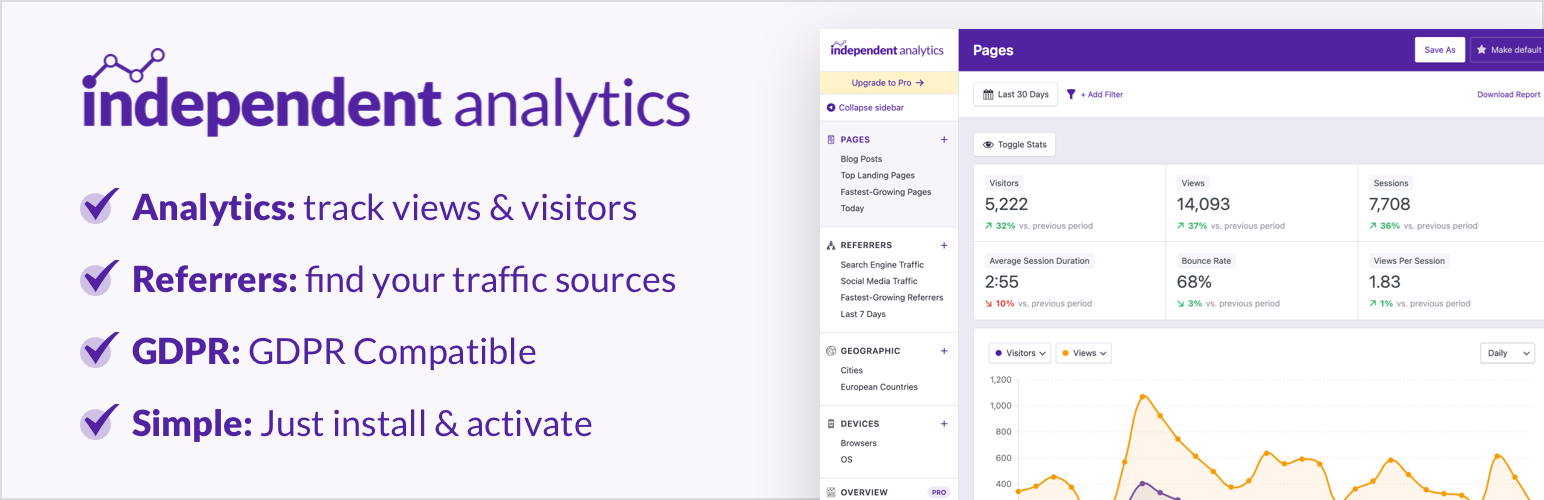
Independent Analytics 是一款完全免費的 WordPress 網站流量分析外掛,無需串接外部服務或建立帳號,所有數據皆儲存於自有主機,兼顧隱私與易用性,是取代 Google Analytics 的輕量級方案。
【主要功能】
• 內建於 WordPress 控制台的流量分析儀表板
• 熱門文章與頁面瀏覽排行
• 流量來源追蹤與分析
• 國家及城市數據搭配互動式世界地圖
• 裝置、瀏覽器與作業系統報表
• 自訂報表儲存及匯出 CSV 與 PDF
外掛標籤
開發者團隊
② 後台搜尋「Independent Analytics – Google Analytics Alternative for WordPress」→ 直接安裝(推薦)
📦 歷史版本下載
原文外掛簡介
Google Analytics is complicated!
Independent Analytics gives you simple, common-sense stats you can use to grow your website.
This is a free plugin and doesn’t require you to create an account on another site. All features outlined below are included in the free plugin.
Every Tool You Need to Analyze & Grow Your Website
Analytics dashboard inside your WP admin
Popular posts and pages
Top traffic sources
Country & city data with interactive world map
Device report with device types, browsers, and OS
Save custom reports
Export to CSV & PDF
Fully Private for You and Your Visitors
When it comes to privacy, just say, “No!”
No communication with external servers
No cookies
No personal data
As a Google Analytics alternative, Independent Analytics runs entirely on your site so all of your data is created and stored on your server. No personal data is saved and no cookies are used to track visitors, making it easy to comply with regional privacy laws like the GDPR and CCPA.
Loved by the WP Community ❤️
Independent Analytics has received renown from WP Tuts, Web Squadron, WP Weekly, WP Builds, and many more publications.
Independent Analytics Pro
Get more valuable insights with the Independent Analytics Pro plugin, which includes UTM campaign tracking, real-time analytics, click tracking, eCommerce sales tracking (WooCommerce, FluentCart, EDD, SureCart), user journeys, form submission tracking, HTML email reports, and a customizable Overview report.
Click here to get Independent Analytics Pro →
Who’s it for?
Independent Analytics is easy enough for a total beginner to use while offering plenty of depth for more advanced users to dig into their data.
Bloggers: use Independent Analytics as a simple blog stats plugin. Find out how many views your posts get and how much traffic you get from search engines and social media.
eCommerce stores: track views and visitors for your products and find out what your visitors are searching for.
News sites: get same-day statistics for all your posts and filter by author to find your most successful writers.
Startups: start tracking your visits right away and find out which early marketing tactics are driving results.
Non-profits: track which campaigns get the most views and find out where your donors are coming from.
How to Get Started
Visit your Plugins > Add New menu
Search for “Independent Analytics”
Install and enjoy 🙂
Independent Analytics starts tracking visitors immediately without configuration. You don’t have to mess with any JavaScript or code snippets.
Explore the Simple, Yet Powerful Features
Our WordPress statistics plugin is more robust than a simple hit counter and includes all of the following features:
Pages report – discover your most visited pages.
Referrers report – find the sites sending you traffic.
Geographic report – see which countries and cities your visitors are from.
Devices report – get a breakdown of traffic by device type, browser, and OS.
CSV exporting – export any report to CSV for additional analysis.
PDF exporting – export any report as a beautiful PDF to share with colleagues.
Saved reports – create and save your own custom reports to the sidebar.
Share access with authors – share access with any user role in a few clicks and optionally limit the stats to only content published by the author.
White-label the dashboard – white-label the analytics for non-admins to remove any branding and external links.
View counts in the Posts menu – check how many views your recent posts have while browsing the Posts menu
Dashboard widget – get a quick look at your stats when you login.
Admin toolbar stats – see how many views each page has while viewing or editing it.
Public view counter – show off how many views each post on your site has gotten.
Ignore user roles – easily ignore activity from admins while recording traffic from Subscribers and Customers
Ignore IP addresses – add any IP address to your ignore list in just two clicks.
Automatically delete old data – delete data older than X days/years to limit the total data storage.
Filtering system – segment your data with the powerful filters.
Essential metrics – find your views, visitors, sessions, bounce rate, session duration, and views per session metrics in the Quick Stats, chart, and data table.
Visitors Growth – find your fastest-growing pages and referrers.
Author stats – sort and filter your pages by author.
Post type stats – segment by post type to view stats for your posts, search results, custom post types, and more.
Landing page stats – Use the Entrances metric to find your top landing pages.
Developer API – the rudimentary developer API lets you get stats from any page on your site.
RTL support – Independent Analytics works just as well for right-to-left languages.
Mobile-friendly – the Analytics dashboard is fully compatible with mobile devices.
Campaigns report (Pro) – create and track UTM campaign links.
Real-time analytics (Pro) – see how many visitors are currently on your site.
Click tracking (Pro) – track clicks on any link without touching code.
eCommerce analytics (Pro) – integration with WooCommerce, FluentCart, EDD, and SureCart lets you find your most profitable campaigns, landing pages, and referrers.
User journeys (Pro) – explore every recorded session including a timeline for each one, so you can understand exactly how visitors use your website.
Form tracking (Pro) – integration with 20+ top form plugins, like WPForms and Contact Form 7, lets you automatically track form submissions and discover where your leads are coming from.
Overview report (Pro) – find all your data in one place with the customizable Overview report.
Solo reports (Pro) – view dedicated reports for individual pages and referrers.
HTML email reports (Pro) – schedule a beautiful daily, weekly, or monthly email report for yourself and your clients.
Explore every feature with screenshots here →
Independent Analytics Pro
Get more valuable insights with the Independent Analytics Pro plugin, which includes UTM campaign tracking, real-time analytics, click tracking, eCommerce sales tracking (WooCommerce, FluentCart, EDD, SureCart),user journeys, form submission tracking, HTML email reports, and a customizable Overview report.
Click here to get Independent Analytics Pro →
Who Made This?
Independent Analytics is designed and developed by Ben Sibley and Andrew Mead in the beautiful city of Philadelphia. Check out our interview on the WP Builds podcast if you’d like to hear our story.