內容簡介
Analytics Insights 是一款免費的 WordPress 外掛,能夠使用最新的 Google Analytics 4 追蹤碼進行網站追蹤,並在 WordPress 控制台中顯示關鍵的 Google Analytics 數據,幫助用戶輕鬆分析網站表現。
【主要功能】
• 實時訪客數據顯示
• 自訂 Google Analytics 追蹤碼
• 詳細的頁面和文章報告
• 支援 Google Tag Manager
• 多站點網路安裝相容性
外掛標籤
開發者團隊
② 後台搜尋「Analytics Insights – Google Analytics Dashboard for WordPress」→ 直接安裝(推薦)
📦 歷史版本下載
原文外掛簡介
Analytics Insights is a free WordPress plugin that enables site tracking using the latest Google Analytics 4 tracking code. It allows you to view key Google Analytics stats in your WordPress Dashboard.
Google Analytics Reports, Stats and Insights
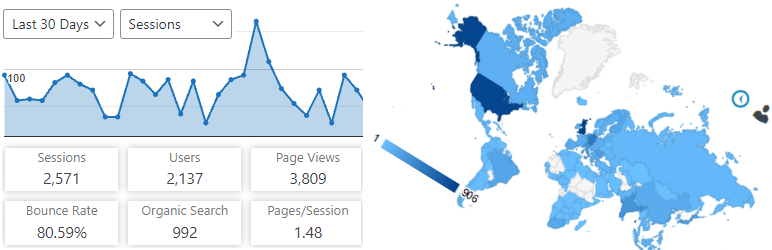
Analytics Insights displays the reports you need on your dashboard and on the site’s frontend. Audience, acquisition, behavior, engagement and real-time stats are all presented as charts within a dedicated dashboard widget.
In addition to a set of general Google Analytics stats, insights like in-depth Page reports and in-depth Post reports are available.
The Google Analytics tracking code is fully customizable through options and hooks, allowing advanced data collection like custom dimensions and events.
Google Analytics Real-Time Stats
Google Analytics reports, in real-time, in your dashboard screen:
Real-time number of visitors
Real-time number of visitors per page
Real-time device category
Google Analytics Reports and Insights
The Google Analytics insights and reports you need on your dashboard and on the site’s frontend:
Sessions, organic searches, page views, bounce rate analytics stats
Locations, pages, referrers, keywords, 404 errors analytics stats
Traffic channels, social networks, traffic mediums, search engines analytics stats
Device categories, browsers, operating systems, screen resolutions, mobile brands analytics stats
Google Analytics Tracking
Installs the latest Google Analytics tracking code and allows full code customization:
Google Analytics 4 tracking code
Accelerated Mobile Pages (AMP) support for Google Analytics
Cross domain tracking
Ecommerce support for Google Analytics
User privacy oriented features and much more
With Analytics Insights you can easily track events like downloads, page scrolling depth, outbound links, emails. In addition, you can track custom event categories, actions, and labels using annotated HTML elements.
Custom dimensions tracking of authors, publication date, categories, tags is also possible with Analytics Insights.
Google Tag Manager Tracking
As an alternative to Google Analytics tracking code, you can use Google Tag Manager for tracking:
Google Tag Manager code
Data Layer variables: authors, publication date, categories, tags, user type
Accelerated Mobile Pages (AMP) support for Google Tag Manager
Accelerated Mobile Pages (AMP) features
Google Tag Manager basic tracking
Google Analytics basic tracking
Events tracking, custom dimensions tracking, annotated HTML elements tracking
Analytics Insights on Multisite
This plugin is fully compatible with multisite network installs, allowing three setup modes:
Mode 1: network activated using multiple Google Analytics accounts
Mode 2: network activated using a single Google Analytics account
Mode 3: network deactivated using multiple Google Analytics accounts