內容簡介
一年中有多個場合,您必須為親朋好友選擇禮物,因為簡單的祝福不足以表達心意。不論是生日、紀念日還是節日,禮物都是一種絕對的喜悅。甚至在節慶或作為員工紅利的追加福利,禮物只會增添歡樂。
但是,不同的人有不同的喜好,你該如何選擇最好的禮物呢?
參考這種情況,我們創造了最棒的禮物選擇,受到所有人的喜愛。不論是家人、朋友還是雇主。不論您希望在私人活動上送給特別的人或在公司周年慶活動中分發給員工,它都是最好的禮物,沒有人可以拒絕。
它是禮物卡。
禮物卡是最佳禮物,因為你可以將其連同祝賀語發送,收件人可以在任何電子商務網站上換取一個價值等同禮物卡上面額的產品。
免費版本演示連結 | 免費版本說明文件連結
看看如何為Woocommerce設置禮物卡
功能
顧客可以在我的帳戶頁面查看他們的禮物卡詳細信息。
啟用/禁用我的帳戶頁面上的禮物卡詳細信息的選項。
設置優惠卷過期月份的選項。
管理員可以創建無限的禮品卡。
激活或取消特定禮物卡的狀態的選項。
啟用/禁用郵件發送到收件人的選項。
設置禮品卡的到期日期的選項。
免費版本演示連結 | 免費版本說明文件連結
高級功能:
高級版本實時演示 | 高級版本連結 | 說明文件連結
添加自定義金額禮品卡的選項。
顯示/隱藏自定義金額的選項。
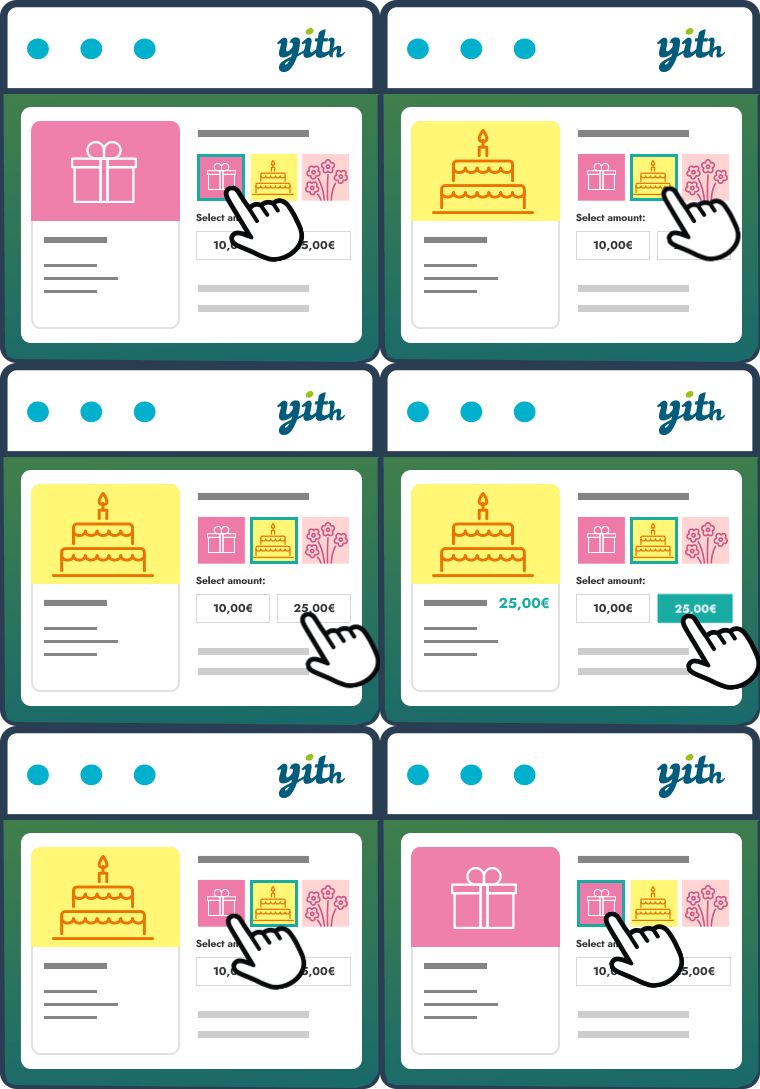
從給定列表中選擇禮品卡模板的選項。
您還可以選擇自訂價格標籤。
在價格之前或之後設置自定義金額的位置的選項。
編輯電子郵件文本的選項。
在電子郵件中添加公司徽標的選項。
啟用/禁用購物車和結帳頁面上的優惠券應用按鈕的選項。
撰寫應用優惠券按鈕文本的選項。
編輯應用優惠券按鈕占位符文本的選項。
從前端選擇禮品卡模板的選項。
從前端選擇自定義禮品卡模板的選項。他們也可以選擇其他禮品卡圖像。
顧客還可以發送禮品卡附註。
顧客可以發送無限的禮品卡。
高級版本實時演示 | 高級版本連結 | 說明文件連結
高級WordPress佈景主題
外掛標籤
開發者團隊
原文外掛簡介
Throughout the year, there are multiple occasions on which you have to choose a gift for your near and dear ones because simple wishes are not enough. Whether it is a birthday, anniversary or a festival, a gift is an absolute delight. Even on account of festivals or as a token of bonus for your employees, a gift just adds to the celebrations.
But how do you select the best gift as different people have different choices?
Taking a cue from such situations, We have created the best gift option which is loved by all. From family to friends to employers. Whether you wish to give it to someone special on account of a private function or distribute to your employees on the occasion of company’s annual day, it is the best gift which no one can refuse.
It is a GIFT CARD.
A gift card is the best gift because you can send it along with a message conveying your best wishes and the receiver can redeem them on any e-commerce website in exchange for a product of their choice against the value indicated on the card.
FREE VERSION DEMO LINK | FREE VERSION DOCUMENTATION LINK
Take a look at how to set up Gift Card for Woocommerce
Features
Customer can view there gift card details in the my account page.
Option to enable / disable the gift card details on the my account page.
Option to set the coupon expiry month
Admin can create unlimited Gift Card.
Option to active or deactive the status of the particular gift card.
Option to enable / disable the mail sending to the receiver.
Option to set the expiry date for a gift card.
FREE VERSION DEMO LINK | FREE VERSION DOCUMENTATION LINK
Premium Features:
PREMIUM VERSION LIVE DEMO | PREMIUM VERSION LINK | DOCUMENTATION LINK
Option to add Custom amount Gift card.
Option to show / hide the custom amount.
Option to select the gift card template from the given list.
You could select the custom price tag also.
Option to set the custom amount position before or after the prices.
Option to edit the text in the emails.
Option to add the company logo in the email.
Option to enable / disable the coupon apply button on the cart and checkout page.
Option to write the apply coupon button text.
Option to write the apply coupon button placeholder text.
From the frontend the customer can select the gift card template.
From the frontend the customer can select the custom gift card template. They can choose any other gift card image also
The customer can send the gift note also.
The customer can send unlimited gift cards.
PREMIUM VERSION LIVE DEMO | PREMIUM VERSION LINK | DOCUMENTATION LINK
Premium WordPress Themes
Here is our premium wordpress theme
Foody Themes
Jstore Themes
Eezy Themes
Craze Themes
Seofication Themes
News Prime Themes
Our Website
Support Email
NOTE
Our plugin support the Multisite Network.