內容簡介
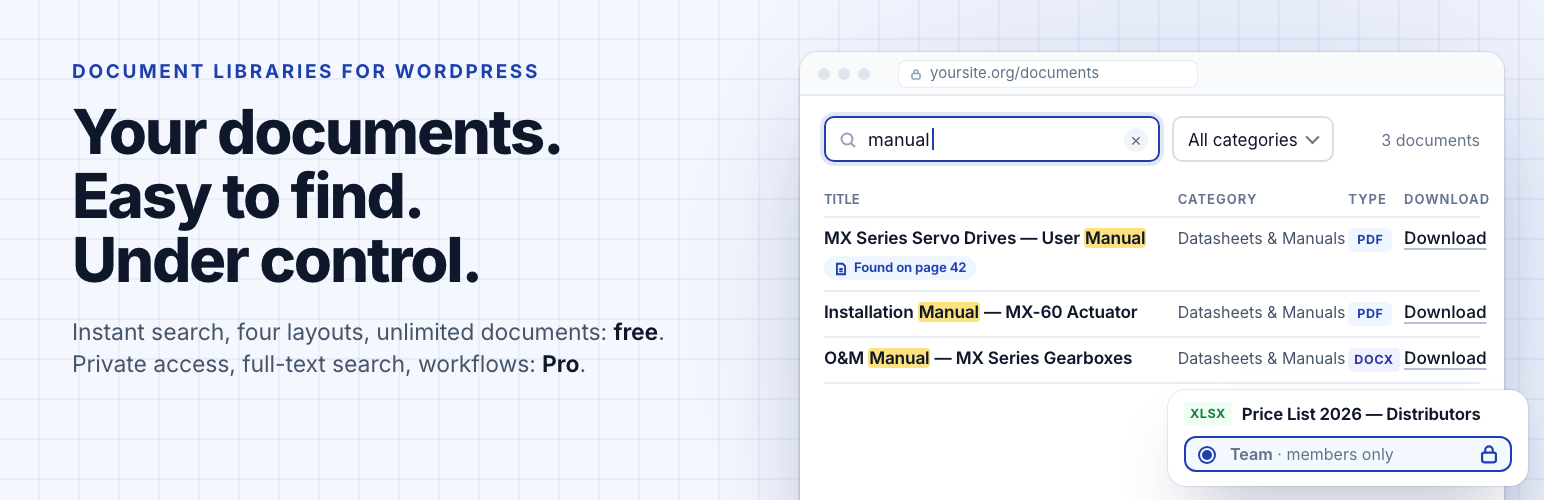
FileDeck 是一款專為 WordPress 設計的文件庫和下載管理外掛,能將文件集合轉換為快速可搜尋的文件庫,並提供客戶專屬的文件入口。它具備多種佈局選擇,能有效追蹤和保護每次下載,並為團隊提供進階的文件管理功能。
【主要功能】
• 快速可搜尋的文件庫
• 支援多種佈局選擇(表格、網格、畫廊等)
• 客戶專屬文件入口
• 版本歷史與審核流程管理
• 大文件分段上傳功能
• 免費版本可用於基本需求
外掛標籤
開發者團隊
② 後台搜尋「FileDeck – Document Library & Download Manager」→ 直接安裝(推薦)
📦 歷史版本下載
原文外掛簡介
FileDeck is a WordPress plugin for documents, downloads and client portals. It turns file collections into a fast, searchable document library, PDF library or resource library with table, grid, gallery and folder layouts; tracks and protects every download; and gives each client a private document portal. For teams that need more than a file library, Pro adds document management proper — version history, review and approval cycles, scheduled expiry and a full audit trail.
See it in action: watch the one-minute tour below, try the live demo (the real plugin, no signup) or read the documentation.
A free version that’s actually usable. Every layout, every filter, and the Gutenberg block are free, and you can list as many documents as you like. Nothing essential is locked away just to force an upgrade.
What people use FileDeck for
Safety data sheets and product documentation – SDS, manuals and spec sheets searchable by product code, with a QR code per sheet. SDS library
Meeting minutes, agendas and newsletters – filed by year, with a free year filter. Minutes archive
School policies and forms – for parents, with the library’s interface in nine languages. For schools
Staff policies and procedures – an intranet policy library; Pro limits it to staff and tracks review dates.
Client portals and secure file sharing – Pro gives each client a private document area. Client portal guide
Annual reports and public documents – reports, public notices and tender documents.
What you won’t find elsewhere
Full-text document search – Pro searches inside your PDFs, Office and text files — text is extracted on your own server; only the optional OCR for scanned documents sends files off-site, and only when you switch it on
One-click migration – switching plugins? FileDeck imports the whole library, files and all (see below)
Large file uploads – drawings, scans and video upload in resumable chunks, so your host’s upload limit is no longer the ceiling and a dropped connection resumes instead of restarting
Library event webhooks – a signed JSON POST when a document is published, updated, retired or deleted; point Zapier, Make or your own system at it
Client areas – give each client a private document portal with uploads and email notifications
Free features
Four layouts – searchable table, responsive card grid, a thumbnail-forward document gallery, or collapsible folders that follow your category hierarchy, sub-folders and all, in the order you choose
Instant search – filters as you type, no page reloads
Date-added filter – narrow a library to the past week, month or year (optional)
Year filter – a dropdown of the years the library’s documents span, read from their dates, for minutes, newsletters and reports filed by year (optional); year="2025" pins a library to one year
Reference number – a part number, document code or form number on every document: searchable, and a sortable column
Group by category – one library rendered as a titled section per category, with one search box across all of them, instead of a stacked library per category
AI-agent ready – read-only abilities for WordPress 6.9’s Abilities API, so agents can search the library through MCP
Sortable columns – title, date, size, type, downloads, and more
Unlimited documents – no cap; search scales automatically as your library grows
Download tracking – per-document download counts
Force download or open in browser – choose per document whether the button saves the file or opens it in the browser
Library builder – design a library with a live preview on your own site, in your theme, then create the page in one click or copy its shortcode
Gutenberg block + shortcode + six page builders – a native block, the [filedeck] shortcode, and elements for Elementor (Library, Document Embed — also findable as “PDF Viewer” — and Search), Bricks, Divi, WPBakery (Visual Composer), Avada (Fusion Builder) and Beaver Builder
Translation-ready, nine languages bundled – the library’s front end ships translated into Hungarian, Slovak, Spanish (Spain and Mexico), German, French (France and Canada), Italian, Polish, Brazilian Portuguese and Simplified Chinese, with a .pot template for translating it into any other language; documents and categories translate with WPML, Polylang and compatible plugins, and a bundled wpml-config.xml declares how document data behaves
⌘K command palette – site-wide quick-search overlay that jumps straight to any document
Sidebar widgets & Popular Documents block – Recent Documents and Top Downloads widgets for any sidebar, plus a Popular Documents block that puts the most-downloaded (or newest) list on any page; access-aware, so restricted documents never show to someone who cannot open them
QR codes – generate a printable QR for any document (offline, nothing leaves your site) for noticeboards and posters
Multi-select filters with counts – pick several categories or tags at once, see how many documents sit behind every option before you click, and drop any single one from the active-filter bar; put the filters above the library or under the column headings, and click a category in the table to filter by it
Multi-column sorting – click a heading to sort, shift-click a second to break the ties (file type, then newest first)
Shareable filtered views – search, filters, sort order and page all live in the URL with a one-click “copy link”; hover previews show a thumbnail and file details
Pagination your way – page numbers, a Load more button or infinite scroll, plus an optional fixed library height that scrolls the documents in place
External links – list documents hosted on Google Drive, Dropbox, SharePoint, or any URL — pasted Google Docs, Sheets, Slides and Drive links embed as live previews
Custom field & taxonomy columns – add any post meta (cf:field) or taxonomy (tax:slug) as a column; Pro adds the field builder that defines those fields, fields that apply only to chosen categories, and one-click import of your existing ACF field groups
Document previews – lightbox preview for PDFs and images, and featured images open in a lightbox from the image column
Inline document embed – embed a single document as an always-visible viewer on any page with the [filedeck_embed] shortcode, the Document Embed block or the Elementor widget: PDFs, images and Google links, with width and height controls, an optional download link and a full-screen button
Single document pages – a page per document listing its reference, dates, categories and tags (you pick which), with a download button
Standalone search & links – [filedeck_search], [filedeck_login], and [filedeck_download] shortcodes
Styles to match any theme – a full design-token system: a “Match my theme” preset that inherits your theme’s colours, Minimal/Bordered/Compact presets, a built-in light/dark/auto colour scheme, accent + surface + text colours, plus link styles, custom download-button text, empty messages and pagination — no CSS required, and every element is a --fdk-* variable when you want to go further
Any file type – PDF, Word, Excel, PowerPoint, OpenDocument, images, audio, video, and more
Lightweight – no jQuery on the frontend; assets load only where a library appears
Old links keep working – after a migration, old download links, item pages and shortcodes open your FileDeck documents, even if Pro lapses
Theme template overrides – copy a template into your theme’s filedeck/ directory to replace library markup without forking the plugin
Accessible – keyboard-sortable columns, ARIA labels, screen-reader friendly
Switching from another WordPress document plugin?
FileDeck Pro includes a one-click migration tool for supported plugins, including Download Monitor, WordPress Download Manager, Document Library Pro, Shared Files and others.
Import your existing documents, files, categories, tags and supported metadata directly from your WordPress database — without manually exporting files or mapping columns.
Your original library remains intact while you review your migrated documents. Some settings, access permissions and metadata may require review depending on the source plugin and version. We’ll help you move free.
FileDeck Pro
Upgrade for the features organizations need — from $59/year, your renewal never increases, and every purchase is covered by a 30-day money-back guarantee:
Full-text search inside files – search the text inside PDFs, Office documents and text files (optional OCR makes scanned PDFs searchable too); extraction runs on your own server, and results tell you which page of a PDF the match is on so you can jump straight to it
Access control – role restrictions on categories, password protection on a category or any single document, plus assigning a document to specific named people or to a group you define once and reuse — an assigned document is hidden from everyone else, not padlocked. Site-wide IP rules can limit downloads to your own networks, and a refused visitor can be sent to a page of your own instead of a dead end
Protected files – restricted files move to a deny-all vault and stream only after an access check, so direct file URLs stop working; optional signed links expire, for sharing with someone who can’t log in, and a single-use link works for exactly one download and then stops. Optional hotlink protection refuses downloads requested from other sites’ pages
Share button on every document – copy the link, open the device share sheet, or send it by email, X, Facebook, LinkedIn or WhatsApp; shares the document page, never the file, and loads nothing from any network until a visitor picks one
Client portal – add a client and FileDeck creates their account, a private client area and an emailed invitation. Clients sign in on your site, not the WordPress dashboard, to their documents, uploads and account page. Admit people by name, by group, by email domain, or by membership plan (MemberPress, Paid Memberships Pro, WooCommerce Memberships, Restrict Content Pro, s2Member) — plan access ends when the membership lapses. Plus download history, new/already-downloaded markers and favourites
One-click migration – from the plugins listed in the FAQ, read straight from your own database
Import a server folder – point FileDeck at a folder in your uploads directory and every file becomes a document, with sub-folders becoming nested categories; an optional daily re-scan imports new files on their own, so SFTP-ing a file in is enough to publish it
Automatic PDF thumbnails – plus Office, audio and video previews and inline embeds on top of the free PDF/image lightbox and embed
Self-hosted PDF viewer – embedded PDFs render from your own server with zoom, in-document find, print and full screen; because no external viewer service is involved, protected files, signed links and watermarked documents all display. Popup mode opens any embed in an overlay that loads only when clicked
Document lifecycle – version history, supersede with evergreen links, review cycles, approval workflow and auto-expiry, plus a public document changelog (a block or the [filedeck_changelog] shortcode) that lists published and updated documents newest first, grouped by month
Check-out & editing locks – claim a document while you prepare its next revision, so nobody else can replace the attached file until you check it back in
Downloads toolkit – email/webhook download notifications, daily quotas, per-document download limits (expire after N downloads), optional CAPTCHA bot friction (Cloudflare Turnstile or Google reCAPTCHA), lead capture with Mailchimp/Brevo sync, multi-select zip downloads with a select-all control in the table header, and Download all on a folder
Require a form before download – gate downloads behind Gravity Forms, Ninja Forms, WPForms, Contact Form 7 or any other form plugin you already use
Attach documents to a post – tick documents in the post editor and they list automatically at the end of the page
Terms before download – require readers to accept licence conditions or a disclaimer first, with every acceptance recorded in the activity log
Analytics & audit – activity log with per-document history (with country, referrer and user agent), a per-document view count (also as a library column), analytics dashboard, optional GA4 events, CSV export
Search synonyms & spelling tolerance – teach the library your own shorthand so “PO” finds “purchase order”, and let a search that returned no results retry against the closest spelling in your titles and categories, saying which word it used
Search analytics – popular searches and a content-gap report of searches that found nothing, fed by every search box: library search, the command palette, full-text and AI search
Document feedback – anonymous “Was this helpful?” votes on document pages, with a least-helpful report (off until you enable it)
Cloud storage – browse and attach files from Amazon S3 or any S3-compatible service (Cloudflare R2, Wasabi, DigitalOcean Spaces), plus Dropbox, Google Drive, OneDrive, SharePoint document libraries and Box
Vault offload – mirror protected files into an S3-compatible bucket and serve downloads by short-lived presigned link, so the bucket carries the bandwidth while every access check still runs first
Multisite shared libraries – render one site’s library on any other site of a WordPress network, with the source site’s access rules still enforcing
Publish & embed – put your whole library on any other website (Wix, Squarespace, Shopify, Webflow, Framer, or a custom front end) with one line of code; embeds show public documents only
Plus custom fields with faceted filtering, CSV import/export, bulk add from the Media Library, change subscriptions, a library health monitor, a GDPR toolkit and more — see every feature. An optional AI tier adds records governance — retention schedules, access certification, transmittals, acknowledgment tracking and PDF accessibility screening — plus semantic search, smart collections and “Ask this library”. Full pricing: https://www.getfiledeck.com/pricing/
Download Monitor, Simple Download Monitor, WordPress Download Manager, Document Library Pro, Document Library Lite, Shared Files, Simple File List, Advanced File Manager, BSK PDF Manager, Download Attachments, WP Customer Area, FileBird, and FileBird Document Library are trademarks of their respective owners; FileDeck is not affiliated with or endorsed by them.