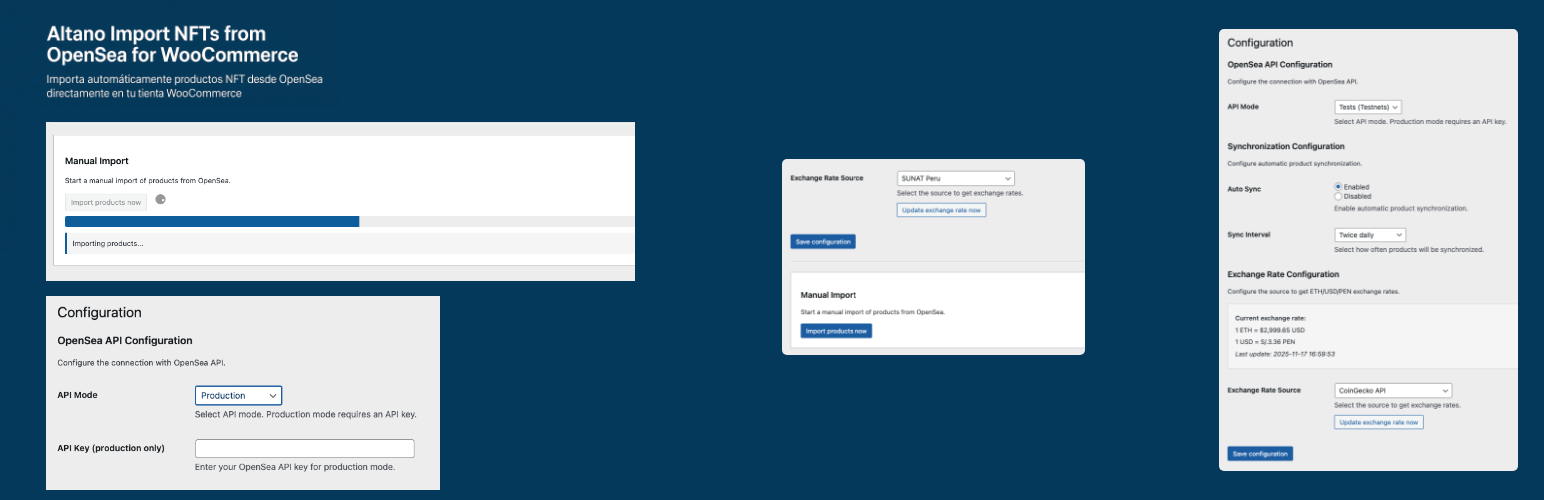
內容簡介
總結:altano-import-nfts-from-opensea-for-woocommerce通過自動從OpenSea導入產品,將您的網站轉變為一個完全功能的NFT商店。
1. 這個外掛做什麼?
- 自動將開放海中的NFT產品導入您的WooCommerce商店,將您的網站轉變為功能齊全的NFT商店。
2. 主要功能
- 自動導入
- 每30分鐘、每小時、每天兩次或每天定期同步
- 從管理面板中一鍵手動導入
- 智能檢測,只導入新的NFT,避免重複
- 實時價格管理
- 使用實時匯率自動轉換ETH → USD → PEN
- 多個數據來源:Google Finance、CoinGecko、SUNAT
- 匯率小部件展示在您的網站上
- 始終自動更新價格
- 完整產品管理
- 導入所有信息:名稱、描述、圖片、NFT屬性
- 客製屬性如稀有度、特征等
- 根據OpenSea集合自動分類
- 自動生成獨特SKU
- 將庫存管理設置為虛擬產品
- 增強用戶體驗
- 每個產品頁面上的詳細NFT信息
- 直接連結到OpenSea進行驗證
- 產品頁面上可見的NFT屬性
- 目錄中NFT產品的視覺指示
設定
1. 配置集合
- 進入產品 → 分類
- 編輯一個分類,添加OpenSea集合的URL
- 例如:https://opensea.io/collection/jlandygame
2. 配置導入設置
- OpenSea導入 → 設置
- 選擇API模式(測試或生產)
- 設置自動同步
- 選擇導入間隔
3. 配置匯率
- 選擇匯率來源(推薦Google Finance)
- 這個外掛將每天自動更新價格
技術細節
- 相容性
- WordPress:5.8或更高版本
- WooCommerce:5.0或更高版本
- PHP:7.4或更高版本
- API和數據
- 官方OpenSea API v2
- 提供測試和生產模式
- 自動API速率限制處理
- 遇到錯誤時自動重試
外掛標籤
開發者團隊
② 後台搜尋「Altano Import NFTs from OpenSea for WooCommerce」→ 直接安裝(推薦)
原文外掛簡介
altano-import-nfts-from-opensea-for-woocommerce turns your website into a fully functional NFT store by automatically importing products from OpenSea.
🎯 What does this plugin do?
Automatically imports NFT products from OpenSea into your WooCommerce store, transforming your site into a full-featured NFT shop.
✨ Key Features
🔄 Automatic Import
Scheduled sync every 30 minutes, hourly, twice daily, or daily
Manual import with a single click from the admin panel
Smart detection – only imports new NFTs, avoids duplicates
💰 Real-time Price Management
Automatic conversion ETH → USD → PEN with live exchange rates
Multiple data sources: Google Finance, CoinGecko, SUNAT
Exchange rate widget to display on your website
Always updated prices automatically
🏷️ Full Product Management
Imports all information: name, description, images, NFT attributes
Custom attributes like rarity, traits, etc.
Automatic categorization by OpenSea collections
Auto-generated unique SKUs
Stock management as virtual products
🎨 Enhanced User Experience
Detailed NFT info on each product page
Direct links to OpenSea for verification
Visible NFT attributes on product pages
Visual indicators for NFT products in the catalog
Configuration
1. Configure Collections
Go to Products → Categories
Edit a category and add the OpenSea collection URL
Example: https://opensea.io/collection/jlandygame
2. Configure Import Settings
OpenSea Importer → Settings
Choose the API mode (Test or Production)
Set up automatic synchronization
Select the import interval
3. Configure Exchange Rates
Choose the exchange rate source (Google Finance recommended)
The plugin will automatically update prices daily
Technical Details
Compatibility
WordPress: 5.8 or later
WooCommerce: 5.0 or later
PHP: 7.4 or later
API & Data
Official OpenSea API v2
Available in test and production modes
Automatic API rate limit handling
Automatic retries in case of errors
Available Shortcodes
[opensea_exchange_rate]
[opensea_exchange_rate show_eth="yes" show_usd="yes" show_last_update="yes"]
External Services
This plugin connects to several external services to function properly. Below is detailed information about each service, what data is sent, and when:
OpenSea API
What it is: OpenSea is the world’s first and largest NFT marketplace. This plugin uses the official OpenSea API v2 to retrieve NFT collection data and listings.
What it’s used for: To import NFT products (including names, descriptions, images, metadata, and prices) from OpenSea collections into your WooCommerce store.
When data is sent:
– When you manually trigger an import from the admin panel
– During automatic scheduled synchronizations (if enabled)
– When retrieving NFT metadata and collection information
What data is sent:
– Collection slugs configured in your product categories
– API authentication key (only in production mode, if configured)
Data retrieved:
– NFT names, descriptions, images, and attributes
– Collection information and token standards
– Listing prices in ETH
– NFT metadata URLs and contract addresses
Service URLs:
– Test mode: https://testnets-api.opensea.io/api/v2
– Production mode: https://api.opensea.io/api/v2
Terms of service: https://opensea.io/tos
Privacy policy: https://opensea.io/privacy
Google Finance
What it is: Google Finance is a financial information service provided by Google.
What it’s used for: To obtain real-time cryptocurrency and foreign exchange rates (ETH/USD and USD/PEN).
When data is sent:
– During automatic daily exchange rate updates
– When manually updating exchange rates from the admin panel
What data is sent:
– HTTP GET requests to publicly available Google Finance pages
– No personal or site-specific data is transmitted
Data retrieved:
– Current ETH to USD exchange rate
– Current USD to PEN exchange rate
Service URLs:
– https://www.google.com/finance/quote/ETH-USD
– https://www.google.com/finance/quote/USD-PEN
Terms of service: https://policies.google.com/terms
Privacy policy: https://policies.google.com/privacy
CoinGecko API
What it is: CoinGecko is a cryptocurrency data aggregation platform that provides a free public API.
What it’s used for: As an alternative source for obtaining ETH/USD exchange rates when Google Finance is unavailable or selected as the preferred source.
When data is sent:
– During automatic daily exchange rate updates (if selected as the exchange rate source)
– When manually updating exchange rates from the admin panel
– As a fallback when the primary source fails
What data is sent:
– HTTP GET requests to the public API
– No personal or site-specific data is transmitted
– No API key required
Data retrieved:
– Current ETH to USD exchange rate
Service URL:
– https://api.coingecko.com/api/v3/simple/price?ids=ethereum&vs_currencies=usd
Terms of service: https://www.coingecko.com/en/terms
Privacy policy: https://www.coingecko.com/en/privacy
SUNAT Peru
What it is: SUNAT (Superintendencia Nacional de Aduanas y de Administración Tributaria) is the Peruvian tax authority that provides official exchange rates.
What it’s used for: As an alternative source for obtaining USD/PEN exchange rates (official Peruvian tax exchange rate).
When data is sent:
– During automatic daily exchange rate updates (if selected as the exchange rate source)
– When manually updating exchange rates from the admin panel
What data is sent:
– HTTP GET requests to publicly available SUNAT pages
– No personal or site-specific data is transmitted
Data retrieved:
– Official USD to PEN exchange rate (selling rate)
Service URL:
– https://e-consulta.sunat.gob.pe/cl-at-ittipcam/tcS01Alias
Terms of service: https://www.sunat.gob.pe/institucional/contactenos/atencion_contribuyente.html
Privacy policy: https://www.sunat.gob.pe/institucional/privacidad/index.html
Data Privacy and Security
Important: This plugin does not collect, store, or transmit any personal information from your site visitors or customers to these external services. All API calls are made server-side and only retrieve publicly available information about NFTs and exchange rates. No customer data, purchase information, or personal identifiable information is ever shared with these services.