
內容簡介
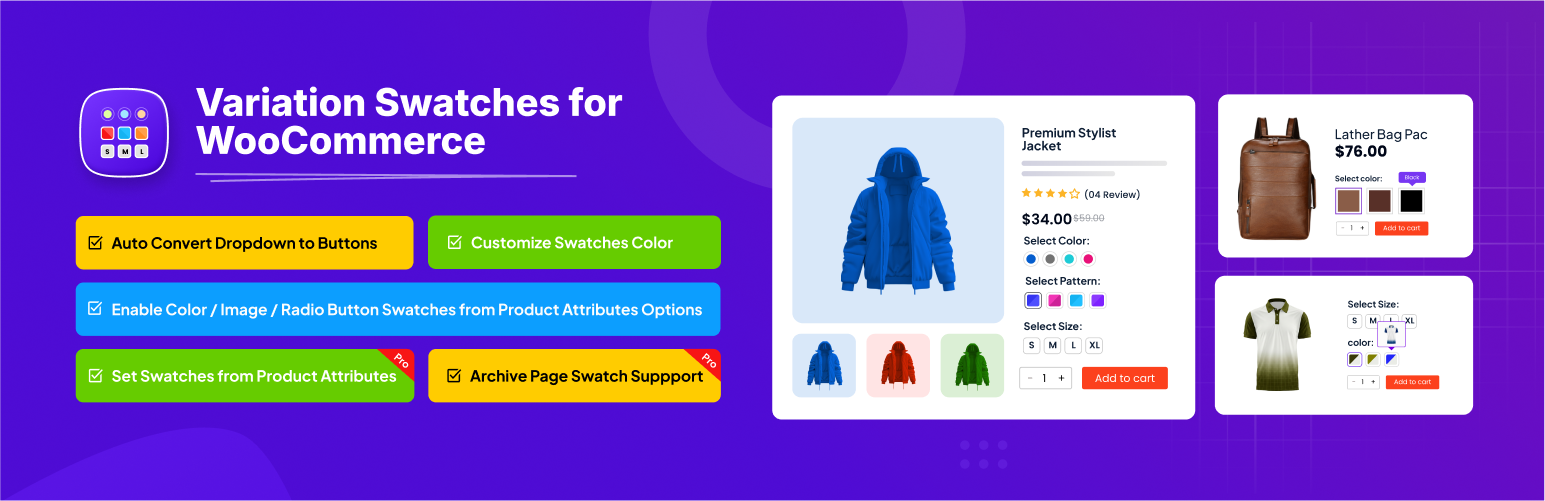
Variation Swatches for WooCommerce 外掛將產品變化選擇欄位轉換為更友好的顏色、圖片和標籤,提升顧客的選擇體驗,並增加銷售機會。此外掛完全響應式,適合各種設備使用。
【主要功能】
• 將下拉選單轉換為顏色、圖片和標籤
• 提供流暢的使用者體驗
• 可自訂產品樣本邊框和背景
• 與 WooCommerce 可變產品完美兼容
• 輕量化設計不影響網站速度
外掛標籤
開發者團隊
② 後台搜尋「Variation Swatches for WooCommerce」→ 直接安裝(推薦)
📦 歷史版本下載
原文外掛簡介
Woocommerce variation swatches plugin converts the product variation select fields into radio, images, colors, and labels. By using this Variation swatches for WooCommerce Plugin, you can display your product variation attributes in images, colors, and label. As a result, dropdown product attribute fields are no longer necessary. This fantastic plugin by RadiusTheme is creatively crafted to give your customers have comfortable experiences and increase your sales. All these benefits are due to the many variation features and options.
👉 Plugin Demo | Documentation | Get Pro 👈
Since Woocommerce Variation Swatches is fully responsive and mobile-friendly, your users will have the smoothest experiences. This plugin is comparable to our Variation Images Gallery Plugin, and both plugins can be used together for even better results. This WooCommerce variation swatches plugin will work with WooCommerce Variable Products.
Click here to get Metro – Minimal WooCommerce WordPress Theme with Variation Swatches PRO
WooCommerce Variation Swatches
This excellent Variation Swatches for WooCommerce plugin changes the product variation select option fields into user-friendly labels, colors, and images. The plugin gives you an alternative to the default WooCommerce dropdown fields so that the variations on your products can be their actual colors, images, and labels.
WooCommerce Variation Swatches ensures that your WooCommerce website and product page offer a refreshing user experience and elegant look. Your customers can select the variations that they want on a product before placing an order seamlessly. Since it is fully optimized and lightweight, the plugin doesn't compromise your site's speed.
With this WooCommerce Variation plugin, you can customize your product swatches border to match your site’s sophistication. If you want to have an image or specific color on your background, WooCommerce Variation Swatches enables you to do it quickly. It also offers Tooltip for use on your product and product category pages.
By default, WooCommerce Variation Swatches works on the product detail page, facilitating the display of colors, images, and labels for attributes. What's more, the plugin supports the Quick View feature. WooCommerce Variation Swatches gives you control over Tooltip as well as the image size. If you want rounded or squared swatch shapes, this plugin gives you a choice to use either. You can also control the font color and size.
Fully Customizable Variation Swatches
Not only is the plugin highly customizable, but it is also highly compatible with WooCommerce themes and plugins. WooCommerce Variation Swatches plugin allow you to customize border, background color image. Tooltip is great feature for this plugin. It is easy to install and customize its behaviour.
Variation Swatches by default work in product detail page view attributes color, images & label. It also support in QuickView option. WooCommerce Product Variation Swatches plugin has Tooltip control, Square or Rounded Shape, custom image size, Tooltip background & font color also font size. for disable product variation its cross color and opacity control.
🚀 WooCommerce Variation Swatches Plugin Key Features
🏆 Auto Convert All Variation Drop-downs to Button Swatches
You can easily convert the variation select drop-down option to button just check the check box from general settings it will convert all drop-downs to buttons swatches.
🏆 Support color, image, button, and radio attributes 4 types
You can showcase the product attributes you want to in either or a combination of 4 attribute types, including color, image, button, and radio. WooCommerce Variation Swatches Plugin allows you to add the custom attributes that you want.
👉 Live Demo | Documentation
🏆 Color Variation Swatches in Detail Page
This plugin allows you to set the color variations of your product from the product attributes in the detail page as well as from each separate product.
👉 Live Demo | Documentation
🏆 Image Variation Swatches in Detail Page
WooCommerce Variation Swatches allows you to set the image variation from the product attributes. You can also do the same from each individual product.
👉 Live Demo | [https://www.radiustheme.com/docs/variation-swatches/docs/attributes/configure-attributes/)
🏆 Button or Label Variation Swatches in Detail Page
You can set the button or label variation from the product attributes with this plugin. It also allows you to set the variation from each product.
👉 Live Demo | Documentation
🏆 Radio Variation Swatches in Detail Page
With Variation Swatches for WooCommerce, you can create and customize the radio button variation from the product attributes or from each product.
👉 Live Demo | Documentation
🏆 Variation Swatches in Quick View
When you’ve enabled variation swatches in quick view, you enable your visitors to view products in quick view lightboxes. If you want to boost your products' sales, you can enable the feature for viewing product swatches in quick view lightboxes. Therefore, they can buy your items from multiple points within your website.
🏆 Rounded/ Square Variation Swatches in Detail Page
If you want to set the style of the variation swatches to rounded or square, this plugin allows you to do it from the settings, shop, and detail pages.
👉 Documentation
🏆 Blur or hide out of product
When a product or a product variation has run out of stock, all you have to do before restocking is to choose whether you want to hide or blur them.
👉 Live Demo | Documentation
🏆 Improve Loading Performance
This plugin has a default WordPress cache system that facilitates caching for faster loading of your site.
👉 Documentation
🏆 Highlighted features
Enable color/ image/ label/ button swatches for variable product
Option for ROUNDED/ SQUARED attribute variation swatches shape.
Cross sign/ blur/ hide for out of stock variation swatches
Swatches size control at product page
Swatches tooltip settings
Worked at quick view popup
Customize tooltip/ swatches colors, background and border sizes
Compatible with popular WooCommerce themes and plugins
🚀 Some Pro features of Variation Swatches Plugin
🏆 Enable Swatches for Archive Pages
Displaying swatches in your shop and archive pages boosts your sales by attracting and engaging potential shoppers.
👉 Live Demo | Documentation
🏆 Swatches Display Mode (Default/ Modal/ On Hover)
Choose how swatches appear on the shop and archive pages. Default shows them inline under each product. On Hover keeps the listing clean and slides the swatches up from the bottom of the product when a shopper hovers it. Modal keeps your “Select options” button and opens the swatches in a popup when the button is clicked.
🏆 Swatch Groups
Create your own attribute groups and assign each attribute term to one, so long swatch lists are displayed neatly grouped under their group name instead of one flat row. Groups can be assigned globally from the attribute term, or overridden per product. Renaming a group never breaks the terms already assigned to it.
🏆 Image Variation Tooltip in Archive/ Shop Page
Since images are capable of drawing the attention of your visitors, using them shrewdly can improve your sales massively. This plugin has the image tooltip, a feature that empowers you by allowing you to choose the picture you want to showcase in the archive or shop page.
👉 Live Demo | Documentation
🏆 More Link in Archive/ Category Page
You can showcase single attributes with a limit, such as two or three attributes, and then display a ‘show more’ link.
👉 Live Demo | Documentation
🏆 Variation customization for each product
If you want each of your similar products to have distinctive variations, WooCommerce Variation Swatches allows you to customize the variations of individual products.
👉 Live Demo | Documentation
🏆 Custom Image/ Text Tooltip for Archive/ Product detail page
WooCommerce Variation Swatches facilitates the display of images and text descriptions for products and their variations. With the image and text tooltip that comes with the plugin, you can easily add the custom images and textual descriptions.
👉 Live Demo | Documentation
🏆 Single Attributes Customization per Product
You can display all the swatch attributes of each product on the shop page, but this would clutter your pages. Instead, this plugin gives you the option to select and showcase a single attribute in the archive or shop page.
👉 Live Demo | Documentation
🏆 Tooltip Text Customization Per Product/ attribute
The ideal product attribute should have a written description. With this plugin, you can customize text descriptions to a particular product or attribute using the text tooltip.
👉 Live Demo | Documentation
🏆 Rounded/ Square Variation Swatches in Archive Page
Your variation swatches can appear on the archive page in the style that you want, be it rounded or square. This plugin allows you to set this easily in its settings.
👉 Live Demo | Documentation
🏆 Generation Variation link
You can add the links to attributes from the archive or shop page, which will be shown in theaddress bar when a user visits the detail page.
👉 Documentation
🏆 Single Selected Attribute in Archive/ Shop Page
Most products will have several swatch attributes. This plugin lets you have a more professional look by giving you the option to select a single attribute to showcase in the archive or shop page instead of showing all attributes available.
👉 Live Demo | Documentation
🏆 Dual Color Variation Swatches
If you have a dual-color product, you can showcase the two colors easily on the swatches. You can set the dual colors from individual products on the color attributes.
👉 Live Demo | Documentation
🏆 More Link in Archive/ Category Page
The ‘more link’ in the archive and category pages allows you to display 2 or 3 attributes and hide the rest in the link. This gives your pages a professional and minimal feel.
👉 Live Demo | Documentation
🏆 Support Custom Attributes for product
If you want to set custom attributes for individual products with different variations, you can customize that on single products.
👉 Documentation
🏆 Highlighted Pro features
Archive/ catalog/ shop/ category/ tag page swatches
Swatches display mode — inline, on hover, or in a modal popup
Swatch groups — group attribute terms under custom group names
Dual color
Add to cart in category/ archive page
Catalog mode attribute display limit (more option).
Custom tooltip option (Image/ text)
Support override settings at every single product
Tooltip and others style settings
Single or multi attribute at archive/ catalog/ shop/ category/ tag page
Need Any Help?
For any bug, support or suggestion please submit your ticket here.
Liked RadiusTheme
Join our Facebook Group.
Learn from our tutorials on YouTube Channel.
🔥 WHAT’S NEXT
If you like The Post Grid Plugin, then consider checking out our other WordPress Plugins:
ShopBuilder – Elementor WooCommerce Builder Addons with 84+ widgets and 10+ modules.
Variation Gallery – Woocommerce Variation Gallery plugin allows to add UNLIMITED additional images for each variation of product.
The Post Grid – Shortcode, Gutenberg Blocks and Elementor Addon for Post Grid.
Classified Lisitng – Best Classified ads and Directory WordPress Plugin.
Food Menu – Restaurant Menu & Online Ordering using WooCommerce.














