內容簡介
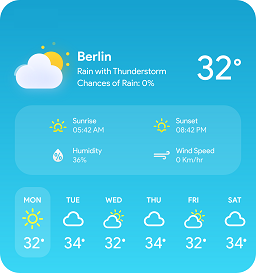
總結:Weather Map 外掛讓您可以使用 OpenWeatherMap API 來顯示多個座標的即時天氣資訊。每個位置的天氣資訊都會被擷取並顯示在一個互動式地圖上。此外,這個外掛還包含了一個 15 分鐘的快取機制,以減少 API 的使用量。
1. 這個外掛允許您顯示多個座標的即時天氣資訊。
2. 每個位置的天氣資訊都會在 Leaflet.js 為基礎的互動式地圖上被取得並顯示。
3. 包含了一個 15 分鐘的快取機制,以減少 API 使用量。
4. 最多可輸入 6 個座標,以保持地圖的可讀性。
5. 內建 API 金鑰驗證器。
6. 使用全 shortcode 整合:[weather_map]。
7. 管理員友好的設定介面。
問題:
1. Weather Map 外掛主要是用來做什麼?
2. 這個外掛最多支援幾個座標?
3. 什麼時候會發送數據?
4. 外掛連接到哪個 API 服務提供者?
外掛標籤
開發者團隊
原文外掛簡介
Weather Map allows you to display real-time weather information for multiple coordinates using OpenWeatherMap API. Each location’s weather is fetched and displayed on an interactive map (Leaflet.js based). The plugin includes a 15-minute caching mechanism to reduce API usage.
Features:
– Enter up to 6 coordinates to keep the map readable.
– Built-in API key validator before saving.
– 15-minute transient cache for weather data.
– Fully shortcode-based integration: [weather_map].
– Admin-friendly settings interface.
External Services
This plugin connects to the OpenWeatherMap API to retrieve real-time weather information for the locations configured in the plugin settings.
Data Sent:
– Latitude and longitude values entered by the site admin
– The API key provided by the site admin in the plugin settings
Data is sent only when:
– The front-end map loads to fetch and display weather data for a specific location
Service Provider:
– OpenWeatherMap
– Terms of Service
– Privacy Policy