內容簡介
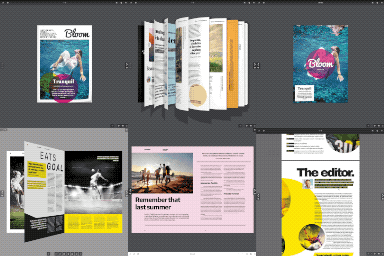
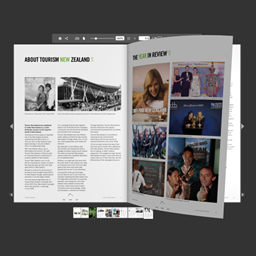
預覽 Nature FlipBook
下載專業版
FlipBook 管理簡單,您可以添加圖片(jpg,png)作為頁面,頁數沒有限制。
FlipBook 功能:
1、不需要購買和安裝額外的庫
2、PDF 支持(您可以直接從 PDF 文件創建一本書,PDF 文件會自動轉換為 JPG 文件)
3、支持多文件上傳(您可以一次上傳所有頁面,無需逐頁添加)
4、可在 iPad、iPhone 等上運行(不需要使用 Flash 播放器)
5、WYSIWYG 編輯器中支持標籤
6、為東方國家的翻頁書顯示反轉(從右到左)
7、三種顯示翻頁書的技術:
7.1、短代碼(您可以在內容的任何地方(頁面、帖子、自定義帖子等)放置翻頁書)
7.2、模板(您可以將翻頁書作為獨立模板添加到整個瀏覽器窗口中,優點是它能與所有主題完美兼容(不會與 CSS 樣式等產生衝突))
7.3、燈箱(您可以在站點內容的任何地方放置文本連結、圖像連結,當單擊該鏈接時,作為燈箱加載一本書。)
8、可以在頭部標籤中插入腳本 - 只在有短碼翻頁書的子頁面中。
9、您可以在管理面板中禁用/啟用單個圖標
10、圖標全屏幕(僅在 FF 和 Chrome 中有效)
11、您可以更改鼠標的雙擊縮放
12、您可以更改縮放步驟,對於縮小和放大都可操作
13、您可以啟用/禁用深度鏈接(地址欄末尾的字符串)
14、Youtube 視頻顯示在書的上層
15、自適應設計
16、翻頁書中無限頁數
17、延遲加載(如果頁面很多,書會加載得更快;示例1:如果當前頁面是8-9,那麼只加載頁面8-9、10-11和6-7;示例2:如果當前頁面是1,那麼只加載頁面1、2、3、4、5、6)
18、您可以在一個主題上創建無限量的翻頁書
19、雙頁面
20、顯示所有頁面
21、優秀的縮放工具
22、AJAX 表單
23、其他…
如何在我的網站上嵌入 FlipBook:
您必須使用此短碼:
[nature_book cat='book1']
cat - 翻頁書類別(管理頁面中的 slug 名稱)
功勞
WordPress.org 插件預覽圖標由 Smashicons 源自 www.flaticon.com
外掛標籤
開發者團隊
② 後台搜尋「Nature FlipBook WordPress Plugin」→ 直接安裝(推薦)
原文外掛簡介
Preview Nature FlipBook
Download Pro Version
FlipBook is easy to manage. You can add images (jpg, png ) as the page. The number of pages is unlimited.
Features FlipBook:
1.you do not need to buy and install additional libraries
2.pdf support ( you can create a book directly from the PDF file , Pdf file is automatically converted to jpg files )
3.support multiple file upload ( you can upload all your pages at once – no need to add each page separately )
4.works on the iPad,iPhone etc. ( no Flash Player needed )
5.support for tags in WYSIWYG editor.
6.reverse flip book for the eastern countries (right to left)
7.three techniques show flipbook:
7.1 shortcode – you can put flipbook anywhere in content ( page, post, custom post etc)
7.2 template – you can add flipbook as an independent template in the whole browser window, the advantage is that it is 100% working with all theme ( no conflict with css styles etc…. )
7.3 lightbox – you can put text link, image link anywhere in content on your site, when you click on the link loads a book as a lightbox. />
8.insert scripts in section head – only subpages where is the shortcode flipbook
9.you can disable / enable individual icons in the admin panel
10.icon fullScreen ( only works under FF and Chrome )
11.you can change the zoom to double click the mouse
12.you can change the zoom step for zoomIn and for zoomOut
13.you can enable / disable deeplinking (string at the end of the browser’s address)
14.youtube videos are shown on a layer above book
15.responsive design
16.unlimited number of pages in flipbook
17.lazy loading ( if you have a lot of pages – book will load faster, Example 1: If the current page is 8-9 – then are loaded only pages 8-9, 10-11 and 6-7 ; Example 2: If the current page is 1 – then are loaded only pages 1,2,3,4,5,6 )
18.you can create an unlimited number of flipbooks on one theme
19.double pages
20.show all pages
21.excellent tools to zoom
22.ajax form
23.and other…
How to embed FlipBook on my website:
You must use this shortcode:
[nature_book cat=’book1′]
cat – category flipbook ( slug name in admin page )
Credits
Icons preview on wordpress.org/plugins made by Smashicons from www.flaticon.com