內容簡介
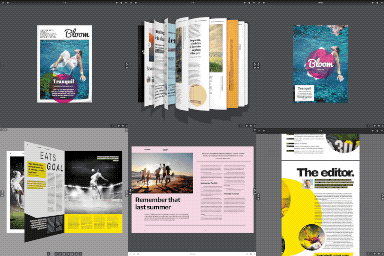
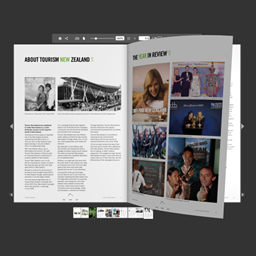
Flipbook PDF Viewer & Embedder 外掛將 PDF 文件轉換為互動式 3D 翻頁書,提供真實的閱讀體驗,並且可隨時切換至傳統檢視模式,讓使用者輕鬆瀏覽文件。
【主要功能】
• 真實的 3D 翻頁效果
• 支援多種檢視模式切換
• 互動式電子書檔案庫顯示
• 四種檔案庫佈局選擇
• Elementor 拖放整合
外掛標籤
開發者團隊
② 後台搜尋「Flipbook PDF Viewer & Embedder」→ 直接安裝(推薦)
原文外掛簡介
Most PDF viewer plugins just drop a flat, static embed on the page — a rectangle you scroll through, no different from opening the file directly. Flipbook PDF Viewer & Embedder treats a PDF like what it actually is: a book. Every document you upload gets a realistic, interactive 3D page-flip flipbook automatically, with a standard traditional viewer always one click away — no coding, no conversion step, just upload a PDF and drop in a shortcode.
Live Demo | Support
📖 A Real Reading Experience, Not Just an Embed
Realistic 3D page-flip — drag a page corner or tap to turn it, a genuine flip animation, not a fade or a slide.
3D Flipbook & Standard modes — visitors can switch between the immersive 3D view and a plain traditional viewer at any time (or you can hide the switcher and lock in one view).
Reading Direction (RTL/LTR) — set per document, so the flipbook, its Previous/Next arrows, and the E-Book grid’s hover animation all mirror correctly for Arabic, Hebrew, and other right-to-left documents.
Interactive Ebook archive view — covers flip open on hover with a smooth 3D animation and a real preview of the document’s next page, not a placeholder icon.
Seamless theme integration — the single PDF page renders using your active theme’s own header and footer, including modern block themes, so it never looks like a bolted-on plugin page.
🗂️ Four Archive Layouts
Display your whole library — or a filtered slice of it — in whichever layout fits the page:
* List 📋 — a clean, scannable row-based layout.
* Grid 🟦 — card-based, with cover, title, description, and meta.
* Newsletter 📰 — grouped by year, built for an archive that reads like a publication.
* Ebook 📚 — cover-flip hover previews, shelf-style.
🧩 Elementor Integration
Drag-and-drop Archive View and Single PDF View widgets — no shortcode typing required.
Full support for every shortcode attribute, visually configurable.
Category filtering built into the widget controls.
Compatible with any Elementor-ready theme.
⚙️ Built for Real Libraries, Not Just One PDF
Category organization — organize documents by category for easy browsing.
Manual drag-and-drop ordering — reorder your library exactly how you want it from the admin list, or set an exact position per document; List, Grid, and Ebook views respect that order.
Remote PDF support — link to a PDF hosted elsewhere, or clone it into your own Media Library with one click.
Document meta — Author, Publisher, Published Year, Edition, and Description, each individually shown or hidden globally or per shortcode.
Usage counters — track reads and downloads per document, shown or hidden independently.
Demo content import — one click to see the plugin populated with sample PDFs.
🎨 Admin Experience
Modern settings dashboard — sidebar navigation, cards, toggle switches, and styled dropdowns.
Redesigned PDF editor screen — General, Book Info, and Template settings in organized tabs.
Modernized admin list — status badges, taxonomy pills, and a one-click shortcode copy button per document.
Shortcode Generator — build a shortcode with the exact attributes you want, without memorizing syntax.
Brand color customization — match the viewer to your site’s own palette, including the flipbook container’s border, background, and max width.
Editable archive URLs & titles — the archive slug and page title are yours to set.
🛠️ Shortcodes & Attributes
Single PDF — [pdfev_embed_viewer id="post_id"]
show_description, show_author, show_publisher, show_year, show_edition, show_download — each yes/no, overrides this document’s own setting for just this one embed.
Archive (multiple PDFs) — [pdfev_viewer]
template — list, grid, ebook, newsletter (default list)
category — filter by category slug
limit — number of items to show (default 10)
order — asc, dsc (default dsc)
read / download — show the Read/Download button, yes/no (default yes)
reading_count / downloading_count — show the read/download counter, yes/no (default yes)
show_description / show_author / show_publisher / show_year / show_edition — yes/no (default yes)
Examples:
* [pdfev_viewer template="grid" limit="10" order="dsc" show_author="yes" show_year="yes"]
* [pdfev_embed_viewer id="123" show_download="no"]
Prefer a visual builder? Use Settings → Shortcode Generator instead of writing these by hand.
🔒 Privacy
This plugin uses the Appsero SDK to collect basic telemetry — but only after you explicitly consent via an admin notice. By default, no data is collected at all, and nothing personal or sensitive is gathered without permission. See the Appsero Privacy Policy for details.
🌍 Languages
English (en_US), Bengali (bn_BD), French (fr_FR) — and translation-ready for any other locale.