內容簡介
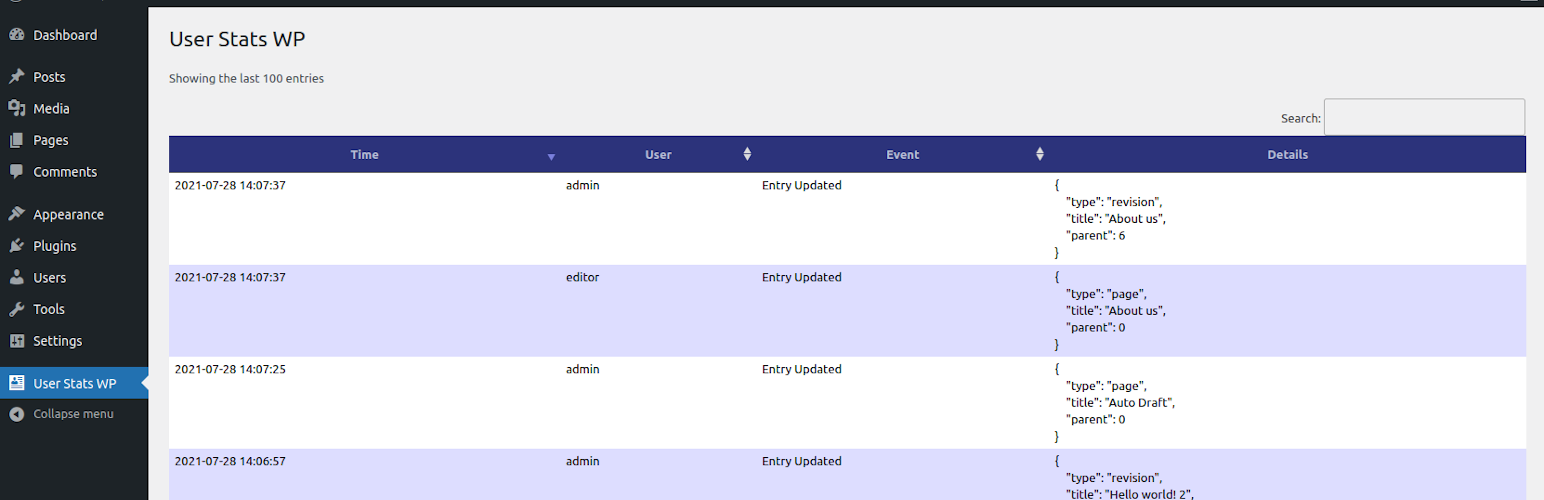
這個外掛會收集 WordPress 網站現有使用者的動作並將資料呈現成易於處理的表格。
外掛不會追蹤網站訪客(未登入的訪客)的資訊。
它不會建立任何額外的 Cookie。您可能需要告知已註冊使用者他們的一些動作會被儲存。這包括任何在 WordPress 安裝中有帳號的訪客。
沒有使用者資訊會被發送到您的安裝以外。
管理者可以預設查看統計資料。
使用案例:
檢查您的使用者最近有沒有登入
確認誰是最活躍的使用者
驗證您的編輯和作者有否正在編輯內容
監控變更中的內容
簡單易用:
登入 WordPress 控制台。
前往「外掛」->「新增外掛」
搜尋「User Stats WP」
安裝
啟用
外掛標籤
開發者團隊
原文外掛簡介
This plugin collects actions performed by existing WordPress users and shows that data in an easy-to-process table.
The plugin won’t track guests (non-logged visitors) of your website.
It does not create any additional cookies. You may want to inform your registered users that some of their actions are being stored. This includes any type of visitors that have an account within your WordPress installation.
No user information is being sent outside of your installation.
The statistics are available to Administrators only by default.
Use cases:
check if your users have logged in recently
check who is most active
verify that your editors and authors are editing content
monitor which content is being worked on
Simple:
Login to your WordPress dashboard.
Navigate to Plugins -> Add new
Search for User Stats WP
Install
Activate