內容簡介
WebberZone Top 10 是一款用於 WordPress 的熱門文章計數器與熱門文章外掛,能夠計算文章、頁面及自訂文章類型的瀏覽次數,並以小工具、區塊及短碼顯示最受歡迎的文章。所有追蹤數據均儲存在 WordPress 資料庫中,無需外部服務,確保用戶隱私。
【主要功能】
• 計數器:每小時追蹤文章瀏覽次數,自動顯示計數
• 熱門文章:依總瀏覽數或自訂時間範圍顯示熱門文章
• 小工具:側邊欄小工具顯示每日及整體熱門文章
• 短碼:使用 [tptn_list] 顯示熱門文章列表
• 縮圖:支援特色圖片或預設圖片顯示
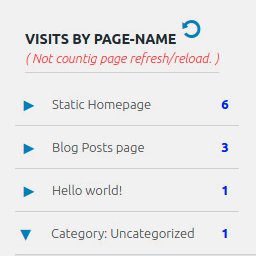
• 管理控制台:顯示熱門文章及瀏覽數圖表
外掛標籤
開發者團隊
② 後台搜尋「WebberZone Top 10 — Popular Posts」→ 直接安裝(推薦)
📦 歷史版本下載
原文外掛簡介
Top 10 is a post views counter and popular posts plugin for WordPress. It counts daily and total page views on posts, pages and custom post types, then displays your most viewed and trending posts with blocks, widgets and shortcodes.
All tracking data stays in your WordPress database, with no external services, no cookies and no personal data. Views are queued in a lightweight table and counted in the background, so tracking works behind page caches without slowing down your pages.
Top 10 also offers thumbnails with fallbacks, flexible display options and a built-in cache. Developers can customize queries, tracking and output with WordPress actions and filters.
Features
Page Counter: Tracks hourly post views on posts, pages, and custom post types. Display counts automatically using blocks, shortcodes, or template functions
Popular Posts: Display most viewed posts by total counts or within custom time periods
Blocks: Popular Posts and Post Count blocks with configurable display options
Widgets: Sidebar widgets for daily and overall popular posts
Shortcodes: Use [tptn_list] to display popular post lists and [tptn_views] to show view counts
Thumbnails: Featured images, the first image in the post, or a default image
Exclusions and Styling: Exclude posts by category or ID, and use the included styles or your own CSS
Admin Dashboard: Daily and overall popular posts with a views chart, plus sortable view-count columns on post lists
Multisite Dashboard: Network-wide statistics across all sites in a multisite network
Bot Filtering: Optionally skip known bots when counting views
Koko Analytics Data Source: Build popular posts lists from Koko Analytics page views, optionally switching off Top 10 tracking
Import and Export: Export and import view counts and settings, and migrate view data from WordPress Popular Posts
Popular Posts Feed: RSS feeds of your daily and overall popular posts
REST API and Abilities API: Popular posts and view counts for integrations, including the Abilities API on WordPress 6.9+
Caching Compatibility: Works with WP Rocket, LiteSpeed Cache, W3 Total Cache, WP Super Cache, and similar plugins
Developer-Friendly: Filters and actions to customize queries, tracking, and output
Features in Top 10 Pro
Top 10 Pro adds the following. See Free vs Pro for a full comparison.
Faster Tracking: Fast and High-traffic trackers, site-wide tracking of archives and searches, and feed view counting
Advanced Blocks: Advanced Popular Posts block with editable cards and six layouts, plus the Query, Featured Image and Popular Posts Pro blocks
Page Builders: Elementor, Bricks and WPBakery elements
Popular Authors: Popular authors blocks, shortcodes and widgets, built in
Performance: Lazy-loaded lists, a query time limit, and configurable data retention
Admin Tools: Admin bar menu, Feed vs web report, dashboard access by role and more
Multisite: Network-wide popular posts lists, including Koko Analytics data, and copying settings between sites
Display Options: Grid Thumbs style, lists restricted to taxonomy terms, and RSS feeds filtered by category or post type
WP-CLI: wp top10 commands for counts, database, cache, settings, cron and status
Abilities API: Count editing and cache clearing for integrations
Privacy and GDPR
Top 10 does not use cookies and does not store personal data. Its database tables (wp_top_ten, wp_top_ten_daily, wp_top_ten_visits_funnel and wp_top_ten_visits_log; the prefix may vary) hold only post IDs, site IDs, view counts, visit times and whether a view came from the web or a feed. No IP addresses or user agents are stored. The user agent is read only to skip bots when that option is on.
You are responsible for ensuring GDPR compliance on your website.
Multilingual sites
Top 10 works with WPML, Polylang and TranslatePress without extra configuration, and caches popular posts separately for each language. See Multilingual support.
Translations and contributions
Help translate Top 10 on WordPress.org. Top 10 is developed on GitHub, where pull requests are welcome. Please use the support forum, not GitHub, for support requests.
Other WebberZone Plugins
Contextual Related Posts – Related posts for your site and feeds
Better Search – Relevance-based WordPress search
Knowledge Base – Knowledge base and FAQ sections
WebberZone Snippetz – HTML, CSS and JavaScript snippets
Auto-Close – Close comments, pingbacks and trackbacks
WebberZone Link Warnings – Accessible warnings for external links