
內容簡介
此外掛可在管理控制台、瀏覽器開發者工具及網站前端顯示每個頁面的訪問次數,幫助網站擁有者了解頁面流量,並提供隱藏計數器和報告功能,符合GDPR規範。
【主要功能】
• 顯示每頁訪問次數
• 隱藏計數器功能
• 支援CSV或XML匯出數據
• 不計算頁面刷新為新訪問
• WooCommerce相容性
外掛標籤
開發者團隊
原文外掛簡介
This plugin is going to display the number of visits for each page in the:
Admin dashboard
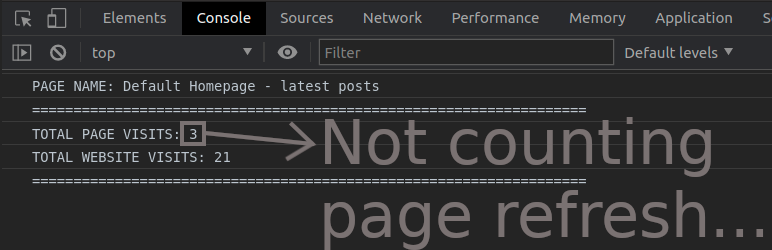
Browser developer-tools/console tab – (HIDDEN COUNTERS)
Website/page frontend – (OPTIONAL)
You can add and display counters on the frontend of your website:
total page-visits-counter and/or
total website-visits-counter
( Page-visits-counter does not count page refresh as a new visit while Website-visits-counter counts everything. )
Export page visits data as CSV or XML.
Hidden page counter + admin page reports
How to display hidden counter on a website frontend?
The purpose of this plugin is to supplement the report of actual visits to the pages of the website that cannot be recorded through advanced analytical tools. Advanced analytical tools require the consent of a visitor before the visit is recorded.
WHY LITE?
It is a small size software and it does not require much memory.
It is not going to crowd your database with tons of metric data and “eat” database memory.
It is not going to collect user’s personal data – GDPR compliant.
NOT COUNTING
Logged in user with a role:
admin
editor
shop manager
custom role
Page refresh/reload ( But “Total Visits” load&reload sum will count it. )
Submitting comments ( But “Total Visits” load&reload sum will count it. )
Visiting direct media link in the uploads folder
Media – attachment page
Search results page
Update cart ( But “Total Visits” load&reload sum will count it. )
Checkout/order received ( But “Total Visits” load&reload sum will count it. )
COUNTING
A visitor ( Not logged in )
Logged in user with a role:
Subscriber
Author
Contributor
Pending_user
Customer
Pages and posts:
Pages and subpages
Default and Static Homepage
Blog Posts page
Single post
Default category and tag – archive pages
404
CPT
Taxonomy archive pages
WooCommerce:
SHOP – archive page
Single product
Default category and tag – archive pages
Attribute archive pages
Cart ( Check Update cart is not counting… )
Checkout ( Check “Checkout/order received” is not counting…)
ON CHANGE NAME of Page, Post, Product…
If you change the name of an existing page, post, product, archive, etc. then the old page will remain intact in the page visits report.
After a new visit, the new page name will appear in the page visits report and the counter will start counting visits for the new page from the start.
ON DELETE of Page, Post, Product…
If you delete an existing page, post, product, archive, etc. then the page will remain intact in the page visits report including its number of visits.
VISITS-COUNTER ON THE WEBSITE FRONTEND
There are two counter types:
Website counter
Page counter ( Not counting page refresh. )
You can add one or both counter types on your website or page frontend.
Instructions on how to add counter/s to your website are in the plugin settings page under the tab named counter.
FEATURES
Invisible counter (In browser Developer-tools / Console)
GDPR Compliant
WooCommerce (HPOS and Remote Logging) compatible
REQUIREMENTS
WordPress 5.0 +
PHP 5.6.40 +
WooCommerce 4.9.2 +
PLUGIN UNINSTALL
On the plugin delete/uninstall it will automatically clean its data from the database unless you select to preserve them in the plugin settings area.
Therefore, it is harmless for you to try out this plugin.
FOR DEVELOPER
Admin dashboard widget has four wp-hooks:
add_action( ‘StrCPVisits_db_widget_wrapper_start’ );
add_action( ‘StrCPVisits_db_widget_after_total_visits_boxes’ );
add_action( ‘StrCPVisits_db_widget_wrapper_end_before_js’ );
add_action( ‘StrCPVisits_db_widget_wrapper_end_after_js’ );
LEGAL
Privacy policy
Disclaimer
