內容簡介
現場演示 | 文件 | 支援 | 升級至專業版!
WP Team 是最多功能且領先業界的 WordPress 團隊展示外掛程式,建立和管理多位成員陳列和各種選項的卓越設計。
此外掛程式有 3 種獨特的版面設置和驚人的樣式選項。您可以在幾分鐘內在 WordPress 網站上輕鬆創建出看起來很棒的團隊成員區域。插件的主要目的是顯示團隊或員工成員,但也可用於顯示其他需要圖像和文字的內容,所以要創造力!
它非常適合於顯示和管理您的工作人員、團隊或工作力量的成員。
為什麼 WP Team 很重要?
訪客想要認識貴公司或組織核心的人員,因為這很重要。向您的潛在客戶展示您出色的團隊成員,以促進商務與消費者之間的信任關係。所以輕鬆將您的團隊成員頁面設計提升至更高水平。
我們相信,您不應該成為一名程式設計師或僱用開發人員來在您的 WordPress 網站上創建好看的團隊成員頁面。這就是為什麼我們建立了最終 WP Team 成員陳列外掛程式,既易用且強大。我們可以誠實地說,這是其類型市場上最智能的外掛程式。
WP Team 2.0.0
WP Team 2.0.0 已完全重建,現在為您提供了許多改進和新的驚人功能。與新的 WordPress v.5.x(古騰堡)兼容。

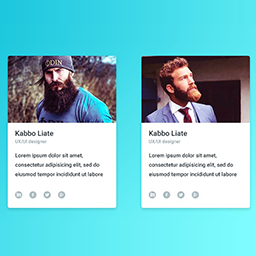
可用的輸入欄位
成員名稱
職位/工作標題
照片/圖像
簡短傳記
社交連結(Facebook、Twitter 等)
您可以輕鬆顯示/隱藏和自定義每個欄位。
可用的佈局預設
旋轉木馬
網格
列表
關鍵功能清單
完全響應且支援行動裝置。
流暢、優雅且快速。
創建無限的團隊和成員。
3 種獨特的版面設置(旋轉木馬、網格和列表)。
短碼產生器。
在同一頁面上顯示多個團隊短碼。
乾淨直觀的設置面板-無需編碼!
控制不同裝置中的欄位。
控制顯示的成員總數。
顯示隨機順序的成員。
成員間的邊框、半徑和背景顏色。
顯示/隱藏成員每個元素。
社交圖標位置、邊距和形狀。
從可用的切割尺寸中選擇圖像大小。
照片/圖像邊框和背景顏色。
圖像縮放效果。
詳細頁面連結(打開/關閉)。
詳細頁面欄位控制。
無限的顏色和樣式。
10+ 旋轉木馬控制:
-自動播放
-自動播放速度
-幻燈片捲動速度
-幻燈片捲動
-懸停暫停
-無限循環幻燈片
-顯示/隱藏導航
-導航顏色
-顯示/隱藏分頁點
-圓點顏色和活動顏色
-自動高度等。
高度自訂。
排序和排序方式。
開啟/關閉預載程序。
觸控啟用旋轉木馬。
右至左語言支援
外掛標籤
開發者團隊
② 後台搜尋「Responsive Team Members Showcase, Team Grid, Team Slider, and Staff List – SmartTeam (formerly WP Team)」→ 直接安裝(推薦)
📦 歷史版本下載
原文外掛簡介
Live Demo | Documentation | Support
SmartTeam is a WordPress team showcase plugin for creating and managing team member displays. The plugin includes 3 layout presets and styling options to create team member sections on your WordPress site. The main purpose is to display team or staff members, but it can also be used for other content that requires an image and text.
Why use SmartTeam?
Displaying your team members helps visitors connect with the people behind your organization. SmartTeam allows you to create team member pages without coding knowledge. The plugin provides an intuitive interface for building team displays.
Who is SmartTeam perfect for?
Business Owners & Startups – Showcase your staff, departments, and leadership team.
Agencies & Freelancers – Present your creative team or collaborators.
Educational Institutions – Display teachers, professors, faculty, or students.
Medical & Corporate Websites – Highlight doctors, lawyers, executives, and professionals.
Non-profits & Organizations – Introduce volunteers, board members, or community leaders.
Event & Conference Websites – Showcase speakers, mentors, or trainers.
Online Communities & Clubs – Present members, admins, or contributors.
Available Input Fields
Member name
Position/Job title
Photo/Image
Short bio
Social links (Facebook, Twitter…)
You can show/hide and customize every field.
Available Layout Presets
Carousel
Grid
List
Key Features List
Fully responsive and mobile-ready.
Create unlimited teams and members.
3 Layouts (Carousel, Grid, and List).
Shortcode Generator.
Multiple team shortcodes on one page.
Settings panel – no coding required!
Control columns in different devices.
Control the total members to display.
Display random order members.
Margin or space between members.
Member border, radius, and background color.
Show/hide every element of a member.
Social icon position, margin, and shapes.
Choose the image size from the available crop sizes.
Photo/Image border and background color.
Image zoom in/out effect.
Detail page link (on/off).
Detail page fields control.
Unlimited color & styling.
Order & order by.
15 Team carousel slider options.
Translation & RTL Ready.
Multisite supported.
Custom CSS options.
Compatible with any theme.
The Pro version of SmartTeam provides extra layouts, more styling controls, and extended customization options for building team member showcases with added flexibility.
Documentation
If you have any questions about working with SmartTeam, you can take a look at the online documentation.
For Support and Bug Reporting
If you encounter an issue or find any bugs, post it in the support. You can also get support via WordPress.org.
Author
Designed and Developed by ShapedPlugin, LLC