內容簡介
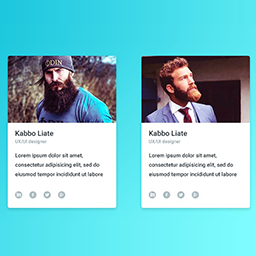
Meet The Team 是一款為 Elementor 提供的小工具,讓使用者能夠輕鬆展示團隊成員的資訊,包括姓名、職稱、個人照片及社交連結,並可自訂佈局。
【主要功能】
• 提供兩種響應式佈局樣式
• 無限制添加團隊成員
• 自訂顏色、字型及間距
• 社交圖示及個人連結功能
• 內建快速入門頁面
外掛標籤
開發者團隊
原文外掛簡介
Meet The Team adds an Elementor widget for displaying your team. Add members, names, designations, profile images, and social links, then customize the layout in Elementor.
Two responsive layouts: Style 1 and Style 2.
Unlimited team members through the Elementor repeater.
Colors, typography, spacing, and responsive column controls.
Social icons and profile links.
A Getting started page under Tools > Meet The Team.
Elementor 3.5.0 or later is required. The free layouts do not expire. Additional layouts are available in the separate Meet The Team Pro addon.
Privacy and external services
The WP CV Builder recommendation is rendered locally. It does not send impressions, clicks, referral identifiers, or site details to an external service, and it never installs or activates another plugin. Clicking its link opens the plugin’s WordPress.org page.
This plugin retains the Appsero SDK from earlier releases for optional usage insights and voluntary deactivation feedback. Usage insights are enabled only after choosing to allow them. When enabled, the SDK can send site URL and name, administrator name and email, WordPress/PHP/server versions, locale, plugin/theme information, usage counts, and the server IP address to https://api.appsero.com. The SDK may query https://icanhazip.com to determine the server’s public IP. Voluntary deactivation feedback is also sent to Appsero. Choosing to skip the insights prompt sends Appsero the plugin identifier and whether the prompt was previously skipped; this is separate from the CV Builder recommendation. Use the Appsero opt-out action on the Plugins screen to stop scheduled usage insights.
Appsero: Privacy policy and SDK data information.