內容簡介
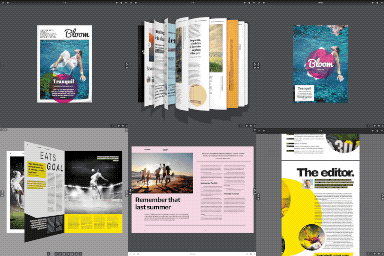
SoftIcon Flipbook 是一款能將您的手冊、雜誌、目錄、菜單及電子書轉換為逼真的翻頁書籍的外掛,並可直接在區塊編輯器中編輯與預覽,無需使用短碼或額外的翻頁畫面。
【主要功能】
• 支援從媒體庫或連結匯入 PDF 翻頁書
• 可從任意圖片集建立翻頁書
• 自動、雙頁或單頁佈局選擇
• 可自動翻頁的封面設計
• 支援縮放與全螢幕模式
• 鍵盤箭頭可翻頁,適合螢幕閱讀器使用
外掛標籤
開發者團隊
② 後台搜尋「SoftIcon Flipbook – PDF Flipbook & Magazine Viewer」→ 直接安裝(推薦)
原文外掛簡介
SoftIcon Flipbook turns your brochures, magazines, catalogs, menus and ebooks into a realistic page-turning book, right inside the block editor. Add the Flipbook block, pick a PDF and you see the finished book in the editor – no shortcodes, no separate “flipbook” screens.
Why choose SoftIcon Flipbook?
Block first – upload or pick a PDF in the block and preview the real flipbook while you edit.
Readable on phones – the book switches to one page at a time on small screens, two-page spreads on wide ones. Or force one layout.
Light on your pages – the flipbook engine loads only when the book scrolls into view, and pages are drawn as the reader gets near them.
PDF or images – build a book from a PDF, or from images in reading order.
Clear errors – if a PDF cannot be shown (for example a link to another website that blocks it), the block says why and keeps a link to the file.
Features
PDF flipbook from the Media Library or a link
Image flipbook from any set of images
Auto, always-two-pages or always-one-page layout
Hard cover: first and last pages turn on their own
Open at any page, jump to a page from the page counter, or link straight to a page with #page=5
Thumbnails of all pages: a click opens that page
Zoom with the toolbar buttons, a pinch on phones or Ctrl + scroll on computers; drag to move around a zoomed page
Toolbar with page counter, previous/next, thumbnails, zoom, download, fullscreen and a page-turn sound visitors can mute
Keyboard arrows turn the pages, the toolbar works with screen readers
Fullscreen that fits the book to the screen, with an iPhone fallback
Maximum height and colors for background, toolbar and icons
Wide and full width alignment
Third-party libraries
PDF.js 6.4.299 (npm package pdfjs-dist) by Mozilla – github.com/mozilla/pdf.js – Apache License 2.0. Bundled as build/pdfjs.js and build/pdfjs/pdf.worker.min.js (minified upstream build); license in build/pdfjs/LICENSE.txt.
Also from the pdfjs-dist package: the JavaScript builds of the OpenJPEG (BSD-2) and JBIG2 (BSD-3) image decoders in build/pdfjs/decoders, the Foxit (BSD-3) and Liberation (GPLv2 with font exception) standard fonts in build/pdfjs/standard_fonts, and the Adobe CMaps (BSD-3) in build/pdfjs/cmaps, each with its license file. The fonts and CMaps are binary data files; the build stores each one unchanged as a base64 string in a .json file, which the plugin decodes back to the original bytes for pdf.js.
StPageFlip 2.0.7 (npm package page-flip) by Nodlik – github.com/Nodlik/StPageFlip – MIT License. License in build/page-flip-LICENSE.txt.
The unminified source of this plugin is in the src folder, with package.json and webpack.config.js. Build it with npm install and npm run build; the build copies the pdf.js files from node_modules/pdfjs-dist.
Development
The plugin is developed on GitHub: github.com/alamingitpailot/softicon-flipbook. Bug reports and pull requests are welcome there; for help, use the support forum here on WordPress.org.