內容簡介
SimpleBoards 是一款 WordPress 外掛,提供公共產品路線圖、想法板和功能投票,讓用戶可以在自己的網站上收集反饋。它不需要額外的訂閱費用,所有數據都存儲在自己的 WordPress 資料庫中,確保用戶的反饋不被第三方訪問。
【主要功能】
• 公共路線圖和反饋板在自己的域名上運行
• 允許訪客提交功能請求,無需註冊
• 內建功能投票系統,促進真實決策
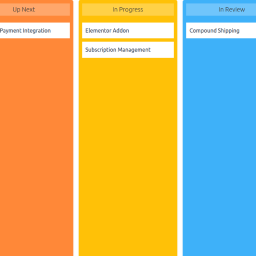
• 看板式產品路線圖,顯示進度狀態
• 可自訂路線圖和想法板的標籤名稱
外掛標籤
開發者團隊
② 後台搜尋「Roadmap and Feedback Plugin for WordPress – SimpleBoards」→ 直接安裝(推薦)
原文外掛簡介
SimpleBoards is the WordPress roadmap and feedback plugin that puts your public roadmap, ideas board, and feature voting on your own domain instead of a separate SaaS subdomain. Visitors submit feature requests, vote on what they want most, and watch roadmap items move from Up Next through In Progress to Released. Every idea, vote, comment, and notification email lives in your own WordPress database, indexable by search engines, with no monthly subscription and no third party reading your customer feedback. If you have wanted a product roadmap and feature request board that actually belongs to you, this is the roadmap and feedback plugin for WordPress that gives you one.
Try the live demo | Documentation | Get Pro | Contact | Roadmap
SimpleBoards is a self-hosted LoopedIn and Frill alternative, built as a WordPress plugin so your roadmap and feedback board run inside the site you already own. There is no separate login, no SSO to configure, and no data leaving your server.
A public roadmap and feedback board on your own domain
Most product feedback tools host your public roadmap on their subdomain, on their infrastructure, behind their branding. SimpleBoards flips that. Your public roadmap, your ideas board, and your feature voting all render natively inside your WordPress theme, on a /roadmap page or any page you choose. Because the board is real content on your own domain, search engines can index every feature request and roadmap item, which brings organic traffic that a SaaS subdomain never sends to you. Your customer feedback stays in your WordPress database where you can query it, export it, and back it up like any other content.
Collect feature requests without forcing signups
The fastest way to kill feedback is to make people create an account first. SimpleBoards lets guests submit feature requests with nothing more than a name and email, so you capture ideas from the people who would never bother registering. Logged-in users submit too, and every submission, guest or member, lands in the same moderation queue so you approve, edit, or reject feature requests from the WordPress admin before they go public. Built-in spam protection keeps that queue clean with a hidden honeypot, a timing check, and a per-visitor hourly limit, all without showing your visitors a captcha.
Feature voting that drives real decisions
Every idea and roadmap item gets feature voting, so you build what people actually want instead of guessing. Sort by most voted, filter by category or status, and put your effort where the demand is loudest. Feature voting works for both logged-in users and guests, with one vote per identifier enforced at the database level, so the numbers you act on are real. Threaded comments on every item turn a flat request list into a conversation, and the top voted sidebar surfaces your highest-demand feature requests at a glance.
A kanban product roadmap your users can follow
The roadmap is a kanban board. Status columns such as Up Next, In Progress, and Released, or any columns you name, show progress so users stop emailing to ask what is happening. Drag and drop reordering, color coded statuses, and a Release stage flag for shipped work keep the product roadmap readable at a glance. Because the kanban roadmap is public, it doubles as an expectation-setting tool: customers see what is planned, what is being built, and what already shipped, which cuts support load and duplicate feature requests.
Rename the Roadmap and Ideas tabs to match your site
Not every team calls it a “roadmap” and an “ideas board.” SimpleBoards lets you rename the Roadmap and Ideas tabs, per board, to anything that fits your site, for example Tasks, Scheduled, Suggestions, or Requests. The new name shows everywhere on the board: the tabs, the search box, the filters, and the item view, plus the WordPress admin, so the board speaks your language instead of the plugin’s. The page URL follows the name too. Rename Roadmap to Tasks and the page becomes /tasks/ automatically, while your old /roadmap/ links keep working and redirect to the new address, so nothing you have shared or that Google has indexed ever breaks. It is a per-board setting, so different boards on the same site can use different names.
Turn your ideas board into a public changelog
Shipping is only half the value. SimpleBoards lets you move a roadmap item to Released and show it as done, so your ideas board becomes a living changelog your users can follow. With the Pro add-on you can add a dedicated Announcements tab and widget that publishes release notes as a proper changelog, complete with unread badges and dismissible cards, so the people who requested a feature find out the moment it ships.
A self-hosted LoopedIn and Frill alternative
If you are paying a monthly subscription for LoopedIn, Frill, or a similar SaaS feedback tool, SimpleBoards runs the same workflow, public roadmap, ideas board, feature requests, and feature voting, inside your own WordPress site with no recurring fee. You already pay for hosting and you already have an audience, so paying $30 to $400 a month to host your public roadmap on someone else’s subdomain is money you can keep. SimpleBoards ships a LoopedIn CSV importer so you can migrate your existing feedback, titles, descriptions, statuses, dates, and vote counts, without starting over. The plugin is GPL licensed, so you can modify, extend, or audit it whenever you want.
Who SimpleBoards is built for
WordPress plugin and theme authors collecting feature requests from real users.
Service providers and freelancers who want a roadmap and feedback board clients can follow.
Agencies sharing roadmap visibility with clients in a portal they already own.
Education sites and course platforms turning student and member ideas into shipped features.
Membership and community sites collecting customer feedback in one place.
Internal product teams running roadmap planning inside the WordPress admin.
Free features
Public roadmap and ideas board, on the same page or split across two pages.
Rename the Roadmap and Ideas tabs per board to any label, such as Tasks or Suggestions, with the page URL updating to match and old links redirecting.
Feature voting and threaded comments on every roadmap item and feature request.
Guest submissions and guest voting without forcing visitors to register.
Built-in spam protection with a honeypot, a timing check, and a per-visitor hourly limit, and no captcha.
Search, filter, and sort on both the ideas board and the roadmap views, toggleable per board.
Custom statuses and categories with colors, plus a Release stage flag for shipped work.
Moderation tools to bulk edit, reject, or publish feature requests from the WordPress admin.
LoopedIn CSV importer with vote counts and duplicate handling.
Editable email notification templates and submission button text to match your brand.
Per-item subscriptions with one-click unsubscribe links.
Pretty permalinks and a [sbir_board product="board-slug"] shortcode for any page or post.
Theme-resilient public CSS so the roadmap and feedback board stays predictable across themes.
Pro add-on
SimpleBoards Pro adds the things teams ask for after their first month of running a public roadmap:
Private boards. Restrict a board by role so internal roadmap planning stays internal.
Announcements and changelog. Publish release notes as a changelog with unread badges and dismissible cards.
Workflow automation. Auto-promote a feature request when a vote threshold is hit, auto-change status when a checklist finishes, and notify by email when a roadmap item goes overdue.
Checklist progress on cards. Track sub-tasks on roadmap items with a visible progress bar.
Design controls. Layout, colors, typography, and preset themes (Clean Light, Midnight Glass, Pulse) without writing CSS. Saved presets reuse a design across boards.
Custom CSS. Style any board with your own CSS from the Design tab. It is scoped safely to the board, so your rules never leak into the rest of your site. Write per-board CSS or global CSS that applies everywhere.
Outgoing webhooks. Send board activity to Discord, Slack, Microsoft Teams, make.com, Zapier, or any URL when an item ships, a status changes, or a new idea comes in. Post straight into a chat channel or feed an automation tool, with signed delivery, retries, and a delivery log.
Torin AI assistant. Analyze incoming feature requests by intent, find duplicate ideas, and suggest the next action.
Common use cases
Replacing a paid LoopedIn or Frill subscription with a self-hosted feature request board you fully control.
Adding a public roadmap to a WordPress plugin or theme’s own site on a /roadmap page.
Running a feature requests portal on a product or service marketing site.
Sharing roadmap visibility with agency clients without giving them admin access.
Collecting customer feedback on a membership site, course platform, or education site.
Privacy Policy
Roadmap and Feedback Plugin for WordPress – SimpleBoards uses the Appsero SDK to collect some telemetry data upon the user’s confirmation. This helps us to troubleshoot problems faster and make product improvements.
Appsero SDK does not gather any data by default. The SDK only starts gathering basic telemetry data when a user allows it via the admin notice. We collect the data to ensure a great user experience for all our users.
Integrating Appsero SDK DOES NOT IMMEDIATELY start gathering data, without confirmation from users in any case.
Learn more about how Appsero collects and uses this data.
More info, live demo, and support: simpleboardswp.com. Email: [email protected]