內容簡介
ShapedCart 是一款 WooCommerce 側邊購物車外掛,能夠取代預設的購物車頁面,提供快速、流暢的滑出式購物車抽屜或彈出式購物車。顧客可以在不重新導向或重新載入頁面的情況下,方便地添加、更新或移除產品,提升購物體驗。
【主要功能】
• 快速滑出購物車,無需頁面重載
• 浮動購物車按鈕,隨時可見
• 內建優惠券欄位,方便使用折扣
• 自訂顏色與樣式,符合佈景主題
• 無需付費,所有功能免費使用
外掛標籤
開發者團隊
② 後台搜尋「ShapedCart – WooCommerce Side Cart, Mini Cart & Floating Cart」→ 直接安裝(推薦)
原文外掛簡介
ShapedCart is a WooCommerce side cart plugin that replaces your default cart page with a fast, smooth slide-out cart drawer or popup cart. Shoppers add, update, and remove products right where they are — no redirect, no page reload, no lost momentum.
You also get a floating cart button on every page and a menu cart trigger for your theme header, so the cart is always one tap away.
And it’s genuinely free. There’s no Pro version and no locked settings — the plugin you install is the whole plugin. Every feature below is yours to use from the start.
Documentation | Support
Why your store needs a WooCommerce side cart
The default WooCommerce cart page kills momentum. A shopper clicks Add to cart, gets bounced to a separate page, and loses interest. A side cart fixes this instantly — the cart slides open right on the page, turning every moment into a step toward checkout instead of a dead end:
No redirect, no reload — shoppers keep browsing while they review their cart.
The cart is always one tap away — a floating icon stays pinned in the corner so shoppers never lose track of what they’ve added.
A faster path to checkout — fewer clicks and less friction between adding a product and reaching checkout.
Fewer abandoned carts — momentum is never broken by a sudden page change.
What makes ShapedCart different
Most WooCommerce side carts look alike until you install them — then the friction, the paywalls, and the bloat show up. ShapedCart is built on a different set of commitments:
Everything free — no Pro version and no locked settings. Every feature is included, out of the box: the floating cart, menu cart, popup cart, coupon field, shipping, savings badge, and styling controls.
Live in seconds — activate the plugin and your side cart is already working with sensible defaults. Adjust the heading, colours, and triggers whenever you like — no setup wizard to sit through, no code to touch.
Genuinely fast — the cart opens the instant a shopper clicks, and adding or removing items updates the totals right away, with no page reload.
Built on the WooCommerce Store API — modern, reliable cart data instead of legacy hacks, so totals stay accurate and fast.
Lightweight by design — loads only what each page needs, with no layout shift, keeping your Core Web Vitals healthy.
Accessible by default — built to WCAG 2.2 AA with full dialog semantics, live-region announcements, keyboard support, and comfortable tap targets.
Powerful features — all free
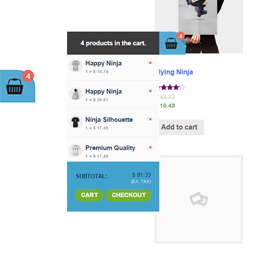
Side Cart Drawer — An instant panel slides in the moment a shopper adds a product or opens the cart, so they can review and adjust everything without ever leaving the page they’re on. Open it from the right or the left, and set its width independently for desktop, tablet, and mobile.
Popup Cart — Want the cart as a modal or centre popup instead of off to the side? Turn on the popup cart and it opens as a focused overlay in the middle of the screen — the same fast, instant experience, in a layout that puts the cart at the centre of attention.
Auto-Open Cart on Add to Cart — Open the side cart the moment a product is added, so shoppers get instant confirmation and a clear path to checkout. Prefer a quieter add-to-cart? Turn it off and the drawer stays put until they’re ready.
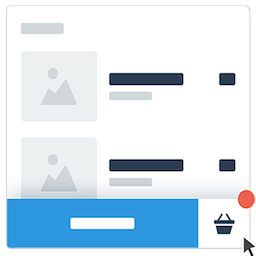
Floating Cart Button With Count Badge — A cart bubble stays pinned in any corner or mid-edge with a live count badge, so the cart is always one tap away. Fine-tune its offsets, hide it when the cart is empty, keep it off specific pages, and choose which devices see it.
Menu Cart Trigger & Shortcode — Add a cart icon straight into any navigation menu, complete with a count badge and an optional running total. Need it somewhere else? Drop the [shaped_cart_menu] shortcode anywhere on your site.
Every Product Detail in the Cart — Each item shows its variation attributes and, when a product is on sale, its original price struck through beside a savings badge in either a percentage or an amount.
Low-Stock Urgency Badge — Add a badge that appears once stock drops to a threshold you set — an “Only 3 left” nudge that turns hesitation into a purchase, shown only on products that track stock.
Quantity Stepper with Undo — Shoppers adjust quantities with a stepper or type a number directly, and if they remove something by mistake, a brief undo window lets them put it right — no frustration, no lost sale. Selling one-of-a-kind items? Turn the stepper off.
Built-In Coupon Field — Let shoppers apply discount codes without leaving the cart. Show the field open or tuck it into a collapsible link to save space, and word the heading, placeholder, and button however you like.
Cart Summary Controls — Show the subtotal, a shipping line, and the total — as a plain price, or a price paired with everything the shopper saved. Add a Summary Note under the total to set expectations before checkout.
Checkout, Continue Shopping & View Cart — A prominent checkout button carries shoppers straight to your WooCommerce checkout, with the cart total on it if you want. Optional Continue shopping and View cart buttons give browsers an easy way back — each with its own label and behaviour.
Customizable Empty Cart State — An empty cart is an invitation, not a dead end. Write your own heading, message, and button so shoppers always have somewhere inviting to go next.
Translation-Ready & GDPR Friendly — Every string is translatable and works with WPML, Polylang, TranslatePress, and Loco Translate. ShapedCart collects no personal data from your shoppers.
Full Styling Controls — A dedicated Style tab for both the side cart and the floating cart. Match colours, buttons, and typography to your brand without touching a line of code.
Who can benefit from ShapedCart?
WooCommerce store owners who want to retire the default cart page and give shoppers a modern, conversion-ready side cart that keeps them on the page.
Conversion-focused businesses looking to lift average order value and cut cart abandonment with an instant drawer and an always-visible floating cart.
Growing and high-volume stores that need a cart which stays fast and accessible as traffic climbs, without piling on paid add-ons.
Developers and agencies building WooCommerce stores for clients who expect a polished, fully customizable cart drawer and floating cart — with clean markup and no lock-in.
Compatibility
WooCommerce (Classic and Block themes), the Block Editor, and RTL layouts.
Works with popular themes and page builders — Astra, Storefront, GeneratePress, OceanWP, Kadence, Blocksy, Neve, Flatsome, and Elementor.
HPOS (High-Performance Order Storage) compatible.