內容簡介
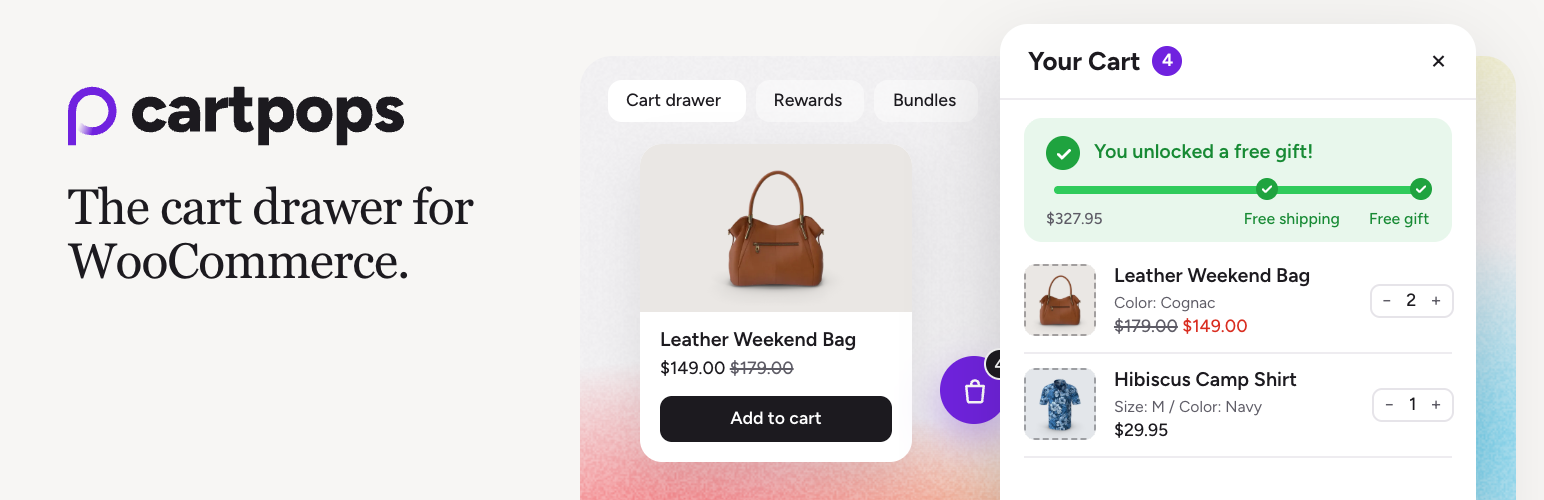
CartPops 是一款專為 WooCommerce 設計的外掛,提供側邊購物車、購物車抽屜及彈出式購物車功能,讓顧客在不重新載入頁面的情況下,輕鬆查看和管理購物車內容,提升購物體驗。
【主要功能】
• 側邊購物車抽屜:顧客可隨時查看購物車內容
• 漂浮購物車圖示:隨時顯示購物車商品數量
• 促銷建議:在抽屜中推薦交叉銷售產品
• 優惠券功能:顧客可直接在抽屜中使用優惠券
• 自訂設計:可調整顏色、按鈕文字及佈局
• 設定匯入匯出:輕鬆將設置從測試網站轉移到正式網站
外掛標籤
開發者團隊
② 後台搜尋「CartPops – WooCommerce Side Cart, Cart Drawer & Cart Popup」→ 直接安裝(推薦)
📦 歷史版本下載
原文外掛簡介
Try the live demo and add a product to see the cart drawer in action.
CartPops adds a slide-out side cart to your WooCommerce store, so shoppers no longer have to visit the cart page. Shoppers add a product, see their cart slide in, change quantities, apply a coupon and head straight to checkout, all without a page reload.
The drawer is light: no jQuery, and its styles and scripts only load where they are needed. It works with block themes, classic themes and the popular page builders.
What you get for free
Slide-out side cart. The cart drawer opens as an add to cart popup when a product is added, including from the product page, or only when the shopper clicks the cart. Quantities, removals, totals and coupons update in place.
Floating cart launcher. A floating cart icon with a live item count, like a mini cart that is always in reach. Place it anywhere with the Cart Launcher block or the [cartpops_launcher] shortcode, or let it appear automatically.
Upsells and cross-sells. Suggest products inside the drawer from your cross-sells, upsells or related products, with a random fallback so the section is never empty.
Coupon form. Shoppers apply and remove coupons right in the drawer. On small phone screens it folds into a “Have a coupon?” link.
Design that matches your store. Start from a preset, then fine-tune 24+ colors, separate dark mode colors, button text and layout with a live preview. Add your own CSS when you need it.
Blocks and classic themes. Cart Drawer and Cart Launcher blocks for the Site Editor, and automatic rendering on classic themes.
Settings import and export. Copy your setup from a staging site to your live store in a few clicks.
What Pro adds
CartPops Pro turns the drawer into a place where orders grow.
Free shipping bar and rewards. A progress bar shows how close the shopper is to free shipping, read straight from your WooCommerce shipping zones. Add reward tiers that unlock a discount or a free gift as the cart grows.
Shipping calculator. Shoppers can estimate shipping inside the drawer.
Bundle builder. Offer “frequently bought together” products with an automatic bundle discount.
Smart add-ons. Offer extras such as shipping protection, gift wrapping or priority handling, added to the order as a fee.
Smart Bar. Show messages, a cart expiry timer or a product spotlight at the top of the drawer, based on cart total, products or categories.
Hand-picked recommendations. Choose exactly which products to recommend, in your own order.
Conversion analytics. See what the drawer, bundles, add-ons and Smart Bar add to your revenue.
Second drawer button. Add a “Continue shopping”, “View cart” or custom link next to Checkout.
Elementor cart widget. Place the launcher with Elementor.
Every Pro plan includes every Pro feature. Plans differ only in the number of sites.
Works with your setup
CartPops is tested with the WooCommerce Cart and Checkout blocks and supports High-Performance Order Storage (HPOS). It works alongside themes and builders such as Storefront, Astra, Kadence, Blocksy, GeneratePress, Flatsome, Divi, Elementor and Bricks, and translation plugins such as WPML, Polylang and TranslatePress.
For developers
CartPops has PHP hooks and filters for its drawer markup, a cartpops:open JavaScript event, and a REST API for its settings. See the developer docs for the full list.
Source code: Authored JavaScript, JSX and SCSS are bundled edition-by-edition in this plugin package.
Build instructions: See BUILDING.md in the plugin root for the exact locked build commands.