
內容簡介
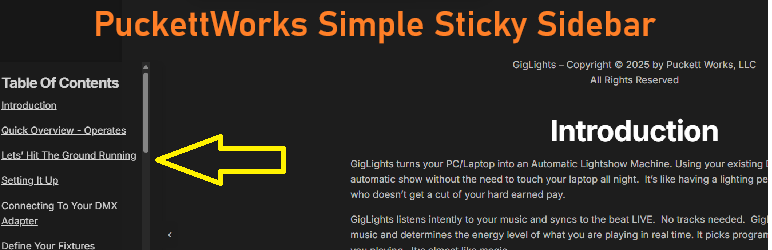
Puckettworks Super Simple Sticky Sidebar 是一款簡易的固定側邊欄外掛,能在網站的左側或右側添加固定面板,隨著訪客滾動而保持可見,適合用於行動呼籲、聯絡資訊、公告或導航連結。
【主要功能】
• 左右側邊位置選擇
• 可調整的背景顏色與透明度
• 自訂寬度與垂直位置
• 可折疊的切換按鈕
• 頁面可見性規則設定
• 支援視覺編輯器(TinyMCE)
外掛標籤
開發者團隊
② 後台搜尋「Puckettworks Super Simple Sticky Sidebar」→ 直接安裝(推薦)
原文外掛簡介
Puckettwork’s Super Simple Sticky Sidebar adds a fixed-position panel to the left or right edge of your site. It stays visible as visitors scroll, making it ideal for calls to action, contact info, announcements, or navigation links. Very Simple but effective for anything that needs a static menu or text links (or ads) attached to the left or right of the screen. I was creating an online manual and wanted the table of contents with section links to stay on the left side of the screen as the user scrolled through the manual. This plugin allows the links to remain on the screen at all times so the user can jump to a particular section in the manual. I thought it may be useful since I couldn’t find anything like it so I created a plugin to do the job.
Puckettwork’s Super Simple Sticky Sidebar has a good selection of configurable settings like color, position, transparency, size and offsets. That should be enough to customize it to your needs. Settings can be found under the menu Settings–>puckettworks simple sticky sidebar.
Features
Visual editor (TinyMCE) for rich content bold, italic, lists, links, images, and raw HTML
Left or right side positioning
Background color picker
Adjustable width (px or %), vertical position, padding, title font size, and opacity
Collapsible toggle button with state remembered in local Storage
Page visibility rules show on all pages, only specific pages, or exclude specific pages
Target by page/post ID or content type (front page, blog, single posts, pages, archives)












