內容簡介
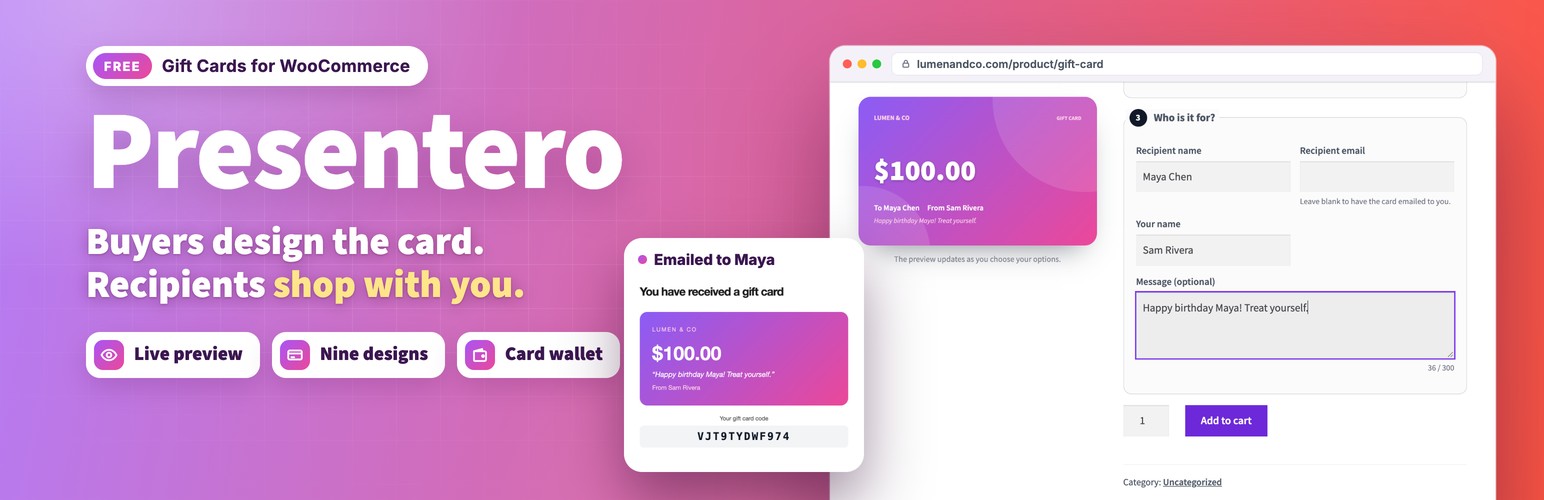
Presentero 是一款專為 WooCommerce 設計的禮品卡外掛,讓顧客能夠輕鬆選擇金額、設計及個人訊息,並在結帳時使用禮品卡抵扣金額。此外掛提供即時預覽及多種設計選項,提升顧客的購物體驗。
【主要功能】
• 支援預設金額及自訂金額的禮品卡產品類型
• 即時預覽顯示選擇的設計與金額
• 提供九種起始設計及自訂設計功能
• 支援多張禮品卡同時購買
• 交易完成後自動生成並發送禮品卡
• 顧客可在帳戶中查看所有禮品卡及餘額
外掛標籤
開發者團隊
② 後台搜尋「Presentero – Gift Cards for WooCommerce」→ 直接安裝(推薦)
原文外掛簡介
Presentero adds a Gift card product type to WooCommerce. Customers choose an amount and a design, add the recipient and a personal message, and watch the card update as they go. Once the order is paid, the card is created and emailed. The recipient enters the code at the cart or checkout and the balance is taken off the order total. Whatever is left stays on the card for next time.
Live demo: Free version | Pro version
Documentation: Free version | Pro version
Support: propluginslab.io/support
Selling gift cards
A Gift card product type with preset amounts and an optional Other amount field with a minimum and maximum.
A live preview that replaces the product images and redraws as the customer chooses the amount, design, names and message.
Nine starter designs, and a designs screen to add your own with two colour gradients, custom CSS gradients or background images.
Limit which designs each product offers.
Recipient name and email, sender name and a personal message with a length limit.
Leave the recipient email blank to have the card emailed to the buyer, ready to print or forward.
Buy several cards at once, each with its own code.
Per product amounts, custom amount range and validity.
Gift cards are paid for straight away: Afterpay and Clearpay in WooCommerce Stripe and Pay Later in WooCommerce PayPal Payments are not offered while a gift card is bought. Cards and the PayPal button stay. On by default.
Delivery
Cards are created when the order is paid, or when it is completed if you prefer to review orders first.
A WooCommerce email shows the card in its design with the code, value and expiry date. Change the subject, heading and text under WooCommerce, Settings, Emails.
Optionally send the buyer a hidden copy of the gift card email.
Send any card again at any time, to the same or a new address.
Redeeming
Works on the classic cart and checkout and on the cart and checkout blocks.
A gift card works like a payment: it is taken off the final total after tax, so your tax figures stay correct.
Use several cards on one order, or limit orders to one card.
Choose whether cards can pay for shipping, and whether they can pay for other gift cards.
Optionally require customers to log in before using a card.
Codes can be typed in any letter case, with or without their dashes and with spaces, so GIFT7KQ2M9XA3HPD finds GIFT-7KQ2-M9XA-3HPD.
Protection against people guessing codes: wrong attempts are counted and the visitor has to wait after too many.
Wrong codes are counted per real visitor, also behind Cloudflare and load balancers, and visitors cannot fake their address.
Works on pages served from a page cache or a Cloudflare edge cache, however long they are kept.
The balance is taken in a single database step when the order is placed, so the same money can never be spent twice.
Balances go back on the card automatically when an order is cancelled or fully refunded, and part of a gift card payment can be refunded to the card from the order screen.
Store coupons never discount gift card products unless you allow it, so balance is never sold for less than it is worth.
Optionally show the balance left on each card next to its payment on the order received page, in My Account orders and in order emails.
Cards bought on an order that is later refunded can be disabled automatically, including when only some gift card lines are refunded.
For customers
A Gift cards page in My Account shows every card in the wallet with its balance, code, expiry date and history, plus the cards they sent to other people.
Customers add a card to their wallet by entering its code. Email addresses alone never put a card in a wallet.
Logged in customers are reminded of their wallet balance at the cart and checkout, with a one click Use button.
A balance checker for any page, as the [presentero_balance] shortcode or the Gift card balance block.
The wallet on any page, as the [presentero_wallet] shortcode or the Gift card wallet block.
For you
A dashboard with the outstanding balance, cards issued, redeemed and sold, cards close to expiry, a setup checklist and the latest activity.
A gift card list with search, status, source and expiry filters and bulk actions. See which active cards expire in the next 7, 30 or 90 days.
A screen for each card to change its balance with a reason, its expiry date, recipient, message, design and status, with a full history of everything that happened to it.
Issue cards by hand for prizes, goodwill or store credit.
A Gift cards box on the order screen, and gift card payments shown in order totals, emails and My Account.
Code settings for the prefix, length, characters and grouping.
Personal data export and erase through the WordPress privacy tools.
Built in documentation that explains every screen and every option.
Compatibility
Presentero supports High Performance Order Storage and the WooCommerce cart and checkout blocks.
External services
This plugin does not connect to any external service. It makes no remote requests and sends no data anywhere. Gift card emails are sent through WooCommerce using your own mail setup.
A note about the Pro edition
This free plugin is complete on its own. Nothing here is limited, locked, trial based or time restricted, and no feature listed above needs Pro to work. A separate Pro edition is described in the Pro version section below.
Pro version
Presentero – Gift Cards for WooCommerce Pro includes everything in this plugin and adds:
Physical gift cards, shipped with your shipping methods and switched on when the order is completed or marked as shipped.
Scheduled delivery on a date the buyer picks, and up to 10 recipients in one purchase, each with their own code.
Customer photo designs, four purchase form layouts, discounted cards and top ups.
PIN protection, usage limits, card transfers, expiry reminders, low balance alerts and store credit refunds.
Automation rules that issue cards for first orders, orders over an amount, lifetime spend, new accounts and approved reviews.
Bulk generation of up to 1,000 cards, CSV import and export, print ready cards, reports and a REST API.
More plugins from ProPluginsLab
Free on WordPress.org:
Back In Stock Notifier for WooCommerce – Waitlist and restock email alerts for out of stock products.
Recovero – Cart Recovery for WooCommerce – Recover abandoned carts with automated emails.
Anticipo – Pre-Orders for WooCommerce – Take pre-orders before a product launches.
Affireo – Affiliates for WooCommerce – Run an affiliate and referral program.
Storefold – Multivendor Marketplace for WooCommerce – Turn your store into a multivendor marketplace.
Dispatchio – Shipment Tracking for WooCommerce – Add tracking numbers and shipment updates to orders.
Kitero – Product Configurator for WooCommerce – Build composite products and kits.
Plusero – Extra Fees for WooCommerce – Add conditional checkout fees and surcharges.
Inputo – Name Your Price for WooCommerce – Let customers choose what they pay.
Mercenza – B2B for WooCommerce – Sell wholesale with customer groups, wholesale prices and trade accounts.
Visuaro – Product Designer for WooCommerce – Let customers design custom products in the browser.
Christmas Snow – Festive Snowfall Effect – Add a lightweight snowfall effect to any site.
Pro plugins at propluginslab.io:
Recovero Pro
Anticipo Pro
Affireo Pro
Storefold Pro
Dispatchio Pro
Presentero Pro
Kitero Pro
Plusero Pro
Inputo Pro
Mercenza Pro
Visuaro Pro
Back In Stock Notifier Add-ons – 26 add-ons incl. Mailchimp, Klaviyo, Twilio SMS, WPML, or all of them in the Bundle.