外掛標籤
開發者團隊
② 後台搜尋「Leo Review Video Popup for WooCommerce」→ 直接安裝(推薦)
原文外掛簡介
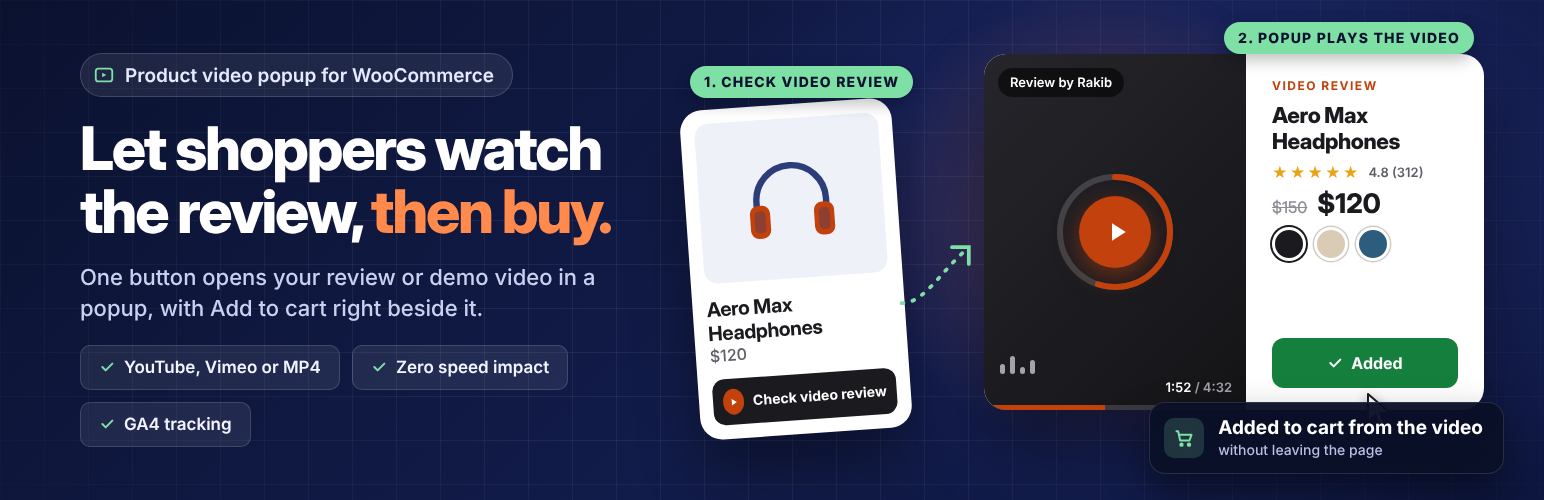
Leo Review Video Popup for WooCommerce lets you attach one product video to each WooCommerce product: your own review, demo or unboxing clip from YouTube, Vimeo, an MP4 link or the Media Library. A “Check video review” button on the product page opens a quick view style popup that plays the video next to the price, star rating, variation picker and Add to cart button. Shoppers watch the product in action and buy on the spot.
Videos are added by you in the product editor. Shoppers watch them; they cannot upload anything.
Most shoppers skip long product descriptions, but they will watch someone handle the product. This plugin puts that video one click away on every product page and every shop card, with no effect on page speed.
Live demo
See it on a real store before you install:
Shop page with video badges
Product page with the button and popup
Product video popup with Add to cart
Quick view style popup: video on one side, product details on the other
Price, star rating and short note (“Unboxing, sound test, pros and cons”) beside the video
Add to cart inside the popup, with AJAX, so your theme’s mini cart updates and the video keeps playing
Variation picker for variable products: pick a color or size, see its price and stock, add it to cart
Shoppable video: shoppers never leave the page they were on
“View full details” link to the product page, plus a deep link (#leovp-video) that opens the popup on load, handy for ads and social posts
Video badge on shop and category pages
A “Video review · 4:32” badge on product cards that have a product video
The badge opens the same popup, so shoppers can watch and buy from the shop page
Zero speed impact
No video player, iframe or third-party script loads until a shopper clicks
Lazy loading with a static thumbnail and fixed size, so there is no layout shift
YouTube and Vimeo thumbnails are saved to your Media Library on product save, so nothing loads from a third-party server on page view
Styles and scripts load only on pages that have a product video
YouTube, Vimeo, MP4 and Media Library
Paste a YouTube, YouTube Shorts or Vimeo link, a direct MP4 or WebM link, or pick a file from the Media Library
YouTube plays through the privacy-friendly youtube-nocookie.com domain; Vimeo plays with Do Not Track on
Plays with sound when the popup opens; if a browser blocks sound, it plays muted with a “Tap to unmute” button
Full-screen popup on phones with a sticky Add to cart bar
Google Tag Manager and GA4 events
Events are pushed to window.dataLayer, ready for Google Tag Manager and GA4: video_review_impression, video_review_click, video_start, video_complete, video_review_add_to_cart, add_to_cart and video_review_close. Each event carries the video provider, title, URL, duration, placement and a GA4 ecommerce object with the product (or variation) as the item.
Built for store managers
“Review Video” box in the product editor: link or file, duration, reviewer name, note and custom thumbnail
Video column and “Has review video” filter in Products > All Products
Product video columns in the WooCommerce product CSV importer and exporter, for bulk upload
Button text, style (card with thumbnail, pill or text link), position and accent color settings under WooCommerce > Review Video
Shortcode [leovp_button id="123"] and templates you can override in yourtheme/woocommerce/leovp/
Hooks and filters for developers, including leovp_video_data, leovp_show_button, leovp_rest_product_response and leovp_tracking_allowed
Third-party services
When a shopper opens a product video, the video is loaded from the service you linked:
YouTube, loaded from youtube-nocookie.com: Terms, Privacy
Vimeo, loaded with Do Not Track on: Terms, Privacy
When you save a product with a YouTube or Vimeo link, the plugin fetches the video thumbnail (and the Vimeo duration) once from i.ytimg.com or vimeo.com and stores the image in your Media Library. Nothing is loaded from these services until a shopper clicks the button.