內容簡介
Merchant 是一款全方位的 WooCommerce 外掛,整合了 40 多個模組,旨在提升銷售、增加平均訂單價值並減少購物車放棄率。這款外掛讓商家無需安裝多個外掛,簡化管理流程。
【主要功能】
• 產品標籤:為產品添加標籤以吸引顧客注意
• 快速查看:顧客可在彈出視窗中查看產品詳情
• 立即購買:直接從產品頁面跳轉至結帳
• 預購功能:允許顧客預訂即將上架或缺貨產品
• 實時搜尋:提供即時結果的預測產品搜尋
• 動畫加入購物車:用動畫效果突出購物車按鈕
外掛標籤
開發者團隊
② 後台搜尋「Product Labels, Quick View, Buy Now, Pre-Orders, Frequently Bought Together & More for WooCommerce – Merchant」→ 直接安裝(推薦)
📦 歷史版本下載
原文外掛簡介
A WOOCOMMERCE TOOLKIT FOR MODERN STORES
Merchant is an all-in-one WooCommerce plugin with 40+ modules that help you boost sales, increase average order value, and reduce cart abandonment. Most WooCommerce stores run 20 or more separate plugins to do this. Merchant brings those features together so you have one plugin to install, update, and maintain instead of a dozen.
TRY A LIVE DEMO
Merchant Pro
Merchant is the free version of Merchant Pro, which adds Frequently Bought Together, Buy X Get Y (BOGO), Bulk Discounts, Free Gifts, and Advanced Reviews, plus 25+ more WooCommerce modules and email support. Upgrade to Merchant Pro and unlock every premium module.
Free WooCommerce Modules (16 Included)
The free version of Merchant includes 16 modules you can switch on individually:
Product Labels: Draw attention to products and drive sales by adding labels to the product images on your shop pages.
Quick View: Let customers view product details in a popup without leaving the current page.
Buy Now: Skip the cart and send shoppers straight from the product page to checkout, the way Amazon does.
Pre-Orders: Let customers pre-order upcoming or out-of-stock products, so you capture sales before items are available.
Real-Time Search: Add predictive WooCommerce product search with instant results and suggested search terms.
Animated Add to Cart: Make your add to cart button stand out with 10+ animations, triggered on mouseover or on page load.
Add To Cart Text: Change the ‘Add to Cart’ button text for simple, variable, out-of-stock, or individual products.
Trust Badge: Add trust badges that match your store’s design to reassure shoppers at checkout.
Payment Logos: Display the payment methods you accept, from credit cards to digital wallets.
Clear Cart: Let customers empty their cart and start fresh in one click.
Scroll to Top: Give shoppers an easy way to return to the top of long pages.
Auto External Links: Automatically open external links in a new tab, with no manual setup.
Cart Count Favicon: Show the number of items in the cart in the browser tab favicon.
Inactive Tab Message: Change the browser tab title when a visitor switches tabs, to draw them back to your store.
Agree to Terms Checkbox: Require shoppers to accept your terms and conditions during checkout.
Cookie Banner: Show a customizable cookie consent banner, floating or fixed.
Every module is optional, so you load only what your WooCommerce store actually uses.
🏆 FEATURED ON WPTUTS
For me, the key selling point of either of these versions, whether it’s the free one or the Pro, is that it means I’ve only got one plugin to maintain and update (and purchase, if I go for the Pro version) over having multiple plugins to maintain, purchase and update. This just makes life a little easier.
More WooCommerce Modules in Merchant Pro
Merchant Pro adds 30+ more modules, built-in analytics, campaign scheduling, and email support:
Frequently Bought Together: Recommend products customers often buy together and add the bundle to the cart in one click.
Product Bundles: Sell curated bundles of products together at a set price to increase average order value.
Bulk Discounts: Reward larger orders with quantity-based discounts on products, categories, tags, or the whole store.
Buy X, Get Y: Run Buy One Get One (BOGO) offers, such as buy one Product X and get one free.
Free Gifts: Reward shoppers with a free gift for hitting a spending target or applying a coupon.
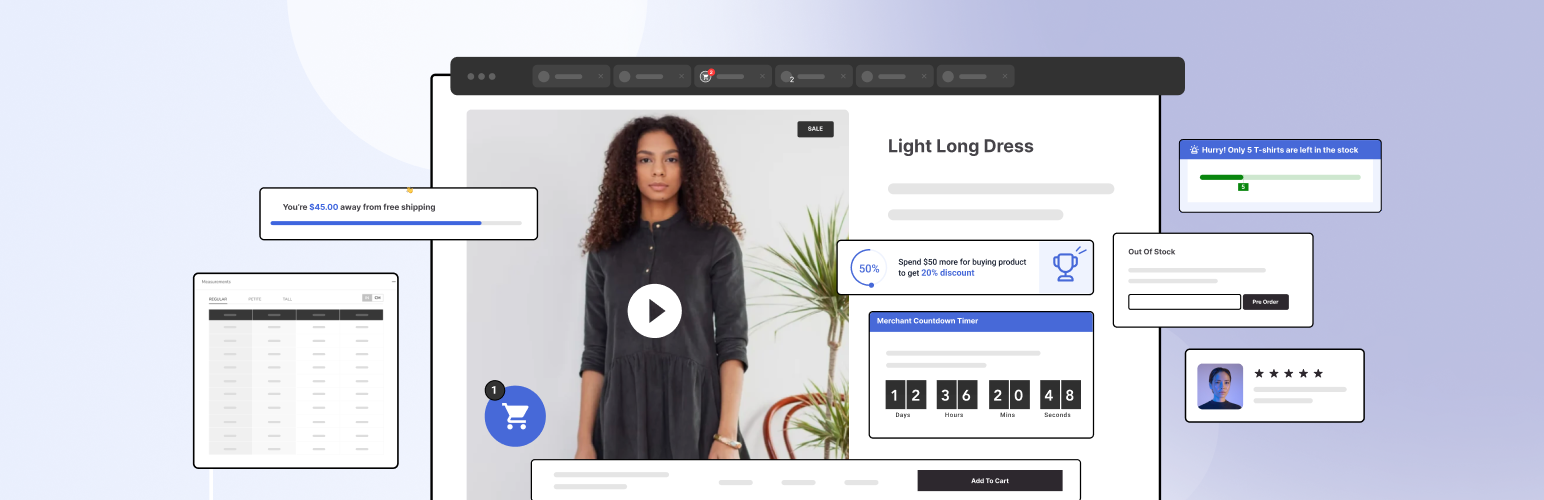
Spending Goal: Show customers how much more to spend to earn a discount, lifting average order value.
Free Shipping Bar: Show the amount left to qualify for free shipping.
Storewide Sale: Schedule discount campaigns across the whole store, specific categories, or selected products.
Complementary Products: Suggest matched products with flexible discount and display rules.
Countdown Timer: Add urgency with a countdown timer on discounted products.
Stock Scarcity: Show low-stock messages on products visitors are viewing.
Sticky Add To Cart: Keep an add to cart bar visible as shoppers scroll product pages.
Added To Cart Popup: Show a cross-sell popup with recommendations when an item is added to the cart.
Side Cart: Slide out a side cart on add-to-cart, with upsells and direct checkout.
Cart Reserved Timer: Tell visitors their cart is reserved for a limited time.
Recently Viewed Products: Show recently viewed products on product pages and in the cart.
Waitlist: Let customers join a back-in-stock waitlist and auto-notify them when items return.
Variation Swatches: Show variable product options as color or image swatches, buttons, or dropdowns.
Wishlist: Let customers save and share products for later.
Advanced Reviews: Collect and display reviews with photo uploads, a review popup, and a rating summary.
Recent Sales Notifications: Show real-time purchase activity to build social proof.
Size Chart: Show a size chart on specific products or all products to reduce returns.
Checkouts: Choose a Shopify-style, multi-step, or one-page checkout layout.
Google Address Autocomplete: Autocomplete checkout address fields to reduce errors and speed up checkout.
Quick Social Links: Show floating social media icons for shoppers to connect with you.
Reasons To Buy List: Summarize the key benefits of a product to support the buying decision.
Brand Image: Add brand images to product pages.
Login Popup: Let users log in from a simple popup.
Product Video: Add video to product galleries and archive pages.
Product Audio: Add audio to product galleries and archive pages.
Product Nav Links: Add next and previous links between products.
Unlike stacking single-purpose plugins, every Pro module shares one settings interface and built-in analytics that track impressions, conversions, and revenue, and many modules run as managed campaigns with scheduling, display conditions, and user-role targeting.
Merchant Pro has significantly enhanced my online commerce experience on WordPress. The user friendly interface and responsive support make this plugin a must-have choice. I highly recommend Merchant Pro!
Christian Laborde, Co-Founder of Zipangu
UPGRADE TO MERCHANT PRO
Merchant Pro comes with a 14-day money-back guarantee. If you are not satisfied, we will refund 100% of your money.
A Merchant Alternative to Single-Purpose WooCommerce Plugins
If you have shopped for WooCommerce conversion features, you have probably compared plugins from YITH, WPC, Flycart, and Barn2. Each adds one capability, with its own settings screen, license, and update cycle.
Merchant brings the equivalents into one modular plugin, then goes further: one settings interface and built-in analytics that track each module’s impressions, conversions, and revenue, plus campaign management on the modules that support it, with scheduling, display conditions, and user-role targeting. You enable only the modules you need, so unused features never load and your store keeps passing Core Web Vitals.
Switching from YITH, WPC, Flycart, Barn2 or Several WooCommerce Plugins?
If you are moving away from a stack of single-purpose plugins, Merchant is designed to be the one you switch to. For most features, like product labels, quick view, buy now, variation swatches, bundles, and discounts, switching is simply enabling the matching Merchant module and deactivating your old plugin. There is no separate tool to learn, because every module lives in one place.
Consolidating also means one license to renew, one plugin to update, and shared analytics across every feature, instead of juggling separate dashboards from YITH, WPC, Flycart, or Barn2. If you get stuck while switching, our support team can help you map your old setup to the right Merchant modules.
WOOCOMMERCE IS REQUIRED FOR MOST MODULES TO WORK
Backed by a trusted team
From the team behind aThemes and WPForms, along with other leading WordPress plugins, Merchant is built with the same commitment to ease of use, reliability, and excellent support. We know WordPress, and we know what you need to succeed.
Documentation and Support
– To learn how to use Merchant, see our documentation.
– For questions, visit the support forum. For direct email support from our developers, consider Merchant Pro. We aim to answer premium support requests within 24 hours.
– To learn more, visit the Merchant plugin page.
Happy user of Merchant?
– Join our Facebook Group.
– Or rate us on WordPress 🙂