內容簡介
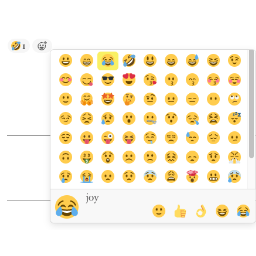
此外掛程式會在 Gutenberg 編輯器中加入一個按鈕,讓您可以在 WordPress 文章或頁面中插入文字符號或表情符號。
製作人: MockoFun 在線平面設計師
功能特色:
包含超過 1000 種圖示、符號和表情符號
使用 Gutenberg 編輯器直接將圖示插入 WordPress 文章和頁面
無需撰寫任何代碼
持續發展中
當您使用 Gutenberg 編輯器編寫內容時,可能想要在文字中包含表情符號或符號。此外掛程式將使這非常容易。因此,表情符號如 👑 💕 💎 或類似圖案就只需點擊一下就能插入了。
外掛標籤
開發者團隊
原文外掛簡介
This plugin will add a button to the Gutenberg editor for inserting text symbols or emojis into your WordPress posts or pages.
Made by: MockoFun Online Graphic Designer
Features
Over 1000 icons, symbols and emojis included
Insert Icons Directly Into WordPress Posts & Pages using the Gutenberg editor
No need to write a single line of code
Actively under development
When using the Gutenberg editor for writing content you might want to include emojis or symbols into your text. This plugin will make this very easy. So, emojis like 👑 💕 💎 or similar will only be one click away.