內容簡介
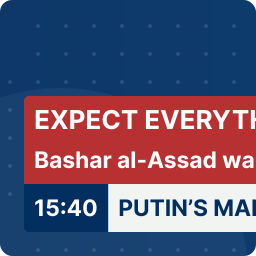
Indesign Text Marquee 是一款用於 WordPress 的文字滾動外掛,能在各種螢幕尺寸上無縫運行,並在滾動區域不在螢幕上時自動暫停以節省 CPU 和電池。此版本提供 32 種預設模板,並具備即時預覽功能,讓使用者能輕鬆創建各種公告條和促銷信息。
【主要功能】
• 32 種預設模板,涵蓋多種風格
• 即時模板預覽,無需保存即可查看效果
• 一鍵應用模板,設定自動匹配預覽
• 完整的字體控制,包括字體大小和間距
• 拖放排序功能,輕鬆調整滾動項目順序
• 支援自定義 CSS 類和 ID
外掛標籤
開發者團隊
原文外掛簡介
Indesign Text Marquee is a text scrolling plugin for WordPress. It runs on requestAnimationFrame, keeps a seamless loop on all screen sizes, and pauses itself when the marquee is off screen to save CPU and battery.
Version 2.0 is a full rewrite of the admin experience. You now get 32 pre made templates, a tabbed settings panel, and a live preview that shows your own text in every template without having to save the marquee first.
What you can build
News tickers, sale bars, announcement strips, hero display text, footer credits, vertical stock tickers, podcast promos, wedding banners, seasonal banners, and more. Every template can be fine tuned after you apply it.
Key features
32 pre made templates covering news, e-commerce, tech, fashion, luxury, sports, gaming, retro, seasonal, and vertical styles.
Live template preview inside the admin. Your own item text appears in every template card the moment you type it. No save required.
One click apply. Clicking a template sets every setting to a known value so the frontend output matches the preview exactly.
Green “Applied” badge shows which template is currently in use.
Tabbed settings panel: Templates, Typography, Motion, Container, Separator and Links, Advanced.
Full typography control: font family (outline safe Google Fonts), font weight, desktop/tablet/mobile sizes, letter spacing, italic, uppercase or lowercase.
Outline mode with adjustable stroke width and separate stroke color.
Motion: speed, item spacing, four directions (LTR, RTL, top to bottom, bottom to top), hover behavior (none, pause, slow, speed up), reverse on scroll, respect reduced motion.
Container: vertical and horizontal padding, background color with transparent toggle, border color and width, border radius, tilt angle, fade edges, fade width, full window breakout mode.
Separator: show or hide, custom glyph or emoji, size, color.
Link behavior: same tab or new tab.
Advanced: custom CSS class and CSS ID for targeting from your theme.
Drag and drop to reorder marquee items. Native HTML5 drag with a visual drop indicator.
Duplicate marquee action in the list table.
Click to copy shortcode.
Custom Post Type. Manage many marquees, each with its own settings and shortcode.
Zero jQuery on the frontend.
IntersectionObserver pauses the animation when the marquee is scrolled out of view.
Google Fonts loaded on demand only when a non default font is selected.
External Services
This plugin optionally connects to the Google Fonts API (fonts.googleapis.com) to load display fonts on the frontend. The request is only made when a non default font family is selected in the marquee settings. No personal data is sent. Only the selected font family and weight appear in the request URL.
Service: Google Fonts
URL: https://fonts.googleapis.com
Privacy Policy: https://policies.google.com/privacy
If you prefer not to use external fonts, select Inherit as the font family. No external request will be made.