內容簡介
Git it Write 外掛允許使用者將 GitHub 儲存庫中的 Markdown 檔案發佈到 WordPress 網站。當儲存庫中的檔案被新增或更新時,對應的 WordPress 文章也會自動更新,讓內容管理更加便捷。
【主要功能】
• 支援從 GitHub 發佈 Markdown 檔案為文章
• 自動更新文章內容,與 GitHub 儲存庫同步
• 支援多個儲存庫的管理
外掛標籤
開發者團隊
② 後台搜尋「Git it Write – Write posts from GitHub」→ 直接安裝(推薦)
原文外掛簡介
Git it Write allows to publish the markdown files present in a GitHub repository to your WordPress site. So with this plugin, whenever the files are added, updated in the repository the WordPress post will be added, updated accordingly.
This plugin is inspired from static site generators like Jekyll, Next.js, Gatsby.js on how content is written is markdown. This is a similar idea for WordPress where markdown files are parsed from GitHub and published as posts.
👓 Live example: Source github repository (/docs/ folder) to Posts published
⚡ Getting started: Get started with Git it write. Learn how to write .md files and publish posts on WordPress.
This allows people to collaborate with the post, share edits and suggestions in GitHub which when pulled the WordPress post will be updated automatically.
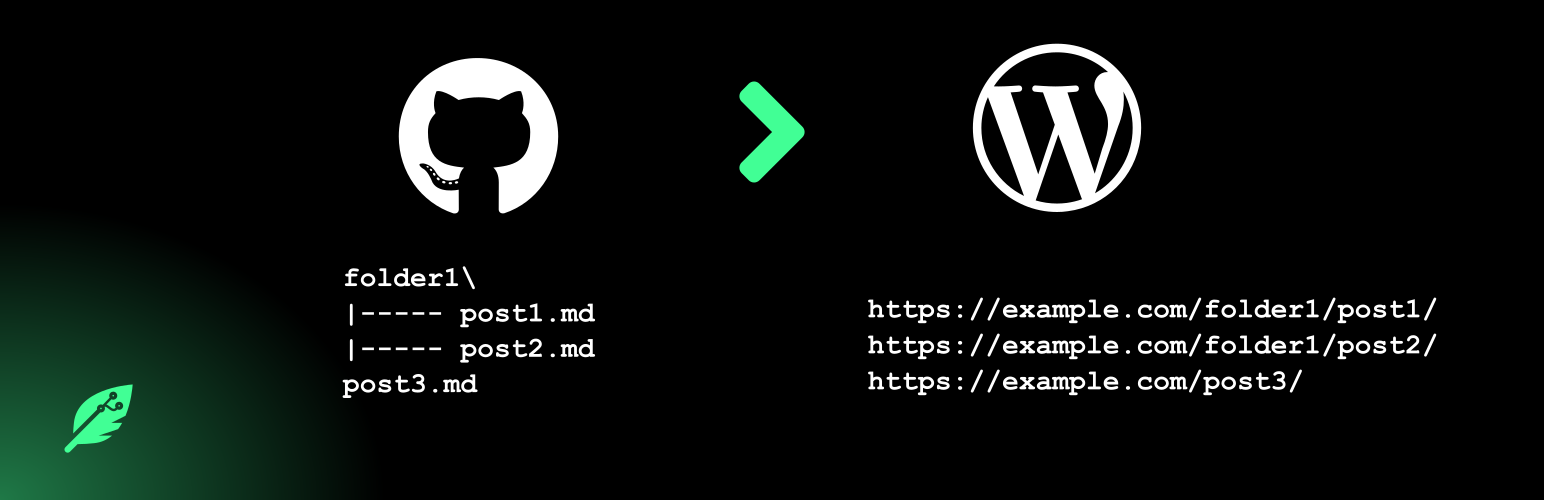
If a repository has files in the below structure,
docs/
guide/
introduction.md
getting-started.md
help/
faq.md
Then below posts will be created like below (if permalinks are configured and the post type supports “hierarchy” i.e creating posts level by level (example: pages))
https://example.com/docs/guide/introduction/
https://example.com/docs/guide/getting-started/
https://example.com/help/faq/
🎲 What is the use of this plugin ?
Publish posts using the files in your GitHub repository.
Write your posts in Markdown format.
Write your posts on your desktop application (Notepad++, Sublime Text, Visual studio code).
Collaborate, involve communities on the files in GitHub and publish them on WordPress.
All the advantages of Git and it’s version management system.
🚀 Some use cases
Can be used for documentation posts, FAQs, Wikis etc.
Write blog posts.
Any articles which may need community involvement.
✨ Features
Markdown will be processed and post will be published as HTML.
Images used in the source file will be uploaded to WordPress.
Relative links are supported.
Set post properties like post status, title, order, category, tags etc, in the source file itself.
Webhook support (whenever repository is changed, it updates the plugin to pull the latest changes and publish the posts)
Add multiple repositories.
Publish to any post type.
Posts are published in hierarchial manner if they are under folders. Example: a file dir1/hello.md will be posted as dir1/hello/ in WordPress if the post type supports hierarchy.
Support for post metadata like setting tags, categories, custom fields.
ℹ Note
Only Markdown files will be pulled and published right now
Posts won’t be deleted when it’s source file is deleted on GitHub.
It is preferred to have a permalink structure.
It is preferred to select a post type which supports hierarchy.
Images have to present only in _images folder in the repository root. Markdown files have to relatively use them in the file.
🥗 Recommendation
It is recommended that a permalink structure is enabled in the WordPress site so that, if you have file under docs/reference/my-post.md then a post is published like https://example.com/docs/reference/my-post/. This will be the result when post type has hierarchy support. They will be posted level by level for every folder in the repository. The folder’s post will be taken from the index.md file if exists under that folder.
🏃♂️ Using the plugin
Have a GitHub repository where all the source files (markdown files) are maintained (organized in folders if needed the exact structure)
In the plugin settings page, click add a new repository.
Enter the details of the repository to pull the posts from and under what post type to publish them.
Save the settings
Click “Pull the posts” and then “Pull only” changes. This will publish posts for all the markdown files.
To automatically update posts whenever repository is updated, configure webhook as mentioned in the settings page.
Links
Documentation
Support forum/Report bugs
Donate
Contribute on GitHub