內容簡介
總結:使用 FYP Weather 這個專業的 WordPress 外掛,讓您的網站帶來美麗的天氣顯示,讓訪客愛不釋手!
問題與答案:
問題:FYP Weather 外掛的特色有哪些?
答案:
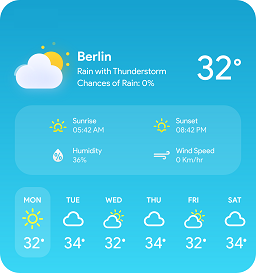
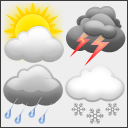
- 現代化的天氣小工具:漸變背景、OpenWeatherMap 的天氣圖示和平滑的 CSS 動畫
- 智能緩存系統:1 小時 WordPress 暫存緩存提升效能並減少 API 使用
- 真正的多語言支援:自動語言檢測,支援 30 多種語言的天氣描述
- 完整的天氣資料:溫度、天氣描述、濕度、風速和天氣圖示
- 靈活的顯示選項:透過管理設定自訂標籤,顯示/隱藏天氣元素
- 多重單位制度:公制(°C)、英制(°F)和標準(Kelvin)溫度單位
- 強大的短代碼:[fyplugins_weather] 具有豐富的自訂參數
- 響應式設計:適用於移動裝置的優化佈局,適應各種設備
外掛標籤
開發者團隊
原文外掛簡介
Transform your website with beautiful weather displays that your visitors will love!
FYP Weather is a professional WordPress plugin that brings stunning, real-time weather information to your website. With its modern gradient design, smooth animations, and responsive layout, this plugin delivers both functionality and visual appeal.
Built for performance and ease of use, FYP Weather features intelligent caching through WordPress transients, automatic language detection supporting 30+ languages, and a comprehensive admin interface that makes configuration simple and straightforward.
Why Choose FYP Weather?
🌟 Beautiful Visual Design – Modern gradient backgrounds with weather icons and elegant typography
🚀 Performance Optimized – Built-in transient caching system (1-hour cache) reduces API calls
🌍 Multilingual Support – Automatic language detection for 30+ languages based on WordPress locale
📱 Fully Responsive – Mobile-first design that works perfectly on all devices
⚙️ Easy Configuration – Comprehensive admin interface under FYPlugins → Weather
🎨 Theme Integration – Works seamlessly with any WordPress theme
🔧 Professional Code – Clean, secure, and following WordPress coding standards
Key Features:
🎨 Modern Weather Widget: Gradient backgrounds, weather icons from OpenWeatherMap, and smooth CSS animations
⚡ Smart Caching System: 1-hour WordPress transient caching improves performance and reduces API usage
🌐 True Multilingual Support: Automatic language detection for weather descriptions in 30+ languages
📊 Complete Weather Data: Temperature, weather description, humidity, wind speed, and weather icons
🎛️ Flexible Display Options: Show/hide weather elements with customizable labels via admin settings
📐 Multiple Unit Systems: Metric (°C), Imperial (°F), and Standard (Kelvin) temperature units
🎯 Powerful Shortcode: [fyplugins_weather] with extensive customization parameters
📱 Responsive Design: Mobile-optimized layout that adapts to any screen size
⚙️ Professional Admin Interface: Clean settings panel with API configuration and default options
🔒 Secure & Reliable: Proper error handling, data validation, and secure API integration
** CSS Customization:** Additional CSS classes and built-in styling options
** ️ Clean Uninstall:** Properly removes all options and cached data when uninstalled
This plugin is part of the FYPlugins ecosystem, designed to provide high-quality WordPress solutions with exceptional performance and user experience.
Usage
🚀 Quick Start:
Get your FREE API key from OpenWeatherMap (1,000 free calls/day)
Configure the plugin at WordPress Dashboard → FYPlugins → Weather
Add weather anywhere using the [fyplugins_weather] shortcode
📋 Basic Examples:
[fyplugins_weather]
[fyplugins_weather city="Paris, France" units="metric"]
[fyplugins_weather city="New York, NY" units="imperial" show_humidity="false"]
🎨 Styling Examples:
[fyplugins_weather class="dark"]
[fyplugins_weather class="light custom-weather"]
Shortcode Parameters
🌡️ Weather Shortcode – [fyplugins_weather]
city string (default: Empty or Set in settings) City name for weather data (e.g., "London, UK")
api_key string (default: Empty or Set in settings) Your OpenWeatherMap API key
units string (default: metric or Set in settings) Temperature units: `metric` (°C), `imperial` (°F), `standard` (K)
language string (default: Auto-detected) Language code for weather descriptions
show_description boolean (default: true or Set in settings) Display weather description
show_humidity boolean (default: true or Set in settings) Display humidity information
humidity_label string (default: "Humidity:" or Set in settings) Custom label for humidity display
show_wind boolean (default: true or Set in settings) Display wind speed information
wind_label string (default: "Wind Speed:" or Set in settings) Custom label for wind speed display
class string | Empty (default: Empty or Set in settings) Additional CSS classes for styling
📝 Advanced Examples:
// Different cities with custom styling
[fyplugins_weather city="Tokyo, Japan" class="dark"]
[fyplugins_weather city="Sydney, Australia" units="imperial" class="light"]
// Minimal display
[fyplugins_weather show_description="false" show_humidity="false" show_wind="false"]
// Custom labels in different languages
[fyplugins_weather humidity_label="Humidité:" wind_label="Vent:" language="fr"]
// Multiple weather widgets on same page
[fyplugins_weather city="London, UK" class="weather-london"]
[fyplugins_weather city="Paris, France" class="weather-paris"]
🌍 Supported Languages:
English, French, German, Spanish, Italian, Portuguese, Russian, Chinese (Simplified & Traditional), Japanese, Korean, Dutch, Swedish, Danish, Norwegian, Finnish, Polish, Czech, Slovak, Hungarian, Romanian, Bulgarian, Croatian, Slovenian, Estonian, Latvian, Lithuanian, Ukrainian, Greek, Turkish, Arabic, Hebrew, Hindi, Thai, Vietnamese
Language support is based on the WordPress locale and OpenWeatherMap API capabilities.
External Services
🌐 OpenWeatherMap API Integration
This plugin connects to the OpenWeatherMap API to retrieve current weather information. This external service is essential for providing accurate, real-time weather data.
🔒 Privacy & Data Protection:
– No user data collection: The plugin only sends the city name, your API key, WordPress language setting, and units preference
– No personal information: No user IPs, emails, or browsing data is transmitted
– Secure connections: All API calls use HTTPS encryption
– Local caching: Weather data is cached locally using WordPress transients for 1 hour
📋 Service Details:
– Provider: OpenWeatherMap (openweathermap.org)
– Terms of Service: OpenWeather Terms & Conditions
– Privacy Policy: OpenWeather Privacy Policy
– Rate Limits: Free tier provides 1,000 API calls per day
⚙️ What Data is Sent:
– City name (as specified in shortcode or settings)
– API key (your personal OpenWeatherMap key)
– Language code (WordPress locale for localized weather descriptions)
– Temperature units preference (metric/imperial/standard)
Roadmap & Future Enhancements
🚀 Version 1.1 – Enhanced Caching & Performance
* Configurable cache duration options in admin settings
* Background API refresh to eliminate user-facing delays
* Database optimization for better transient management
🌤️ Version 1.2 – Extended Weather Features
* 5-day weather forecast display option
* Additional weather parameters (feels like temperature, pressure)
* Weather alerts and warnings integration
🎨 Version 1.3 – Design & Customization
* More built-in theme variants and color schemes
* Custom weather icon sets
* Enhanced CSS customization options in admin
🔧 Version 1.4 – WordPress Integration
* Gutenberg block for visual editor integration
* WordPress Widget support for sidebar placement
* Enhanced shortcode builder with live preview
🌍 Version 1.5 – Advanced Features
* Geolocation-based automatic city detection
* Multiple weather data provider support
* Air quality index integration
💡 Have Feature Ideas?
We welcome feedback and feature requests! Contact us through the WordPress support forum or visit francoisyerg.net for direct contact.