內容簡介
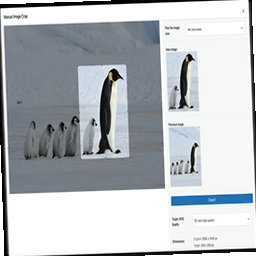
這個外掛可以讓你在網誌的側邊欄中的任何地方添加一個區域,專門用於突出顯示你想要強調呈現的文章。它的使用非常簡單:安裝和啟用後,你可以決定將哪些文章添加到突出顯示的區域中,顯示多少篇文章,顯示順序模式以及封面圖片的大小(它會自動取出文章中的第一張圖片並使用「timthumb.php」腳本進行調整大小)。
訂閱外掛通訊
立即訂閱我們的外掛通訊,獲得開發及其相關改進方面的新聞和資訊。
支援討論區
如果你有任何疑問、建議或批評,請在支援討論區上留言。
一些功能包括:
在側邊欄上指定標題。
選擇在此區域中顯示多少篇文章。
選擇文章的排序方式。
定義要建立的圖像的尺寸。
外掛標籤
開發者團隊
② 後台搜尋「Featured Post with thumbnail」→ 直接安裝(推薦)
原文外掛簡介
This plugin let’s you add – to any spot on your blog’s sidebar – a section dedicated to the articles you’d like to highlight. How it works is very simple: once it’s installed and activated you can decide which articles to add to the highlights section, how many to display, the display order mode and the size of the image retrieved (it takes the first image in the article and automatically resizes it using the “timthumb.php” script).
Subscribe Plugin Newsletter
Sign up
Support Forum
For any clarifications, suggestions, or criticism you can leave a comment on Forum Support.
Some Features
Specify a title to be shown on the sidebar.
Choose the number of articles to display in this section.
Choose the way in which the articles will be ordered.
Define the dimensions of the image that will be created.