內容簡介
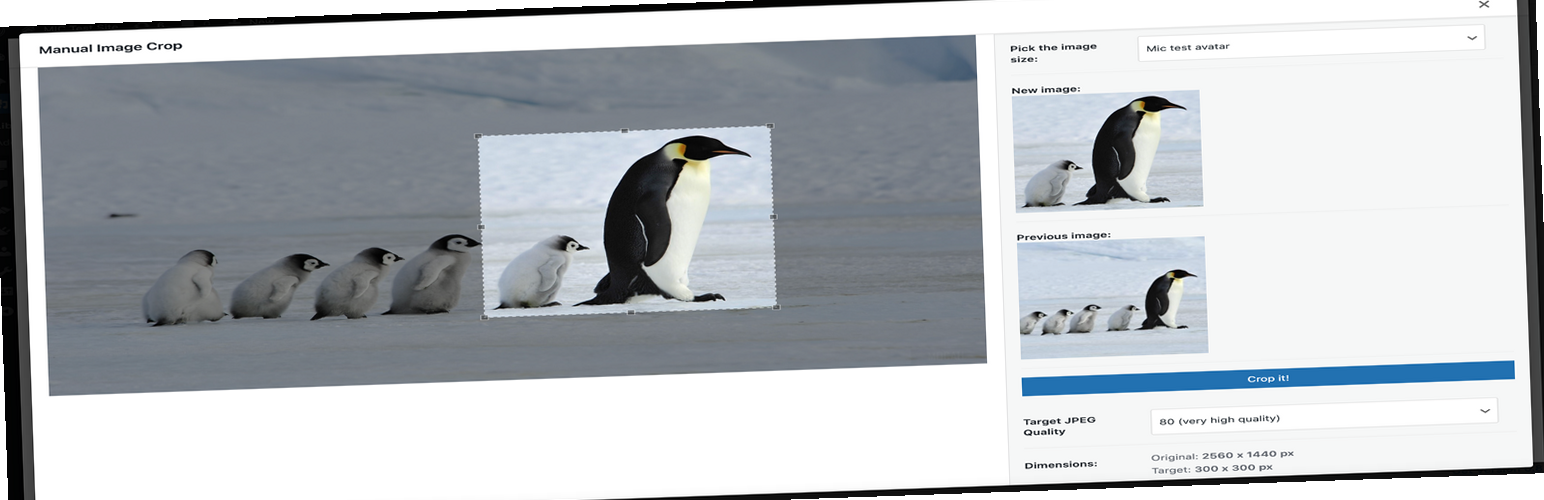
Manual Image Crop 外掛允許用戶手動裁剪 WordPress 主題中註冊的所有圖片尺寸,特別是特色圖片。透過簡單的操作,使用者可以快速進行圖片裁剪,提升媒體管理的靈活性。
【主要功能】
• 手動裁剪所有圖片尺寸
• 在媒體庫中輕鬆點擊裁剪
• 自訂圖片大小標籤
• 設定圖片品質選項
• 在多個位置顯示裁剪連結
外掛標籤
開發者團隊
原文外掛簡介
Plugin allows you to manually crop all the image sizes registered in your WordPress theme (in particular featured image).
Simply click on the “Crop” link next to any image in your media library.
The WordPress Media Modal interface will be brought up and you are ready to go.
Whole cropping process is really intuitive and simple.
Apart from media library list, the plugin adds links in few more places:
* Below featured image box (“Crop featured image”)
* In the media insert modal window (once you select an image)
Settings
The plugin includes a settings page where you can configure:
* Image quality settings
* Visibility of crop options
* Custom labels for image sizes
GitHub Repository
https://github.com/tomaszsita/wp-manual-image-crop
Translations
Czech (AI Generated)
Dutch (Bernardo Hulsman)
French (Gabriel Féron)
German (Bertram Greenhough)
Hungarian (Roland Kal)
Italian (Alessandro Curci)
Japanese (AI Generated)
Korean (AI Generated)
Polish (myself)
Portuguese (Brazil) (AI Generated)
Russian (Andrey Hohlov)
Spanish (Andrew Kurtis)
Swedish (Karl Oskar Mattsson)
Turkish (AI Generated)
Please contact me if you want to add a translation (or submit a pull request on GitHub)