內容簡介
此外掛需要 PayPal 商家帳戶以取得客戶端 ID。
對於 WordPress 預約外掛,eaSYNC Booking 包含多個可用模組:汽車租賃、酒店和餐廳。
主頁 | 酒店預訂外掛定價 | 汽車預訂外掛定價 | 示範
此外掛在許多情況下會非常有用,例如預訂汽車租賃服務以供需要車輛參加活動場合的人使用。它也可用於為客人和活動組織者預訂酒店住宿。宴會廳和派對房間也可以包括在內,以供希望舉辦生日、Baby Shower 和聖誕派對等活動的人使用。最後,它還可以處理特殊場合的餐廳和餐飲預訂,例如情人節、約會之夜、家庭聚會和商務晚宴。
您可以在下面查看此外掛的出色且有用的功能,從所有模組的通用功能開始,然後將其分解為特定功能:
通用功能
*安裝和使用簡單(安裝服務可用)
*完全響應式預訂表格
*時尚的 UI
*預訂條目分為活躍、不活躍、待處理和垃圾箱
*客人在預訂確認後將收到電子郵件通知
*自動分類為待處理項目
*易於整合到帖子/頁面
*支持 Paypal
*可開啟/關閉特定模組
*可為產品或服務設置貨幣代碼
*可自定義電子郵件標題和頁腳文字
*通過地理位置自動貨幣和價格變動;使用第三方服務來自 https://free.currencyconverterapi.com/
*免費貨幣轉換器-Terms of Service: https://free.currencyconverterapi.com/terms-of-service
特此免費授權任何獲得此軟件和相關文檔文件(以下簡稱“軟件”)的人,無限制地處理此軟件,包括但不限於使用、複製、修改、合併、發布、分發、授權和/或出售軟件的副本,並允許軟件的接收方進行此類操作,前提是:
汽車租賃
這個外掛具有簡單、極簡但明亮的設計,為客戶提供自我說明且易於遵循的汽車租賃過程。對於剛開始使用 WordPress 的用戶來說,此汽車預訂外掛功能非常簡單。
前端:
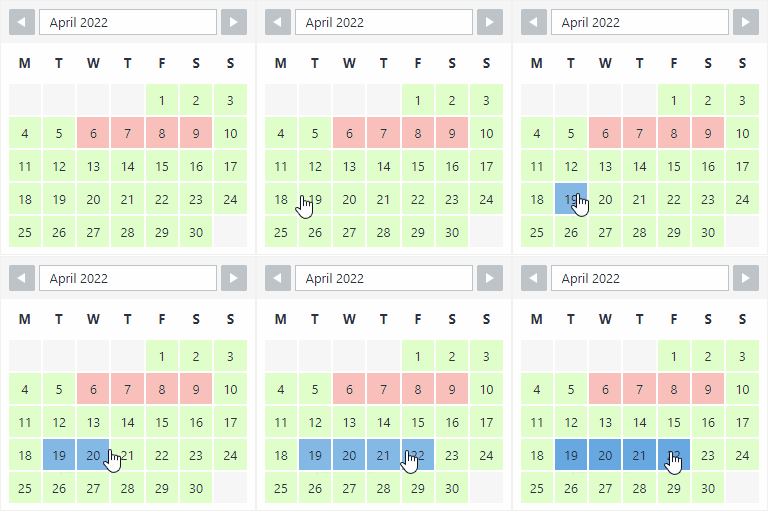
* 表示取車和還車日期的日曆
* 可查看可用車輛
* 可查看汽車功能
後端:
* 入口表示的日曆
* 可添加和設置菜單類別
* 可設置感謝頁面、隱私政策和條款和條件
* 可通過視覺表示監控租賃汽車
* 若出租車還未返還,則可以顯示到期日
* 管理員和客戶都可以通過電子郵件收到通知
* 可設置汽車型號、汽車類型和取車地點
汽車租賃示範
酒店預訂
此 WordPress 酒店預訂功能具有自動結帳日期計數器,顯示了外掛自動化功能的預覽-作為服務的自我推廣。
外掛標籤
開發者團隊
② 後台搜尋「eaSYNC Booking – Hotels, Restaurants & Car Rentals」→ 直接安裝(推薦)
📦 歷史版本下載
原文外掛簡介
Simplify a Customer’s Booking Experience with eaSYNC Booking — a WordPress Booking Plugin for Hotels, Restaurants, and Car Rentals!
NOTE: This WordPress plugin requires a Paypal Merchant Account in order to get the Client ID
Homepage | Pricing for Car Booking | Pricing for Hotel Booking | Pricing for Restaurant Booking | Demo | Help Center
Key Benefits of eaSYNC Booking Plugin:
Car Rentals: The car rental module simplifies management with a visual representation of available and rented vehicles, aiding in efficient fleet allocation and reducing the chances of overbooking or conflicts in reservations.
Hotels: For hotels, the key benefit is the automation of check-in and check-out processes, allowing guests to easily find and book available rooms, which enhances the overall customer experience and operational efficiency.
Restaurants: The restaurant module’s interactive calendar and time slot system streamline the booking process, ensuring diners can reserve a table at their convenience, thereby improving table turnover and customer satisfaction.
We have a list of eaSYNC Booking’s capabilities, starting with features that are common across all modules and then the module-specific ones:
Common Features Across All Modules
Easy to install and use (Installation Service Available)
Fully responsive booking forms
Sleek UI
Booking entries are categorized into Active, Inactive, Pending, and Trash
Guests will receive emails once their reservation is confirmed
Automatic sorting of pending entries
Easy integration into posts/pages
Payment Gateway Integration
Option to turn specific modules on or off
Can set currency codes for products or services
Can customize email header and footer text
Auto currency and price change are based on geolocation; the use of third-party service comes from Free Currency Converter (https://free.currencyconverterapi.com/)
Free Currency Converter Terms of Service: https://free.currencyconverterapi.com/terms-of-service
Car Booking Plugin
The eaSYNC Booking’s Car Rental Module features a minimalistic yet bright design and an easy-to-follow rental process. It’s also simple for those who are starting out on WordPress.
Here are the features of the Car Rental module:
Front-end:
Calendar View of Reservation Slots
Confirmation Pages and Policies
Custom Search Form Title
Specify Car Model, Type, and Pickup Locations
Pre-set Default Time in Rental Forms
Input and Manage Driver Information
Back-end:
Calendar View of Customer Bookings
Can Manage and Cancel Bookings
Can Set and Customize Confirmation Pages and Policies
Can Integrate PayPal Payment Gateway
Can Customize and Schedule Email Notifications
Can Personalize Search Form Title
Can Define Default Time Parameters
Can Allow Users to Input Driver Information
Hotel Booking Plugin
The eaSYNC’s Hotel Booking Module prominently features an automated check-out date counter. It’s a display of the plugin’s automation capabilities, serving as a sneak peek of its overall convenience.
Here’s a full list of the Hotel Booking module’s features:
Front-end:
Calendar View of Reservation Slots
Confirmation Pages and Policies
Custom Search Form Title
Can Select and Customize Hotel Room Preferences (Number of Guests, Rooms, Beds, and Special Requests)
Back-end:
Calendar View of Customer Bookings
Can Manage and Cancel Bookings
Can Set and Customize Confirmation Pages and Policies
Can Integrate PayPal Payment Gateway
Can Customize and Schedule Email Notifications
Can Personalize Search Form Title
Can Configure Hotel Room Settings
Restaurant Booking Plugin
The Restaurant Reservation Module features a stunning and interactive visual representation of the date and time slots. It draws customers in, inviting them to reserve a table. We acknowledge that time is a valuable resource, so the booking forms are kept simple and require only the necessary information from diners!
Here’s the list of eaSYNC Booking features for the restaurant reservation module:
Front-end:
Calendar View of Reservation Slots
Confirmation Pages and Policies
Custom Search Form Title
Choose Dishes from the Custom Menu and Select Preferred Tables
Locate and Choose Specific Restaurant Branch Locations
Choose Available Time Slots for Bookings
Back-end:
Calendar View of Customer Bookings
Can Manage and Cancel Bookings
Can Set and Customize Confirmation Pages and Policies
Can Integrate PayPal Payment Gateway
Can Customize and Schedule Email Notifications
Can Personalize Search Form Title
Can Manage Menu and Table Configuration
Can Configure and Manage Branch Locations
Can Configure and Manage Restaurant’s Available Time Slots
The Best Part? It’s Absolutely Free!
Translations
English – default, always included
3rd Party Service
We used Free Currency Converter (https://free.currencyconverterapi.com/) for automatic price conversion based on user location.
No personal user information is involved in this service, just the price conversion.
Third-party terms of service: https://free.currencyconverterapi.com/terms-of-service.
We used geoPlugin (https://www.geoplugin.com/) to geolocate visitors. It allows you to provide customers with Geolocalised content that’s more relevant to their geographical location.
No personal user information is involved in this service, only the location.
Third-party Privacy Policy: https://www.geoplugin.com/privacy.