內容簡介
**總結:**
以下是有關 WordPress 外掛的總結:
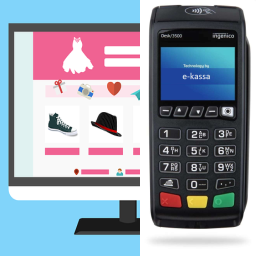
- 提供網站產品的簡單 POS 顯示
- 具有建立簡單 EMV POS 付款或結帳的能力
- 可使用其他支付網關
**問題與答案:**
<ul>
<li>
<strong>這個 WordPress 外掛的功能是什麼?</strong><br>
- 提供網站產品的簡單 POS 顯示<br>
- 具有建立簡單 EMV POS 付款或結帳的能力<br>
- 可使用其他支付網關
</li>
<li>
<strong>這個外掛是否支持其他支付網關?</strong><br>
是的,這個外掛支持使用其他支付網關。
</li>
<li>
<strong>這個外掛是否需要特定的硬體支援?</strong><br>
這個外掛可以簡單地在您的 WordPress 網站上使用,不需要特定的硬體支援。
</li>
</ul>
外掛標籤
開發者團隊
原文外掛簡介
Front-end POS:
Use the shortcode on a page to browse categories, search products by title, SKU, or barcode identifiers (GTIN, UPC, EAN, ISBN, and common plugin meta fields), manage the cart, enter customer details, and pay via PayPlus EMV, PayPlus gateway iframe, cash, or other WooCommerce gateways where supported. Product cards show SKU and barcode when available.
WooCommerce admin (Orders):
Orders created through duckPOS are tagged with order meta so you can filter the WooCommerce orders screen to show all orders, only duckPOS orders, or exclude duckPOS orders. Optional setting: open the orders list with duckPOS orders excluded by default. You can also bulk-export selected orders to CSV (Excel-compatible UTF-8) or to an Excel-openable .xls file.