內容簡介
DearPDF 是一款簡單卻強大的 WordPress PDF 翻書和 PDF 瀏覽器外掛程式,用於顯示您的 PDF。將您的 PDF 嵌入並以桌面 PDF 瀏覽器或互動 PDF 翻書的方式顯示,根據您的選擇。
DearPDF 演示和測試頁面
✔ 您的一站式 PDF 查看解決方案!再也不用為 PDF 瀏覽器和 PDF 翻書外掛程式之間感到困惑
✔ 簡單而多功能的 PDF 瀏覽器,可顯示不規則的頁面和以文本為導向的文件
✔ 逼真的 3D PDF 翻書可展示您令人驚嘆的 PDF 文件、菜單、年度報告、設計作品集等
✔ 基於 WordPress 和 Codecanyon(前任)上我們最受歡迎的 WordPress 翻書外掛程式
DearPDF 外掛程式版本
垂直瀏覽器 – 也提供了查看/閱讀 PDF 文件的傳統方法。當 PDF 文檔具有不同頁面大小時,這是最合適的方法。 DearPDF 可覆蓋所有 PDF 文件大小。PDF 瀏覽器演示
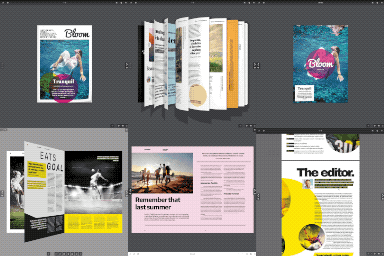
3D PDF 翻書 – 為您生動的 PDF 創造逼真的外觀。 DearPDF 將您的平面 PDF 轉換為互動和真實的書,並借助尖端 WegGL 技術實現。所有高科技的複雜工作都在幕後進行,而您的客戶則在享受 PDF 內容時感到快樂。 3D 翻書是我們的驕傲,也將成為您的驕傲。3D 翻書演示
2D PDF 翻書 – 當設備不支持 3D 翻書或您的口味時,您仍然有多種選擇! 2D 翻書使用 CSS 和 HTMl5 標籤來創建翻動並互動的翻書。這是 3D 翻書之前的一個著名變體,仍然是一個有價值的選擇。2D 翻書演示
僅 5 步驟!
WordPress 以其易於學習和使用的結構而聞名。 DearPDF 遵循 WordPress 帖子結構來創建和管理 PDF 查看器。這與創建帖子一樣簡單。
安裝 DearPDF
創建 DearPDF 帖子
提供 PDF 連結並保存該帖子
複製簡碼並貼到您的頁面上
發布,PDF 查看器已準備在您的頁面上啟動!
特點
垂直 PDF 瀏覽器
翻書模式
易於使用的 WordPress 帖子結構
嵌入模式:顯示 PDF 的默認結構
基本的按鈕彈出:根據需求顯示您的 PDF,在單個頁面上顯示多個 PDF 最佳
PDF 目錄
頁面縮略圖預覽
通過共享按鈕對 PDF 頁面進行深度鏈接
啟用和禁用 PDF 下載
支持任意數量的頁面,超過 1000 頁和 500MB 。
部分加載(按需頁面)使使用 500MB 的文件僅需 5MB 的數據即可加載和啟動
專業版特點
更多彈出變體,例如縮略圖和鏈接
自動 PDF 縮略圖
PDF 鏈接
全局設置
逼真的書結構 3D 書封
可自定義的翻書頁面模式 - 您可以將翻書設置為單頁或雙頁
PDF 部分加載大小選項
Lite vs Pro 全面比較
外掛標籤
開發者團隊
② 後台搜尋「PDF Viewer & 3D PDF Flipbook – DearPDF」→ 直接安裝(推薦)
原文外掛簡介
DearPDF is a simple yet powerful WordPress PDF Flipbook and PDF Viewer plugin to display your PDFs. Embed your pdfs and display them similar to desktop PDF viewers or interactive PDF flipbooks – as per your choice.
DearPDF Demos and Test Page
✔ Your one-stop PDF Viewing solution! No more confusion between PDF viewer and PDF flipbook plugins
✔ Easy and versatile PDF viewer to display irregular pages and text oriented documents
✔ Realistic 3D PDF flipbooks to showcase your amazing PDF documents, menus, annual reports, design portfolio
✔ Based on our best rated WordPress flipbook plugin on WordPress and Codecanyon(former)
DearPDF variations
Vertical Viewer – The traditional method of viewing/reading PDFs is also available. This is the best suitable when the PDF document has different page sizes. With this all sizes of PDF are covered by DearPDF.PDF Viewer Demo
3D PDF Flipbook – Realistic look for your lively PDF. DearPDF takes your flat PDFs and converts them to interactive and real life books with the help of cutting edge WegGL technology. All high-tech complex work happens behind the scenes, while your customers enjoy your PDF content with delight. 3D Flipbook is our pride and soon will be yours. 3D Flipbook Demo
2D PDF Flipbook – When 3D flipbook is not supported by devices or your taste, you are still covered! 2D flipbook use CSS and HTMl5 tags to create flippable and interactive flipbook. The famous variant before 3D flipbook is still a worthy alternative.2D Flipbook Demo
Just 5 Steps!
WordPress is famous for its easy to learn and use structure. DearPDF follows WordPress post structure for creating and managing PDF viewers. It’s easy and simple just like creating a post.
Install DearPDF
Create a DearPDF Post
Provide a link to your PDF and save the post
Copy the shortcode and paste to your page
Publish and PDF viewer is ready to launch on your page!
Features
Vertical PDF viewer
Flipbook modes
Easy WordPress Post structure
Embedded mode: is the default structure to display PDFs
Basic Button Popup: Display your PDFs on demand, best for multiple PDFs in a single page
Table of contents for PDF
Page thumbnails preview
Deep linking to pages of a PDF via share button
PDF download enable and disable
Supports any number of pages, more than 1000 pages and 500 MB.
Partial loading (on-demand pages) make using 500 MB files load and start with just 5 MB of data
Pro Features
More Popup Variations like thumbs and links
Auto PDF Thumbnails
PDF Links
Global Settings
3D Book Cover for realistic Book structure
Customizable Flipbook Page modes – You can set flipbook to single or double page
PDF Partial loading size option
Lite vs Pro Full Comparision