內容簡介
CM CSS Columns 是一款利用 CSS3 多欄排版技術的外掛,透過簡碼即可將內容分割為多欄式佈局,並整合視覺化編輯器對話框,無需手動撰寫程式碼即可設定所有欄位屬性,輕鬆實現專業的多欄排版效果。
【主要功能】
• 提供多組簡碼實現 CSS3 多欄排版
• 整合視覺化編輯器,透過對話框設定屬性
• 可自訂欄數、欄寬、間距與分隔線樣式
• 支援跨欄內容與防止內容斷欄功能
• 設定頁可修改所有預設值
• 自動產生靜態 CSS 檔案以提升效能
外掛標籤
開發者團隊
原文外掛簡介
The plugin offers different shortcodes to use the CSS3 Multiple Columns.
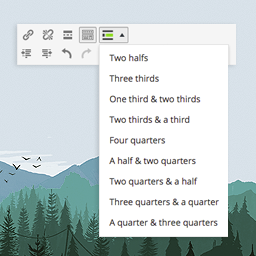
For better user experience it includes an integration into the visual editor. You can enter all attributes with the help of dialogs, so you don’t need to write the shortcodes by hand.
The plugin simply wraps the enclosed content into a container and defines according CSS rules.
The attributes for the shortcodes and examples you can find under “Other Notes”.
All default values can be changed in the settings page. With saving the settings a static CSS file is written and included for better performance.
Shortcodes
Here is the list of shortcodes with the corresponding attributes:
[css_columns]
This is an enclosing shortcode to distribute content into a CSS3 multiple columns layout. As content you can use any complex markup. A div-Tag with CSS classes and default definitions is used to wrap the content. The default values for the attributes can be changed in the settings page of the plugin.
Possible attributes:
gap – Specifies the gap between the columns, e.g. in pixel 40px. Possible values can be found on column-gap on w3schools.com
width – Specifies a suggested, optimal width for the columns. Possible values can be found on column-width on w3schools.com
count – Specifies the number of columns an element should be divided into. Possible values can be found on column-count on w3schools.com
rule_color – Specifies the color of the rule between columns. Possible values can be found on column-rule-color on w3schools.com
rule_style – Specifies the style of the rule between columns. Description for the values can be found on column-rule-style on w3schools.com
rule_width – Specifies the width of the rule between columns. Possible values can be found on column-rule-width on w3schools.com
Example:
[css_columns gap=30px width=120px count=3 rule_color="#000000" rule_style=solid rule_width=medium]
.... here goes the complex content ....
[/css_columns]
[css_col_span]
This is an enclosing shortcode, which only can be used within the [css_columns] shortcode. You can define content, which spans over multiple columns.
Possible attributes:
cols – Specifies how many columns an element should span across. Same values like column-span on w3schools.com
tag – Specifies the tag used for wrapping the spanning content, e.g. span, h2, div, …
Example:
[css_col_span cols=2 tag=div]
... here goes the spanning content ....
[/css_col_span]
[css_no_break]
This is an enclosing shortcode, which only can be used within the [css_columns] shortcode. You can define content, which never breaks into different columns. WARNING Feature is not supported by Firefox yet!
Possible attributes:
type – Specifies whether a page break is allowed inside a specified element. Same values like page-break-inside on w3schools.com
tag – Specifies the tag used for wrapping the non breaking content, e.g. span, h2, div, …
Example:
[css_no_break type=avoid tag=div]
... here goes the non-breakable complex content ....
[/css_no_break]