內容簡介
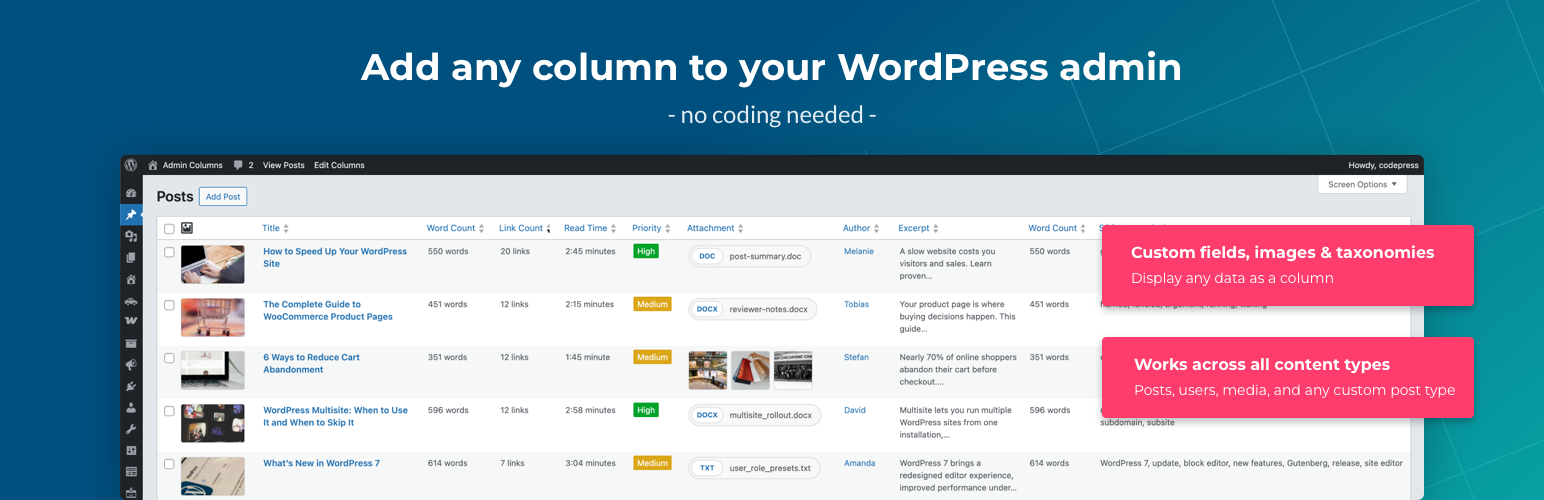
Admin Columns 讓使用者自訂和組織 WordPress 控制台中顯示的文章、頁面、使用者、評論和媒體的列表欄位。透過這個外掛,使用者可以顯示所需的資訊,如自訂欄位、特色圖片和分類法,提升內容管理效率。
【主要功能】
• 自訂顯示文章、頁面和使用者的欄位
• 拖放重新排序和調整欄位大小
• 支援 200 多種欄位類型
• 顯示豐富的元資料,如圖片和日期
• 方便管理大型媒體庫
外掛標籤
開發者團隊
📦 歷史版本下載
原文外掛簡介
Admin Columns lets you customize and organize the columns displayed in the WordPress admin list tables for posts, pages, users, comments and media.
Instead of the limited default list table, you get to display the information you actually need – like custom fields, featured images, taxonomies, file data and more.
Trusted by 100,000+ WordPress sites worldwide.
With a simple drag-and-drop interface you can:
Add any column to posts, pages, users, media and comments
Reorder and resize columns to match your workflow
Choose from 200+ column types including custom fields, taxonomies and file data
Display rich metadata such as images, dates, colors and relational fields
Create clean overviews for even the most complex websites
It works for any site from simple blogs to large WooCommerce stores.
Why Admin Columns?
Default WordPress list tables are limited. They often show only the title, author and date.
Admin Columns turns them into useful management screens that show you what matters.
Examples:
See featured images, custom fields and taxonomies directly in the post list table
Display media file size, dimensions or EXIF data
View user metadata and roles in the users screen
Keep track of large content libraries
Popular use cases
Admin Columns is used by developers, agencies and site owners to manage content more efficiently.
Common setups:
Managing WooCommerce products with price, SKU or stock columns
Displaying ACF custom fields in post list tables
Organizing large media libraries
Reviewing SEO metadata from Yoast
Organizing custom post types with the right columns
Built for developers
Admin Columns is open source and built to be extended. Use actions and filters to register custom column types, modify output or integrate with your own plugins.
Full hooks and filters reference for custom integrations
Register column configurations in PHP for version-controlled setups
Designed to work alongside page builders, custom post type plugins and third-party extensions
Explore the developer documentation.
Admin Columns Pro
Upgrade to Admin Columns Pro for sorting, filtering, inline editing and more. With Pro you can:
Sort any column
Filter content with stackable smart filters
Inline editing – edit titles, custom fields, taxonomies and more directly from the list table
Bulk editing – update multiple items at once
Conditional formatting – color-code rows and cells based on rules
Export to CSV
Import/export column sets between sites or team members
Save to PHP for version-controlled column configurations
Admin Columns Pro also provides deep integrations with popular plugins:
Advanced Custom Fields – display and edit all field types
WooCommerce – product and order columns
Yoast SEO – SEO score and metadata columns
Toolset Types – custom fields and relationships
Pods – Pods fields and content types
Learn more about the additional features of Admin Columns Pro on our website:
Upgrade to Admin Columns Pro
Supported content types
Admin Columns works with the following WordPress admin screens:
Posts, Pages and Custom Post Types
Users
Media Library
Comments
Taxonomies (Pro)
Custom field column
Admin Columns allows you to display custom fields (post meta and user meta) directly in the admin list table.
Supported field formats include:
Color
Date
Images
Number
Text
URL
True/False
Relational: Posts, Users and Media
Docs & Support
Is this your first time using Admin Columns? Check out our documentation and guides:
Documentation
Getting Started
Developer documentation
Need help? Please visit the Admin Columns support forums.
Contribute
Admin Columns is open source and community-driven. There are several ways to contribute:
Translate: Help translate Admin Columns on WordPress.org or Pro translations on Transifex
Report issues: Found a bug? Report it on GitHub
Suggest features: Submit ideas to our public roadmap