外掛標籤
開發者團隊
② 後台搜尋「Aiolos Checkout for WooCommerce」→ 直接安裝(推薦)
原文外掛簡介
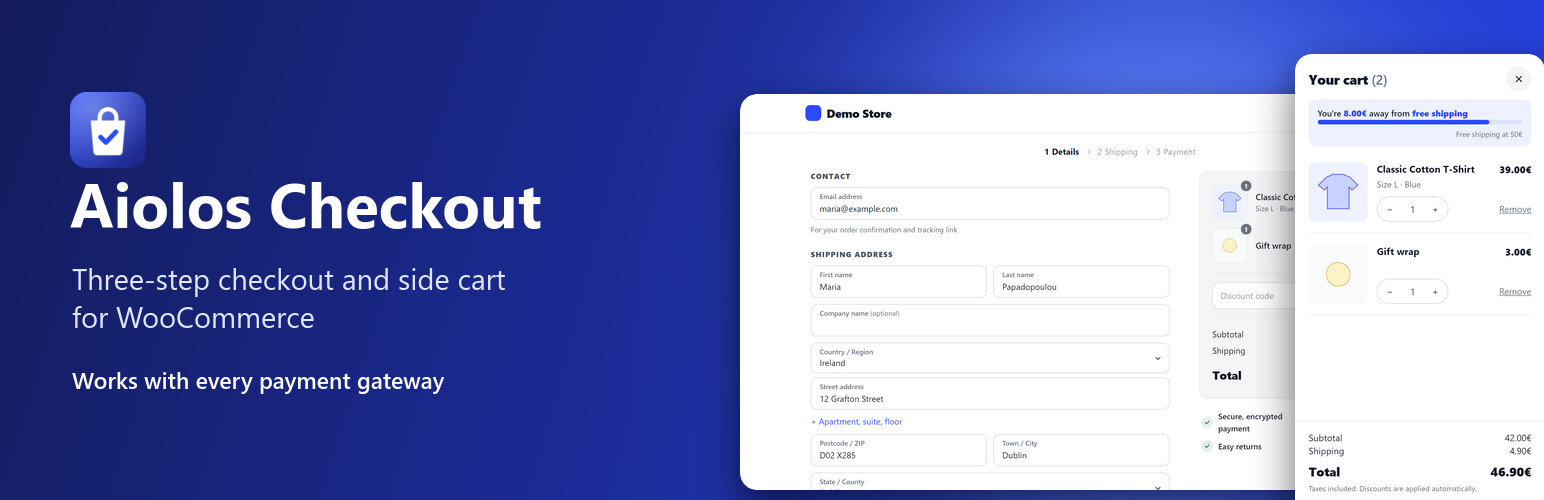
Aiolos Checkout replaces the WooCommerce checkout page with a clean, conversion-focused checkout in three steps (or on one page), and adds a side cart that opens the moment a product is added. It is light, accessible, and built so that the payment gateways you already use keep working exactly as before.
Checkout
Three steps: Details, Shipping, Payment, or one page. A recap of what was entered, with “Change” links, and the order summary always in view.
Change the order without leaving. Plus, minus and remove buttons on the products of the order summary.
Typos caught. “gmial.com” gets a “Did you mean gmail.com?”, so order confirmations reach the customer.
Returning customers. When the email entered belongs to an account, a “Log in” link appears under it.
Every payment gateway. The payment section is WooCommerce’s own, untouched, and WooCommerce’s checkout script still places the order. Stripe, WooPayments, PayPal Payments, Mollie, Revolut, Viva, Klarna Payments, bank transfer and cash on delivery work as on the classic checkout.
Express checkout area. Apple Pay, Google Pay and PayPal buttons from your gateways show at the top, and only when a gateway actually shows one.
The address is asked once. Billing is “same as shipping” unless the customer says otherwise; one phone number fills both.
Errors where they belong. Inline validation on each step; an error from WooCommerce or a gateway takes the customer to the field to fix, even on an earlier step.
Pickup points. Lockers and pickup points of courier plugins (BOX NOW, ACS, DPD and others) show under their shipping rate and are checked before the payment step.
Fields from other plugins (VAT number, invoice type, gift message, consent boxes) appear in the right step and keep their values.
Back from a payment page (a cancelled card or bank payment): the customer returns to the step they were on, with everything filled in.
Your brand. Your logo (left or centered) and every color: buttons and their text, text, page, header, order summary, fields and borders, plus corner radius and font, with a live preview as you choose. Every template can be overridden from your theme (yourtheme/aiolos-checkout/).
Field editor. Show or hide, make required or optional, rename, give a placeholder and reorder WooCommerce’s checkout fields. Works on WooCommerce’s own checkout too.
Discount links. A link ending in ?coupon=CODE applies the code (it waits for the first product when the cart is empty), also on pages served from a cache.
Free shipping, simply. Optionally hide the paid shipping rates once free shipping is offered.
Analytics events. GA4’s begin_checkout, add_shipping_info, add_payment_info and purchase (with products, value and coupon) for Google Tag Manager, Google Analytics and the Meta Pixel your site already loads.
Light. No frameworks; about 15 KB (gzipped) of CSS and JavaScript on the checkout, and the theme’s assets are left off the page.
Thank-you page
A confirmation with the order’s progress (placed, paid, preparing, on its way; “awaiting payment” for bank transfers, “payment on delivery” for cash on delivery) and the order’s key details.
Guests can turn their order into an account with one password: addresses and earlier guest orders included, logged in at once.
Payment instructions, order details and conversion tracking that hook into WooCommerce’s thank-you page keep working.
Side cart
Slides in when a product is added, also on product pages (simple, variable and grouped products, without a reload; product add-on fields are sent along).
Quantity changes and removal with Undo; sale and low-stock badges.
A discount code field, and applied codes can be removed.
Free shipping progress bar computed exactly like WooCommerce’s free shipping method (minimum amount, before or after coupons, coupon requirements).
Opens from your theme’s cart icon: the cart links of popular themes and page builders are recognized, and you can add your own (CSS selectors).
Safe with page caches: the cart is always fetched fresh, never from a cached page.
Works with
Caching and optimization: the checkout is never cached or optimized, and the side cart’s script is kept out of “delay JavaScript”. WP Rocket, LiteSpeed Cache, W3 Total Cache, WP Super Cache, WP Fastest Cache, SiteGround Speed Optimizer, Autoptimize, Perfmatters, FlyingPress and Hummingbird are handled.
Multicurrency: Price Based on Country, WPML / WooCommerce Multilingual, Aelia Currency Switcher, CURCY and WOOCS / FOX, without converting twice.
Languages: translation ready, Greek included, right-to-left languages, WPML and Polylang for the texts you type in the settings.
WooCommerce: High-Performance Order Storage (HPOS), product bundles, composite products and product add-ons.
Accessibility: checked against WCAG 2.1 AA (axe); keyboard and screen reader friendly steps and side cart.
Pro
Aiolos Checkout Pro adds:
Design: ready-made styles (Minimal, Soft, Bold, Elegant, Dark), nine fonts with Greek letters served from your own site (no Google requests), and custom CSS.
Payment and shipping rules: a fee or discount per payment method (cash on delivery +2€), payment or shipping methods hidden by cart value, country, shipping method or category.
Delivery date and time slots with preparation days, cut-off time, closed dates and a limit of orders per day or slot.
Your own checkout fields (text, choices, a date, a checkbox…) shown only for some countries, shipping methods, categories or cart values, saved on the order and shown in the emails.
Bot protection with Cloudflare Turnstile, so bots cannot test stolen cards through your checkout.
Invoices: an “I need an invoice” choice with the tax number named and checked for every country (ΑΦΜ, USt-IdNr., Partita IVA…), confirmed by VIES and, for Greece, AADE (tax office and profession filled in), with the EU reverse charge if you want it.
Order bumps: one-click offers before payment, at a special price and with conditions.
Cart recovery: up to three reminder emails with a link back to the cart and an optional single-use code, with consent and privacy tools.
Address suggestions as the customer types (Google Places).
Checkout analytics in your own database: the funnel, revenue, and what bumps and reminders brought in.
Spend-to-unlock rewards (free shipping, amount or percent off, a free gift), “Complete your order” suggestions in the side cart, a code for the next order and suggestions on the thank-you page, and premium trust badges.
External services
This plugin connects to aiolosweb.com, the site of its author, to show news about the plugin (new features, offers) to shop managers in the WordPress admin.
What is sent: once a day, a request to https://aiolosweb.com/wp-json/aiolos-license/v1/notices with the plugin’s edition (free or pro) and version, the site’s language, and the WordPress and WooCommerce versions. The site’s address, its users, orders and customers are never sent.
When: daily, in the background (WP-Cron), only while “Show news and offers” is on (Aiolos Checkout > General). Switching it off stops the requests and removes the stored news.
The answers are signed by aiolosweb.com and shown as plain text; links only lead to aiolosweb.com.
Terms of use: https://aiolosweb.com/license-terms/ — Privacy policy: https://aiolosweb.com/privacy-policy/