內容簡介
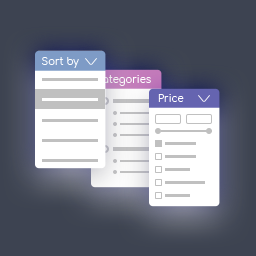
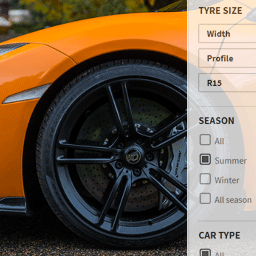
Better Post & Filter Widgets for Elementor 是一款免費的 Elementor 篩選與文章小工具外掛,支援分類法、自訂欄位、ACF、關聯欄位及數值範圍等多元篩選條件,提供進階篩選功能且無任何使用限制,可完全自訂樣式與佈局。
【主要功能】
• 真正的多面向篩選,即時顯示可用選項與結果數量
• 支援分類法、自訂欄位、ACF、關聯欄位及數值範圍篩選
• 免費建立動態 Loop Grid,無需 Elementor Pro
• 文章小工具可同時查詢多種文章類型,支援輪播與格狀佈局切換
• 提供專屬動態標籤,含 ACF Repeater 欄位輸出功能
• 與 Elementor Pro 文章小工具、ACF、WooCommerce 及多數翻譯外掛相容
外掛標籤
開發者團隊
② 後台搜尋「Better Post & Filter Widgets for Elementor」→ 直接安裝(推薦)
📦 歷史版本下載
原文外掛簡介
The only free Elementor plugin for unlimited pro-grade filtering of all your post content. Filter by taxonomies, custom fields, ACF, relational fields, and numeric ranges – with seamless integration, no restrictions, and full customization. Get advanced filtering features without paying for limitations.
Filter Widget Key Features:
Compatible with Elementor Pro post widget, ACF, WooCommerce and most translation plugins.
True faceted filtering with real-time option availability and dynamic result counts.
Filter any post type.
Customizable filter items list with easy re-ordering options.
Filter anything using taxonomies, custom fields/ACF, relational and numeric fields.
Keyword search support for custom field/ACF.
Various filter types catered to diverse use-cases: checkboxes, radio buttons, label list, dropdown, numeric range, select2 (single & multiple select).
Fine-tune the filter with the choice of relation (AND or OR) between terms and parents.
User-friendly more/less and toggle options, ideal for managing extensive lists.
Choose how filters are applied: Auto-submission or Submit button mode.
Filter Widget Demo – See the filter in action.
Post Widget Key Features:
Query multiple post types at once.
Do more with less – display posts, users, and taxonomies using a single widget.
Effortlessly switch between a dynamic carousel or grid layout at different breakpoints.
Make the most of Swiper API with advanced features such as carousel synching, parallax effects, and more.
Multiple layout options, including classic, on the side, banner, template grid (loop grid), and custom HTML.
Possibility to create your own loop grid, with any dynamic tags and Elementor widgets.
Flexible post content options: title, content, excerpt, custom field/ACF, taxonomy, HTML, post meta, read more, bookmark, edit options, product price, product rating, buy now, and product badge.
Flexible query system with AJAX pagination.
Customize widget content and style like native Elementor widgets.
Feed-style layouts with taxonomy-based grouping, ideal for magazine or news-style content.
Post Slider/Carousel Demo – Check out the post widget possibilities.
Create Loop Grids for Free:
Create dynamic loop grids without Elementor Pro. Design fully custom layouts using any Elementor widget and dynamic tag, while keeping full compatibility with filtering and AJAX pagination.
Exclusive Dynamic Tags:
Exclusive Repeater Field Tag: Unlock the ability to directly output ACF repeater fields in the Elementor frontend, with the flexibility to wrap each part in different HTML tags.
Includes a series of dynamic tags, allowing users to fully utilize template grids with the free version.
Crafted for Seamless Elementor Integration:
Blends seamlessly with Elementor’s native interface.
No disruptive branding — Enjoy a clean, streamlined interface without unnecessary distractions.
Lightweight design, utilizing Elementor’s resources to minimize external dependencies.
Developer-Friendly:
Tailor the widgets to your needs using dedicated filters and developer hooks.
Troubleshooting
Make sure the Post Widget class name and the Filter Widget target match.
Check for incompatible plugins or theme conflicts:
Temporarily switch to a default WordPress theme.
Deactivate all other plugins except Elementor and Better Post & Filter Widgets.
Test the filter. If it works, reactivate your plugins one by one to find the one causing the conflict.
Disable caching or optimization plugins while testing, as they can interfere with AJAX.
Check the browser console for JavaScript errors (press F12 and look under the Console tab) and resolve any errors that appear.
Docs and Support
Find support for this plugin in the documentation.
Source Code
This plugin includes both compressed and uncompressed versions of CSS and JavaScript files and can be found under the /assets/ directory.