內容簡介
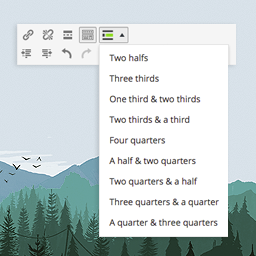
這個外掛提供幾個短代碼,用於將您的內容組織成多欄佈局。它支持兩、三和四欄佈局,並允許內容跨越多個欄位(如果需要)。
用法
將所需的短代碼插入您的內容中,如下所示:
2欄佈局:
[column-half-1]
第一欄的內容
[/column-half-1]
[column-half-2]
第二欄的內容
[/column-half-2]
3欄佈局:
[column-third-1]
第一欄的內容
[/column-third-1]
[column-third-2]
第二欄的內容
[/column-third-2]
[column-third-3]
第三欄的內容
[/column-third-3]
4欄佈局:
[column-quarter-1]
第一欄的內容
[/column-quarter-1]
[column-quarter-2]
第二欄的內容
[/column-quarter-2]
[column-quarter-3]
第三欄的內容
[/column-quarter-3]
[column-quarter-4]
第四欄的內容
[/column-quarter-4]
如果您想要跨越多個欄位的內容,可以將短代碼組合起來,例如:
1/3的欄位 / 2/3的欄位
[column-third-1]
第一欄的內容
[/column-third-1]
[column-third-2-3]
跨越第二和第三欄的第二欄內容
[/column-third-2-3]
1/4的欄位 / 2/4的欄位 / 1/4的欄位
[column-quarter-1]
第一欄的內容
[/column-quarter-1]
[column-quarter-2-3]
跨越第二和第三欄的第二欄內容
[/column-quarter-2-3]
[column-quarter-4]
佔據第四欄的第三欄內容
[/column-quarter-4]
如果您需要在一欄中嵌套一組欄位,可以通過在短代碼中添加 ‘inner-‘ 來完成,如下所示:
[column-half-1]
一些文字
[inner-column-half-1]
更多文字
[/inner-column-half-1]
[inner-column-half-2]
更多更多的文字
[/inner-column-half-2]
[/column-half-1]
[column-half-2]
最後的文字
[/column-half-2]
您也可以通過像下面這樣在短代碼中添加屬性來更改欄位背景顏色:
[column-half-1 background="e8e8e8"]
外掛標籤
開發者團隊
原文外掛簡介
This plugin provides several shortcodes for organising your content into multi-column layouts. It supports two, three and four column layouts and allows for content to span multiple columns if required.
Usage
Insert the required shortcodes into your content as follows:
2 column layout:
[column-half-1]
First column of content
[/column-half-1]
[column-half-2]
Second column of content
[/column-half-2]
3 column layout:
[column-third-1]
First column of content
[/column-third-1]
[column-third-2]
Second column of content
[/column-third-2]
[column-third-3]
Third column of content
[/column-third-3]
4 Column layout:
[column-quarter-1]
First column of content
[/column-quarter-1]
[column-quarter-2]
Second column of content
[/column-quarter-2]
[column-quarter-3]
Third column of content
[/column-quarter-3]
[column-quarter-4]
Fourth column of content
[/column-quarter-4]
If you want content to span multiple columns you can combine the shortcodes to create a column spans multiple spaces, for example:
1 Third / 2 Thirds
[column-third-1]
First column of content
[/column-third-1]
[column-third-2-3]
Second column of content that spans the second and third columns
[/column-third-2-3]
1 Quarter / 2 Quarters / 1 Quarter
[column-quarter-1]
First column of content
[/column-quarter-1]
[column-quarter-2-3]
Second column of content that spans the second and third columns
[/column-quarter-2-3]
[column-quarter-4]
Third column of content that occupies the fourth quarter column
[/column-quarter-4]
If you need to embed a set of columns within a column, you can do so by adding ‘inner-‘ to the shortcode as follows:
[column-half-1]
Some Text
[inner-column-half-1]
Some more text
[/inner-column-half-1]
[inner-column-half-2]
Even more text
[/inner-column-half-2]
[/column half 1]
[column-half-2]
The final text
[/column-half-2]
You can also change the background colour of a colour by adding an attribute to the shortcode as follows:
[column-half-1 background="e8e8e8"]