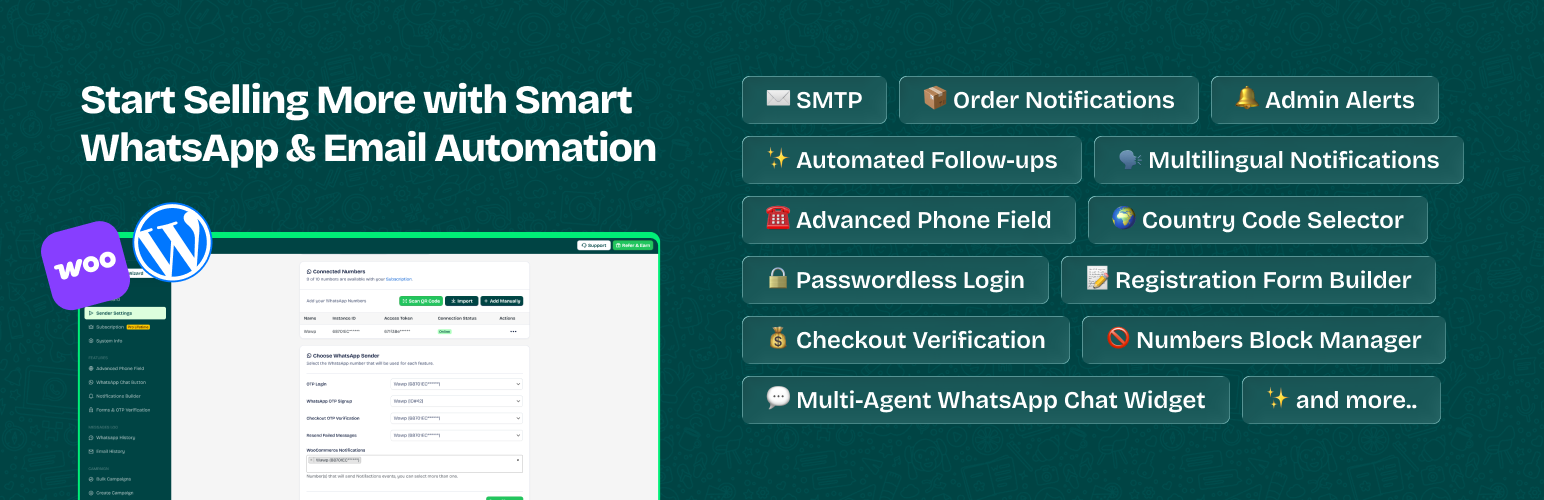
內容簡介
總結:使用WAWP.net Automation Web Platform外掛,可以透過WhatsApp或WhatsApp Business通知顧客有關訂單和遺棄購物車的資訊,還可以發送註冊新訂單的通知或知道現有訂單的狀態。此功能可以讓您給顧客提供興趣和跟進感,增強顧客對您服務的信心,進而促使他們再次購買。
問題與答案:
問題:WAWP.net Automation Web Platform這個外掛可以做什麼?
答案:
- 透過WhatsApp或WhatsApp Business通知顧客有關訂單和遺棄購物車的資訊。
- 可以發送註冊新訂單的通知或知道現有訂單的狀態。
- 可以管理通知,並直接從WordPress面板進行管理。
- 取得WooCommerce和Easy Digital Download的整合功能。
- 自動追蹤並發送遺棄購物車的信息。
- 得到管理員通知(待處理)。
- 發送不同狀態的客製化訊息,包括訂單(新、處理中、已完成、待決、失敗、退款、取消、草案、備註),遺棄購物車和待處理的追蹤訂單等等。
問題:如何使用這個外掛?
答案:
- 首先,需要在https://app.wawp.net/signup上註冊帳戶,可免費得到每月150條信息,並自動續訂。
- 接著,您需要Instance ID憑證和身份驗證的訪問令牌等認證資訊,才可以發送信息。
- 如果您需要更多設定資訊,可查看Help Center https://wawp.net/docs。
- 您可以直接發送訊息、建立自動回覆、使用API、創建聊天機器人,以及使用雲文件管理器、支援中心等功能。
- 您可以免費獲得每月150條信息的免費帳戶,也可以隨時升級到更高級別的套餐。
問題:這個外掛有哪些付費功能?
答案:這個外掛的付費功能包括增加發送限制,可以從每月10,000條信息開始的套餐,而且您可以使用折扣碼在WordPress商店中獲得75%的折扣,請使用代碼“HiWordpress”。
外掛標籤
開發者團隊
② 後台搜尋「Wawp – Order Notifications, OTP Verification, Advanced Country Code, and Chat widget for WooCommerce」→ 直接安裝(推薦)
原文外掛簡介
Tired of manually sending WhatsApp order updates and payment follow-ups?
Let Wawp handle it all—right from your WhatsApp!
Automate notifications, integrate chat buttons, secure your store with OTP verification,
and more—all in one powerful plugin.
More automation, less work—sell smarter with Wawp! ✨
🤖 Automated Notifications
✅ New Order Notification – Send WhatsApp message to customers with order details after checkout.
✅ Order Status Updates – Notify customers automatically about changes to their order status.
✅ Admin/Staff Alerts – Receive real-time WhatsApp alerts for new orders and status changes.
✅ After Purchase Upsell – Schedule follow-up messages to re-engage customers and boost sales.
✅ Pending Payments – Send gentle reminders for pending payments, to get paid faster.
✅ Product Reviews – Collect product reviews on auto-pilot with customized WhatsApp messages.
Notification types:
Pending payment: Notify customers about unpaid orders.
On hold: Inform about orders waiting for payment confirmation.
Processing: Let customers know their order is being prepared.
Completed: Confirm successful order delivery.
Failed: Notify customers of failed transactions.
Draft: Keep track of unfinished orders.
Canceled: Alert customers when an order is canceled.
Refunded: Inform about successful refunds.
Customer Note: Send custom updates directly to customers.
Custom Status: Set up notifications for any custom status.
🔐 User Authentication
✅ Blacklist Numbers — Block Fake and Spam users to prevent abuse and secure your site.
✅ Fully customizable — Colors, logo, and text – control your login looks, without technical effort.
✅ Multiple login options — Enable login via WhatsApp, Email OTP, or Email & Password.
✅ Signup Verification — Verify new accounts via WhatsApp or Email OTP.
✅ Role-Based Redirects — Redirect users to specific pages based on their roles after login.
✅ Welcome message — Send personalized welcome messages to introduce your brand to new customers.
✅ User Login Alerts — Get instant notifications for user logins and signups to ensure security.
Shortcodes for Easy Integration:
Login Form: [wawp_otp_login]
Signup Form: [wawp_signup_form]
Both Forms: [wawp-fast-login]
= 100% Compatible with:
✅ Bricks Builder
✅ Elementor
✅ Gutenberg
✅ Native WordPress Forms
✅ Native WooCommerce Forms
🛒 WooCommerce Order Verification
Prevent fake orders with WhatsApp OTP verification before checkout.
Enable OTP for visitors, members, or everyone.
Enable OTP based on payment method (e.g., Cash on Delivery, PayPal, Stripe).
Enable OTP based on shipping method (e.g., Standard, Express).
💬 WhatsApp Chat Widget
✅ Multi-agent Support — Easily assign different contacts for support, sales, or inquiries.
✅ Display Condition — Set when the chat button appears based on device or pages.
✅ Fully customize — button design (colors, text, icons, positioning).
✅ Integrate social media links — directly into the button.
✅ Auto-generate QR codes — for instant messaging.
✅ Track button clicks — to analyze customer interactions.
🌍 Country Code
✅ Number Validation — Verify phone numbers in real time to reduce errors and boost data quality.
✅ Auto-detect Country — Automatically detect country code by visitor location or preset default.
✅ Country Filtering — Display only the countries that your audience and customers are from.
✅ 100% Compatible — Country code compatible with all themes, page builders & plugins.
✅ Country Selection — Allow users to choose their country code when entering their phone number.
✅ Country Filtering — Restrict or display specific countries in the dropdown.
✅ Auto-Formatting — Format phone numbers dynamically as users type for maximum accuracy.
📜 Messages History
✅ Track all messages – Show all details (order number, user details, phone numbers, etc.).
✅ Advanced Filters – Use live search & advanced filters find specific messages.
✅ Identify Failed Messages – Troubleshoot and fix delivery issues.
✅ Resend Messages – Retry failed messages with a single click.
🎨 Personalization
✅ Dynamic Content — Use Variables to insert customer names, order details, and more.
✅ Full emoji support — Add personality and fun to your communication.
✅ Rich Messages — Attach multi-media to capture customers attention.
✅ Direct Messages — Send message to any WhatsApp number directly from your dashboard.
👤 Customer Management
✅ Verify whether a member’s number is active on WhatsApp.
✅ View all phone numbers linked to a member’s account for login and orders.
Note: You can assign unique WhatsApp numbers for every task like order updates, admin alerts, and login verification.
External Services
This plugin relies on the following third-party services to provide core functionality. Each service is disclosed below with its purpose, data transmission details, and relevant policies.
1. Wawp.net (Core Service Provider)
* Service: Wawp.net API
* Used For: Scans WhatsApp QR codes to link accounts, provides the message delivery gateway, and handles license validation.
* Data Sent: Your site URL (validation), API tokens, Instance IDs, recipient phone numbers, and message content.
* When: Data is sent when connecting a WhatsApp account, and whenever a WhatsApp notification or OTP is triggered.
* Policies: Terms of Service | Privacy Policy
2. Meta (Facebook Graph API)
* Service: WhatsApp Cloud API (Meta)
* Used For: Sending official messages via Meta’s infrastructure for users who configure the Meta Business sender channel.
* Data Sent: Recipient phone numbers, message templates, and authentication tokens.
* When: Only when a notification is triggered through a configured Meta WhatsApp sender.
* Policies: Meta Privacy Policy
3. IP-API.com
* Service: Geolocation API
* Used For: Specifically used in the “Abandoned Cart” module to identify the approximate location (country) of a visitor to help store owners understand their audience.
* Data Sent: The visitor’s IP address.
* When: When a visitor initiates a session that is tracked as a potential abandoned cart.
* Policies: Terms & Privacy
4. Ipapi.co
* Service: Geolocation API
* Used For: Specifically used in the “Advanced Phone Field” and “Chat Widget” settings to auto-detect the visitor’s current country. This allows the plugin to automatically select the correct country flag and dial code prefix.
* Data Sent: The visitor’s IP address.
* When: On page load for any frontend form containing the Advanced Phone Field if “IP Detection” is enabled.
* Policies: Terms of Service | Privacy Policy
5. FlagCDN
* Service: FlagCDN
* Used For: Provides high-quality SVG/PNG flag icons for the Abandoned Cart tracking interface in the WordPress admin dashboard.
* Data Sent: Standard HTTP request data to fetch image files.
* When: Only when an administrator views the Abandoned Cart analytics list in the backend.
* Policies: Terms of Service
📃 How to Start
Install and activate the Wawp plugin.
Create a free account on Wawp.
Connect your WhatsApp number using a QR code.
Insert the API keys into the plugin.
Customize your selected notification messages.
Note: A Wawp account is required to access all plugin features.
Create new account, and send 50 WhatsApp messages per month for Free.
Let’s grow, connect, and thrive together!
👉 Try Wawp for FREE (250 Messages/Month)
📌 Facebook Community. – Join other users for support, advice, and tips.
📚 Getting started. – Access step-by-step guides, FAQs, and tutorials.
⭐ Rate Us on WordPress. – Your feedback helps us grow and improve!
🌍 Help Translate Wawp. – Your feedback helps us grow and improve!
📽 Video Tutorials