內容簡介
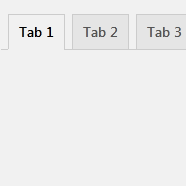
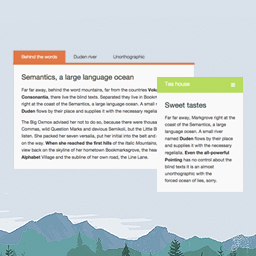
Xpert Tab 是一個很棒的短代碼建立者,讓您可以在標籤樣式中預置內容。此外,該外掛易於自訂且容易於在 WordPress 頁面和文章的任何地方產生無限的標籤組合。Xpert Tab 有著酷炫的後端,您在每次輸入內容時,都可以直接在後端查看前端效果。
Xpert Tab 還擁有更多的後端和前端機會。您可以輕鬆縮短您未定義的項目、切換標籤樣式等等。此外,此外掛程序的炫目功能是,它是使用 Bootstrap 框架和 ThemeXpert 自己的前綴詞開發,以避免與其他外掛產生 CSS 衝突。
實際 DEMO
特徵
Xpert Tab 可以響應式地支援任何移動裝置
無限制的標籤組合可以在佈景中使用
可透過短代碼使用
許多預設樣式
可拖曳的標籤項目,以輕鬆排序
標籤標題的即時更改
可選擇標題圖示
選擇不同圖示將會即時更改
優秀的標籤內容輸入欄位
使用 Bootstrap 框架
Less 可以快速自訂
Gulp 可以立即工作流程
高度自訂使用者體驗
前端和後端 UI 清爽易用
顏色更改的表單驗證
可以從後端新增或移除標籤項目
Font Awesome 圖示支援
已實現巢狀短代碼
選項功能
預設打開第一個標籤項目
當在後端刪除項目時,提醒
Selectize JS 程式庫
短代碼例子
[xt_tab style="xa-default" ]
[xt_item title="標籤標題 01" icon="選擇圖示---"]內容[/xt_item]
[xt_item title="標籤標題 02" icon="選擇圖示---"]內容[/xt_item]
[xt_item title="標籤標題 03" icon="選擇圖示---"]內容[/xt_item]
[/xt_tab]
即使您不需要自己理解短代碼,Xpert Tab 也會為您生成。若要手動更新您的標籤組合,需要三個參數以更改標題、樣式和標題圖示。
樣式參數:
如果您沒有為標籤組合選擇樣式,它將會為您提供 xa-default 樣式。若要更改您的標籤樣式,只需傳遞以下自訂樣式參數。
1. xa-default
2. xa-red
3. xa-blue
4. xa-red
5. xa-yellow
圖示參數
如果您在建立項目時正確選擇了圖示,那麼您就不需要為標題圖示觸碰短代碼參數。如果您需要更新圖示,只需添加圖示名稱即可。Xpert Tab 支援 FontAwesome 圖示,並且每個個別圖示都會有 fa fa 前墜。Xpert Tab 只會為您自動添加前墜,您只需要傳遞圖示名稱即可。以下是一些例子。
icon="facebook"
icon="twitter"
外掛標籤
開發者團隊
原文外掛簡介
Xpert Tab is an awesome shortcode builder, that allow you to preset you contents in a tabbed style. The plugin easy to customize and easy to generate unlimited tab sets anywhere in wordpress page and post. Xpert Tab has been crafted with cool backend, your every input you and frontend look you can visualize directly in the backend.
Xpert Tab is comes with lot more backend and frontend opportunity. you can easily short you incond item, switch tab style and many more. The cool feature of this plugin is that, Xpert Tab has been developed with Bootstrap framework with ThemeXpert’s own prefixes that avoid CSS conflict with others plugin.
Live Demo
Feature
Xpert Tab is responsive and friendly to any mobile devices
Limitless tab anywhere in the theme
Use via short-codes
Numerous preset styles
Draggable tab items for easy sorting
Live tab header change
Selectable icon for tab titles
Live icon change with each selection
Awesome input field for tabs content.
Bootstrap framework.
Less for quick customization
Gulp for instant workflow
Highly customized for User Experience
Slick Frontend and backend UI
Form Validation with color changes
Add and remove tab item from backend.
Font Awesome Icon Support
Nested Shortcode implemented
Optional Features
Open the first tab item by default
Alert when deleting items from backend
Selectize JS Library
Example Shortcode
[xt_tab style="xa-default" ]
[xt_item title="Tab Title 01" icon="Select Icon---"]Content[/xt_item]
[xt_item title="Tab Title 02" icon="Select Icon---"]Content[/xt_item]
[xt_item title="Tab Title 03" icon="Select Icon---"]Content[/xt_item]
[/xt_tab]
Though don’t need to understand shortcode by yourself, Xpert Tab will generate for you. If you want update your tab set manually. it takes three parameters to change tab title, style and title icons.
Styles parameters:
If you don’t select any style for your tab set. It will give you xa-default style. If you change you tab style. just pass the following parameters for the custom styles.
1. xa-default
2. xa-red
3. xa-blue
4. xa-red
5. xa-yellow
Icon Parameters
You don’t need to touch shortcode parameter for title icons if you select them correctly while creating items. If you want update them. Just add the icon name. Xpert Tab supports FontAwesome icons. FontAwesome come with fa fa prefix with each individual icon. Xpert Tab will add the prefix automatically for you. you need only pass the icon name. Have a look on the examples.
icon="facebook"
icon="twitter"