內容簡介
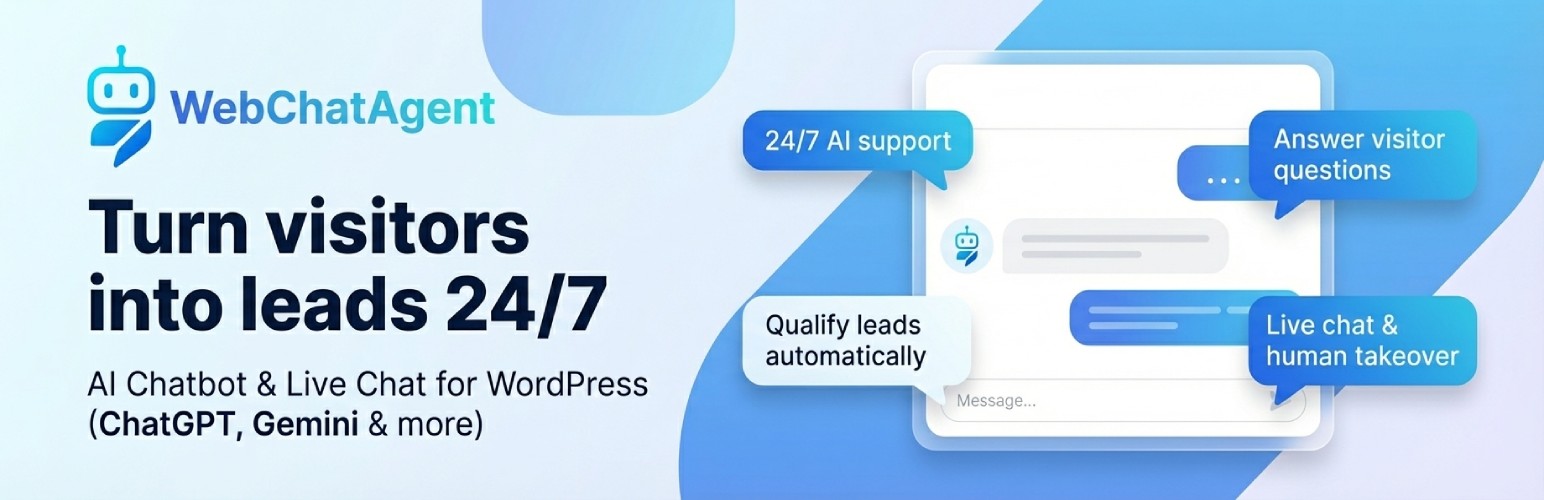
AI Chatbot & Live Chat with ChatGPT Support by WebChatAgent 讓您在 WordPress 網站上添加強大的 AI 聊天機器人和即時聊天小工具,提供 24/7 的訪客服務,捕捉潛在客戶,預約安排,並在必要時將聊天轉交給人類客服。
【主要功能】
• 支援多種 AI 模型,如 ChatGPT 和 Google Gemini
• 即時聊天與人類接管功能
• 自動觸發對話根據訪客行為
• WhatsApp 商業整合,方便用戶聯繫
• WooCommerce 訂單查詢與支援票務
• 自訂知識庫與質量測試功能
外掛標籤
開發者團隊
② 後台搜尋「AI Chatbot & Live Chat with ChatGPT Support by WebChatAgent」→ 直接安裝(推薦)
原文外掛簡介
Add an AI chatbot and live chat to your WordPress site. Answer visitors 24/7, capture leads, book appointments and hand over chats to humans when it matters.
🤖 Description
AI Chatbot & Live Chat for WordPress with ChatGPT and Gemini Support by WebChatAgent lets you add a powerful AI assistant and live chat widget to your WordPress website.
Use advanced features like RAG (Retrieval-Augmented Generation) with support for OpenAI ChatGPT, Google Gemini, xAI Grok, Mistral AI and other top AI models to give your visitors highly relevant answers based on your content. Combine this with human takeover (live chat) so your team can jump in whenever it matters.
You connect your site to your WebChatAgent account, where you manage all AI settings, design, live chat rules, WhatsApp integration, bookings and more. The WordPress plugin focuses on a smooth embed and a live preview in your WP admin.
Key integrations and tools include:
Action Bar & Form Builder – Add links, WhatsApp, Calendly scheduling, and custom lead-collection forms directly inside the chat widget
Live Chat & Human Takeover – AI handles most questions, humans can take over any conversation in the inbox
Proactive Triggers – Start conversations automatically based on visitor behavior (scroll depth, exit intent, inactivity and more)
WhatsApp Business Integration – Engage users via your WhatsApp business number, with QR code and direct link in the chat widget
API Connector for WooCommerce & More – Let customers check their WooCommerce order status, account info or support tickets directly in the chat
Confluence & Notion Integration – Import wiki pages and databases as chatbot knowledge sources
Zapier & n8n Integration – Automate workflows and connect to thousands of apps
AI Team Wiki – Publish an AI-assisted team knowledge base on your subdomain
Knowledge Tester – AI-powered quality testing that finds gaps in your chatbot’s knowledge
Custom MCP (Model Context Protocol) Server Support – For advanced, self-hosted or custom AI models
✨ Key Features
Generous Free Plan – Start free on WebChatAgent.com and upgrade only when you need more usage or advanced features
Hybrid AI Chatbot + Live Chat – Let AI handle routine questions and let humans join any conversation in real time
Human Takeover / Agent Inbox – View all conversations in one inbox and take over any chat with a single click
Smart Contextual Answers – Uses RAG (Retrieval-Augmented Generation) to answer based on your website content and uploaded documents
Multi-LLM Support – Switch between OpenAI ChatGPT, Google Gemini, xAI Grok, and Mistral AI models
Message Streaming – Bot responses appear word by word in real time for a natural, modern chat experience
Action Bar & Form Builder – Add a customizable action bar with up to 5 buttons: external links, WhatsApp contact, Calendly scheduling, and custom lead-collection forms
Proactive Triggers – 9 intelligent trigger types (time on page, exit intent, scroll depth, inactivity, URL match, section visibility, returning visitor, pages visited, rage click) with AI-generated messages
Calendly Integration – Embed your Calendly scheduling page directly inside the chat widget — no redirects
WhatsApp Button in Widget – QR code on desktop, direct link on mobile — visitors can start a WhatsApp conversation from the chat widget header
Knowledge Tester – AI generates test questions from your knowledge base, grades answers, and can fix gaps with one click
Content Search – Search through the actual content of all your data sources with hybrid AI + keyword matching
Custom MCP Server Support – Connect your own Model Context Protocol servers for self-hosted or specialized AI models
Confluence & Notion Integration – Import wiki pages, knowledge bases, and databases directly into your chatbot (Premium+)
AI Chat File Upload – Visitors can upload files and images in the chat for AI analysis (Premium+)
Tool Integrations – Connect your chatbot with external services and systems to perform actions
Lead Management – Automatically collect, qualify and manage potential customer information
Feedback Management – Gather and analyze user feedback to improve your service and chatbot
Questions Management – Track and categorize all questions asked to your chatbot
API Connector for WooCommerce & More – Connect your shop so customers get instant answers
WooCommerce Order Status – Customers ask “Where is my order?” and your chatbot checks WooCommerce and answers in seconds
WooCommerce Product Info – Let customers ask about product availability, prices or details from your shop
Account & Order History – Look up customer accounts, past orders or membership status automatically
Support Ticket Updates – Show real-time status of support requests without manual lookup
Ready-Made WooCommerce Template – Get started in minutes with our pre-built WooCommerce connector — no coding needed
Secure by Design – Customers must verify their identity (e.g. order email) before seeing personal data
WhatsApp Business Integration – Let your bot respond to customers on WhatsApp using your business number
In-Chat Appointments & Bookings – Allow visitors to book appointments directly inside the chat (with Google Calendar sync on supported plans)
Multilingual Support – Automatically responds in the user’s language; human replies can be translated as well
WCAG 2.2 AA Accessibility – Ensures accessible use for all visitors regardless of disabilities
Spam Protection – Prevents chatbot abuse and protects against unexpected usage spikes
Drag & Drop File Upload – Upload PDF, Word, Excel, and text files by dragging them onto the Data Sources tab
Bulk Actions – Select multiple data sources and delete or re-index them all at once
Complete Customization – Customize appearance, persona, colors, fonts, behavior and more via the WebChatAgent dashboard
Custom Role Presets – 6 ready-made chatbot personas to get started in seconds
Live Preview – See your current widget in a live preview iframe inside the WordPress admin
Responsive Design – Works perfectly on all devices and screen sizes
Simple Embedding – Easy integration with your WordPress site using a single Chatbot ID
🚀 Installation
Upload the webchatagent folder to the /wp-content/plugins/ directory of your WordPress installation or install it directly from the WordPress plugin directory.
Activate the plugin in the WordPress admin area under “Plugins”.
Register or log in at https://webchatagent.com and create your chatbot.
Copy your Chatbot ID from the WebChatAgent dashboard.
In WordPress, navigate to “WebChatAgent” in the admin menu and paste your Chatbot ID.
Enable the chatbot in the plugin settings to display the widget on your site.
All design, AI, live chat, WhatsApp and behavior settings are managed in your WebChatAgent dashboard. The WordPress plugin handles the embed and displays a live preview based on your current configuration.
⚙️ Frequently Asked Questions
Do I need an API key or account to use this plugin?
You need to register at WebChatAgent.com to create a chatbot and get a Chatbot ID. You then enter this ID in the plugin settings to connect your WordPress site to your chatbot. API keys and model settings are managed in your WebChatAgent account.
Is this plugin completely free?
You can start with a free plan on WebChatAgent.com. There are paid plans available if you need higher limits, more pages, more traffic or advanced features like higher message quotas, team features and additional integrations.
Can I customize the appearance of the chat widget?
Yes. You customize the color scheme, avatar, fonts, welcome message, widget position, behavior and persona directly in the WebChatAgent dashboard. The WordPress plugin shows a live preview and uses your current configuration.
Is the chat widget mobile-friendly?
Yes, the chat widget is fully responsive and works well on all devices, including mobile phones and tablets.
Does WebChatAgent support live chat and human takeover?
Yes. WebChatAgent offers a hybrid model: AI answers most questions automatically, and your team can take over any chat at any time via the Agent Inbox. You can reply as a human and then hand control back to the bot if you like.
Does the plugin support WhatsApp Business?
Yes. You can connect your WhatsApp Business number in the WebChatAgent dashboard. Your AI chatbot can then reply to WhatsApp messages, and you can manage those conversations alongside website chats.
How does the AI chatbot understand my website content?
WebChatAgent uses RAG (Retrieval-Augmented Generation) to index and understand your website content and documents. When visitors ask questions, the AI combines this indexed content with a large language model (e.g. ChatGPT or Gemini) to provide accurate, context-aware answers.
Which AI models are supported?
The chatbot supports multiple large language models including OpenAI ChatGPT, Google Gemini, xAI Grok, and Mistral AI. You can choose which model to use in your WebChatAgent settings. Speed and quality indicators help you pick the right model. Additionally, you can connect custom MCP (Model Context Protocol) servers for self-hosted or specialized AI models.
Does the chatbot support multiple languages?
Yes, the chatbot automatically detects and responds in the user’s language, making it ideal for multilingual websites. Human replies in the inbox can also be auto-translated.
Is the chat widget accessible for people with disabilities?
Yes, the chat widget is designed to meet WCAG 2.2 AA accessibility standards, ensuring it’s usable for all visitors, including those using assistive technologies.
Can the chatbot perform actions beyond just answering questions?
Yes. With Tool Integrations, your chatbot can connect to external services and systems to perform actions such as submitting forms, booking appointments, updating records or querying databases. You configure these tools in your WebChatAgent dashboard.
What is the API Connector and how does it work?
The API Connector lets your chatbot answer questions that require live data from your WooCommerce shop or other business systems. Instead of just answering general questions, your chatbot can look up real information for each customer.
WooCommerce examples:
“Where is my order #12345?” – The chatbot checks your WooCommerce shop and tells the customer the current order status
“Is the blue T-shirt in size M available?” – Looks up product stock and availability in WooCommerce
“Show me my recent orders” – Displays the customer’s order history from your shop
Other systems:
Support tickets – Show ticket status from helpdesk systems
Account info – Look up balances, memberships or custom data from any system
How to set it up:
Select the WooCommerce template (or another template for your system)
The chatbot asks customers to verify their identity (e.g. their order email)
Once verified, the chatbot can look up their orders, products and personal data
No programming knowledge required — the WooCommerce connector works out of the box.
What analytics and management tools are included?
From your WebChatAgent account, you can access:
Lead Management – Collect, categorize and follow up with leads generated through your chatbot
Feedback Management – Review and analyze user feedback to improve your chatbot and service
Questions Management – View all questions asked to your chatbot, identify common topics and improve your knowledge base
Analytics Dashboard – Track conversations, leads, bookings, human handovers and unanswered questions
How does the spam protection work?
Built-in spam and abuse protection monitor usage patterns and prevent abusive or excessive requests. This helps protect your account from unexpected usage spikes and keeps your costs predictable on higher tiers.
📷 Screenshots
WebChatAgent – AI Chatbot & Live Chat for WordPress settings page in the WordPress admin.
Live chat widget on your website – desktop view.
Mobile view of the chat widget.
📝 Changelog
1.0.3
Changed: Admin shows read-only values loaded from public endpoint
Changed: Only Chatbot ID and Enable are editable in WP; other settings managed in WebChatAgent dashboard
Added: Color swatches for theme and message colors in admin
Improved: Preview iframe sets html lang to current WP language
1.0.2
Added: Hide branding option in General tab
Added: Speech bubble text option in Messages tab
Added: Chat button image URL option in Appearance tab
Added: Live preview support for new options
Added: Documentation for dashboard tools (Leads, Feedback, Questions)
Added: Documentation for custom MCP server support
Improved: Widget rendering to include new attributes
1.0.0
Initial release
🔄 Upgrade Notice
1.0.3
Adds admin read-only values, color swatches and language-aware preview. Also updates documentation for integrations (WhatsApp Business, Zapier, AI Team Wiki, MCP) and clarifies that most settings are managed in the WebChatAgent dashboard.
1.0.2
Initial release of the WebChatAgent – AI Chatbot for WordPress plugin.
🔒 Privacy Policy
WebChatAgent – AI Chatbot for WordPress processes user chat messages to provide AI-powered responses. When visitors interact with the chat widget, their messages are sent to WebChatAgent’s servers for processing. The chat widget also collects basic browser information and IP addresses (in anonymized form) for abuse prevention and geographical customization of services.
Chat conversations are typically stored for up to 30 days to maintain context and provide follow-up support. After this period, conversation data may be anonymized and retained for service improvement purposes.
For privacy inquiries, please contact [email protected].
We operate in accordance with GDPR.
🌐 External services
This plugin connects to the WebChatAgent service (https://webchatagent.com) to provide chat functionality.
The service loads an external JavaScript file (https://webchatagent.com/widget/web-chat-agent.js) to render the chat widget on your website. This script is required for the widget to function properly.
When using custom fonts, external resources may be loaded from Google Fonts (https://fonts.googleapis.com). This means that data may be shared with Google when a visitor views your website with the chat widget enabled.
The service receives the following data when visitors use the chat:
Chat messages and queries submitted through the chat widget
Basic browser information (user agent, device type)
Session information for conversation context preservation
IP addresses, stored in anonymized form for abuse prevention and geographical service customization
Data is only sent when a visitor interacts with the chat widget. No data is collected or transmitted until the visitor actively engages with the chat.
Terms of Service: https://webchatagent.com/terms
Privacy Policy: https://webchatagent.com/privacy-policy