內容簡介
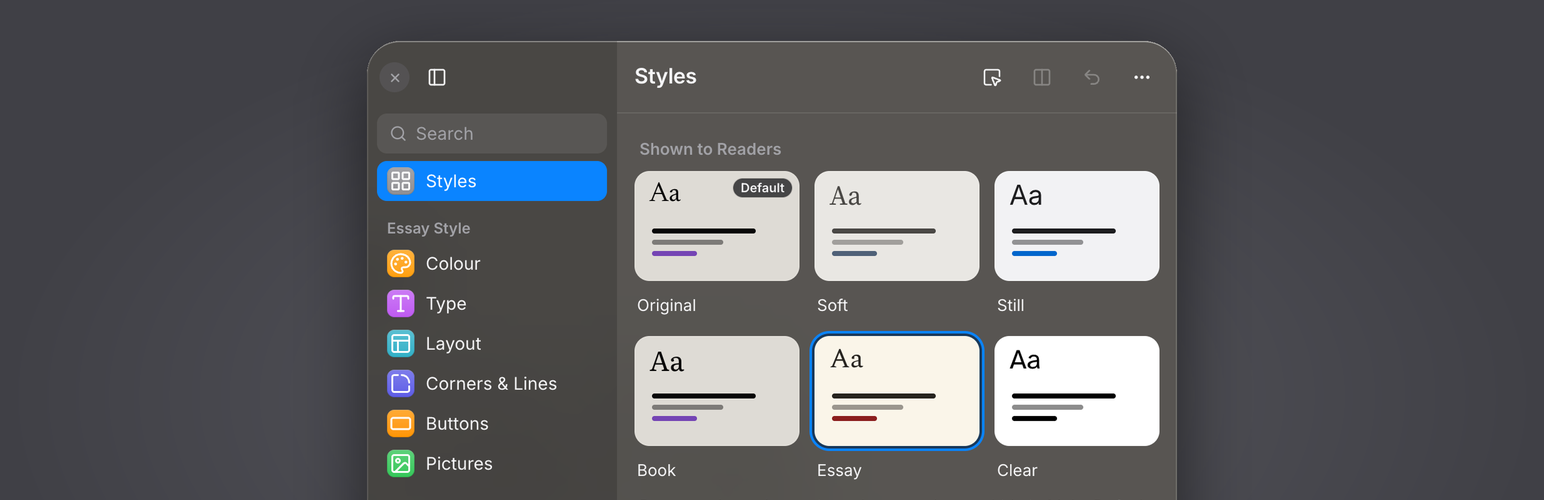
Vibetiles 是一款讓網站擁有者能夠輕鬆調整佈景主題樣式的外掛。使用者可以透過簡單的旋鈕調整顏色、字型、字體大小等,並即時預覽變更,最終將喜歡的樣式儲存並分享。
【主要功能】
• 即時樣式調整:透過旋鈕調整顏色、字型等
• 超過 80 種字型:可選擇的開放授權字型庫
• 儲存與分享樣式:輕鬆分享樣式連結給其他網站
• 讀者自訂選項:讀者可調整閱讀大小與主題顏色
• 不影響原始佈景主題:保持原始設計不變
外掛標籤
開發者團隊
原文外掛簡介
Vibetiles puts a small button on your site. Press it and a panel opens, on the real page, with dials for colours, fonts, text sizes, line spacing, light and dark. Turn a dial and the page changes in front of you. When it looks right, save it as a style.
The panel works on block themes. It does not touch your theme’s design: until you move a dial, the page is exactly what your theme draws, and the Original tile gives that back at any time.
For you, the owner:
Dials for the page colour, the text ink and the accent, in light and dark.
A font library of more than 80 open licensed faces, fetched only when you pick one and then served from your own site.
Text sizes, line spacing, and a dial per kind of text: headings, reading text, quotes, small print, the interface.
Save any state of the dials as a style, publish the ones you like, and set one as the site’s default.
Share styles between sites:
Every style you build can travel. Copy it as a link, and anyone with the plugin pastes that link into their own panel: the whole style arrives, ready to use and to change. Turn on “Everyone can copy styles” and your visitors get a Copy style button too, so a style they like on your site can be on theirs a minute later. No account, no download, no marketplace: a style is just a link, so styles can be passed around by email, in a post or in a chat.
For your readers:
A reader gets a smaller panel: reading size, light and dark, and the styles you chose to publish. You decide how much of it they see, or you hide the button for readers entirely. A reader’s choices are saved in their own browser and never sent anywhere.
Beta. The plugin is in daily use on elmastudio.de/en and is being improved all the time. If something looks wrong on your theme, please say so in the support forum; reports about specific themes are the most useful thing you can send.
External services
The plugin’s font library is not inside the plugin, because that would make it a very large download. When you, the site owner, pick a font for the first time, your server fetches that font’s files and its licence text once from jsDelivr (cdn.jsdelivr.net), an open source CDN, and stores them in your own uploads folder. From then on the font is served by your site.
What is sent: the request for the font file itself. No personal data, no content of your site.
When: only when a logged in administrator picks a font that is not yet on the site. Visitors never trigger it and their browsers never connect to jsDelivr.
The addresses are pinned to exact versions and listed in the plugin file font-files.json.
jsDelivr terms of service: https://www.jsdelivr.com/terms
jsDelivr privacy policy: https://www.jsdelivr.com/terms/privacy-policy
No other outside service is used. The plugin has no analytics, no accounts and it does not phone home.