內容簡介
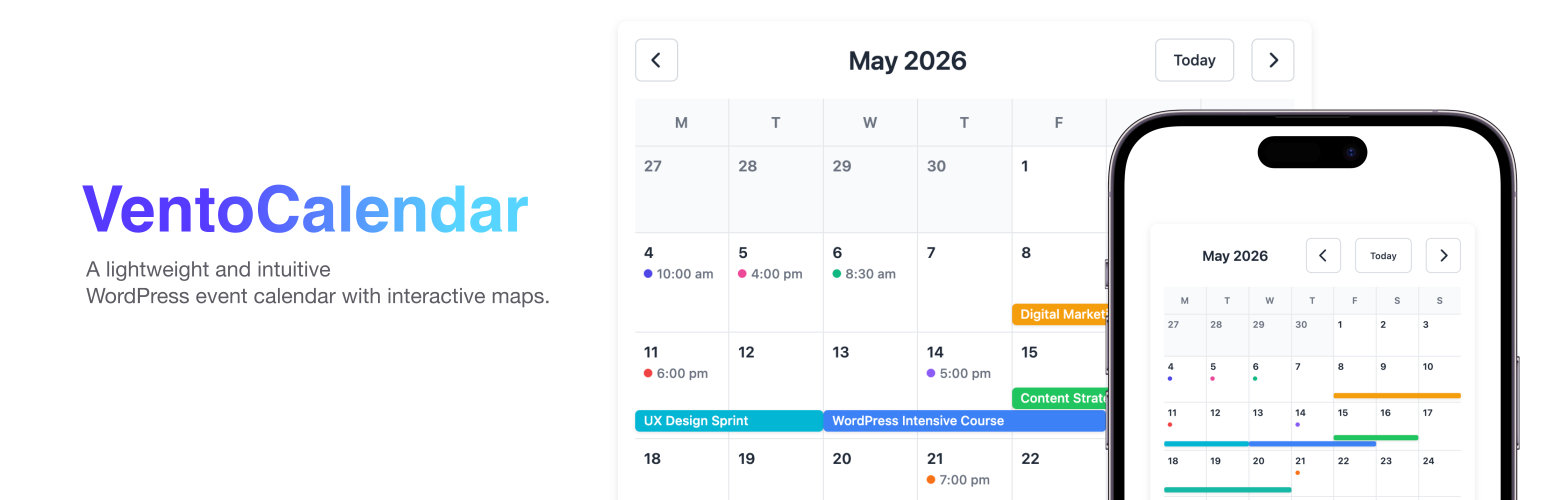
VentoCalendar 是一款簡單且輕量的 WordPress 事件日曆外掛,旨在幫助使用者輕鬆創建和管理活動。它提供直觀的介面,讓使用者可以輕鬆添加活動、設定日期和顏色,並以互動式日曆的方式展示,無廣告、無追蹤,確保隱私。
【主要功能】
• 自訂事件文章類型
• 簡易日期與時間管理
• 顏色編碼以便視覺組織
• 互動式日曆顯示選擇
• 多種佈局選項可選
• 內建 REST API 端點
外掛標籤
開發者團隊
原文外掛簡介
📅 Simple & Lightweight WordPress Event Calendar
VentoCalendar is a powerful yet simple WordPress plugin for creating and managing events. It provides an intuitive interface for adding events with start and end dates, customizable colors, and an interactive calendar view.
Designed to focus on the essentials, VentoCalendar gives you a clean way to manage and display events without unnecessary complexity.
Free and privacy-friendly plugin: No ads, no tracking, and no mandatory external services for the core calendar functionality. Your event data stays on your server. Developed with WordPress coding standards and best practices in mind.
📅 Calendar Features
Custom Event Post Type – Dedicated post type for events with all WordPress features
Date & Time Management – Easy-to-use datetime picker for start and end dates
Color Coding – Assign custom colors to events for better visual organization
Interactive Calendar – Beautiful calendar with selectable view type (monthly calendar or event list), with “Add to my calendar” buttons for Google Calendar and Apple Calendar
Layout Options – Choose between basic, compact, or clean layouts to customize the calendar appearance
Gutenberg Blocks – Two custom blocks for displaying calendars and event information
Shortcodes – Flexible shortcodes for displaying calendars and event information anywhere
REST API – Built-in REST API endpoints for custom integrations
Responsive Design – Fully responsive calendar that works on all devices
Internationalization Ready – Fully translatable with .pot file included
📍 Event Locations & Optional Maps
Events can also have a physical location. Add a location or address to your events and optionally display an interactive map.
Event Locations – Add location and address information to your events
Optional Interactive Maps – Display a map for events that have a physical location
Map Location Picker – Select the event location directly on the map
Powered by OpenFreeMap and MapLibre – Open-source, community-driven map technology, with the MapLibre GL JS library bundled locally
No Google Maps API Key – Maps do not require a Google Maps API key or Google account
No Geocoding Required – Choose the map location manually without sending an address to a geocoding service
Maps are completely optional and do not change the way the core calendar works.
Gutenberg Blocks
Calendar Block – Show a monthly calendar view with all your events
Event Info Block – Display event date and time information using your WordPress date/time formats
Shortcodes
[ventocalendar-calendar] – Display full calendar view
[ventocalendar-start-date] – Display event start date
[ventocalendar-end-date] – Display event end date
[ventocalendar-start-time] – Display event start time
[ventocalendar-end-time] – Display event end time
[ventocalendar-location] – Display event location
[ventocalendar-address] – Display event address
[ventocalendar-map] – Display event map
All shortcodes use the date and time formats configured in Settings → General.
Perfect For
Community organizations
Event venues
Churches and religious organizations
Schools and universities
Business event calendars
Conference websites
Workshop and class schedules
Privacy & Compliance
VentoCalendar is designed with privacy and WordPress.org guidelines in mind:
License
GPLv2 or later – This plugin is free software licensed under the GNU General Public License v2 or later
Designed to comply with WordPress.org guidelines
All code is open source and available for review
No Obfuscated Code
All JavaScript, PHP, and CSS code is readable and unminified
No build process or compilation required
All source code is human-readable and editable
No hidden functionality or encrypted code
No Mandatory External Services
Self-hosted solution – The core calendar functionality runs on your WordPress server
No mandatory third-party services or API keys required
Vue.js library is bundled with the plugin and loaded locally (no CDN)
MapLibre GL JS library is bundled with the plugin and loaded locally (no CDN)
No external accounts, subscriptions, or paid services needed for the calendar
Optional Maps
Maps are optional. When a map is displayed, VentoCalendar uses OpenFreeMap to provide the map resources.
No Google Maps API key or account is required
No address is sent to a geocoding service
Map coordinates are stored with the event in your WordPress database
OpenFreeMap is only used when an event map is displayed
No Advertising
The plugin does not display advertisements in the WordPress admin area or on the frontend
No affiliate links or sponsored content are included
All core calendar features are available without promotional notices or upsells
Privacy Friendly
The plugin does not collect, track, or transmit user data for analytics or advertising
No analytics, tracking scripts, or cookies are added by the plugin
Event data is stored locally in the WordPress database and remains under the site owner’s control
Optional map resources are loaded from OpenFreeMap when a map is displayed
What Data is Stored
Event information (titles, descriptions, dates, colors) – stored in WordPress database
Event location and address information, when provided
Map coordinates and map display settings, when a map is enabled
Event data remains on your server under your control
Developer Notes
Architecture
The plugin follows WordPress Plugin Boilerplate architecture with a centralized loader system. All hooks are registered through the main plugin class.
REST API
Endpoint: GET /wp-json/ventocalendar/v1/events
Parameters:
start (optional) – Start date filter (Y-m-d format)
end (optional) – End date filter (Y-m-d format)
Response: Array of event objects with id, title, dates, times, color, and permalink.
File Structure
admin/ – Admin-specific functionality (PHP, JS, CSS)
public/ – Public-facing functionality (PHP, JS, CSS)
includes/ – Core plugin classes
includes/blocks/ – Gutenberg block classes
includes/cpt/ – Custom post type definitions
languages/ – Translation files
Development
No build process required. All files are unminified and ready for direct editing. The plugin uses standard WordPress enqueue functions for all assets.
Donations
This plugin is free. Donations are voluntary support for its development.
If you find VentoCalendar useful, you can support its development here: Donate via Ko-fi
Support
For support, feature requests, or bug reports, please visit the plugin’s support forum on WordPress.org.
Credits
Built using WordPress Plugin Boilerplate
Calendar powered by Vue.js
Interactive maps powered by OpenFreeMap and MapLibre