內容簡介
Vanquish Order Approval for WooCommerce 讓每個新訂單在進行之前都需經過您的批准或拒絕,並能透過電子郵件及訂單頁面通知客戶。此外掛適合需要確認庫存、地址或客製需求的商家。
【主要功能】
• 訂單批准流程:支付後等待或等待後支付
• 三種訂單狀態:等待批准、已批准、已拒絕
• 訂單畫面上的批准框,顯示決策狀態
• 訂單列表中的批准按鈕及批次操作
• 客戶訂單頁面顯示批准狀態及時間線
• 四封可自訂的電子郵件通知
外掛標籤
開發者團隊
② 後台搜尋「Vanquish Order Approval – Approve & Reject Orders for WooCommerce」→ 直接安裝(推薦)
原文外掛簡介
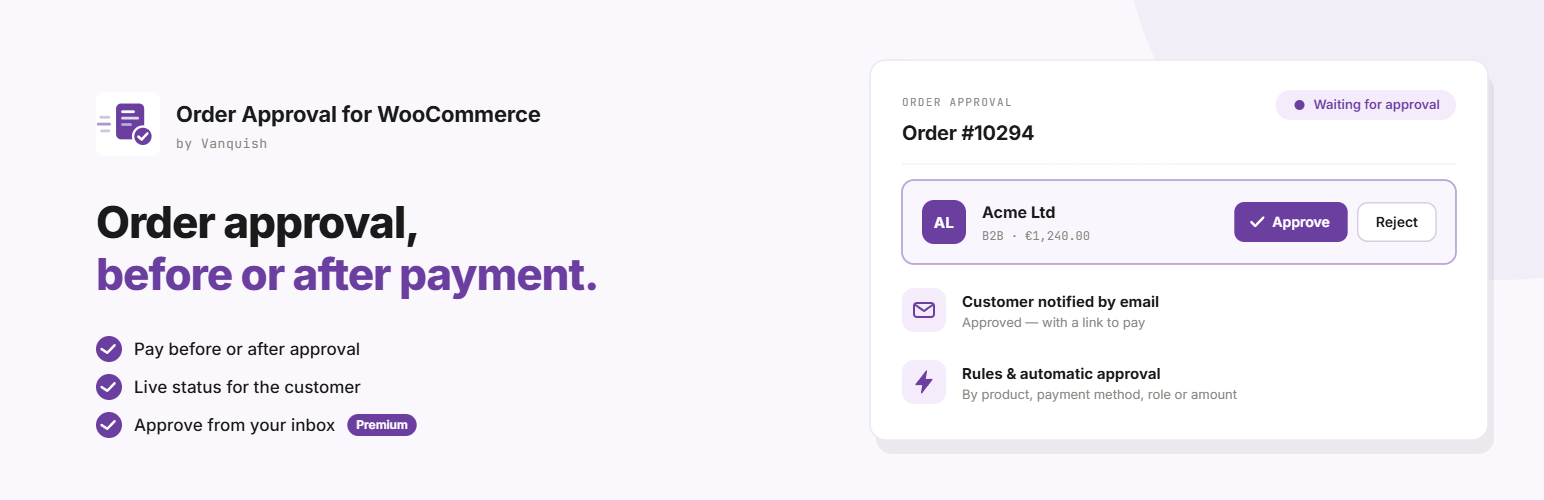
Vanquish Order Approval for WooCommerce puts every new order in front of you before it goes ahead. You approve it or reject it from the order screen, the orders list or a bulk action, and the customer is told by email and on their own order page.
Choose when the customer pays:
Pay, then wait for approval — checkout takes the payment as usual, then the order waits for your decision. Ideal when you want to check stock, an address or a custom request before you ship.
Wait for approval, then pay — checkout asks for no payment at all. Once you approve the order, the customer gets an email with a payment link, and can also pay from their account. Ideal for quotes, B2B and wholesale, made-to-order and anything you price or confirm by hand.
It works with the block checkout and the classic checkout, with any payment method, and with HPOS (High-Performance Order Storage).
Free features
Approval for every order, in either workflow: pay then wait, or wait then pay.
Three order statuses: Waiting for approval, Approved, Rejected, with their own colours in the orders list.
An Approval box on the order screen: where the order stands, when it was decided, and Approve / Reject buttons.
An Approval column, Approve / Reject buttons on each waiting order, and bulk actions in the orders list.
An approval status box for the customer on the order received page and on the order in My account, with a timeline and a Pay button once an approved order can be paid. While the order waits, the box updates by itself when you decide — no reload needed.
Four emails, managed in WooCommerce → Settings → Emails like any other: Order awaiting approval and Order approved (with a Pay button when there is something to pay) and Order rejected to the customer, Payment for an approved order to you. Your own “From” name and address for them, if you like.
A line in WooCommerce’s “New order” email telling you the order is waiting for your approval.
Orders can still be edited while they wait.
Stock held for the order while it waits, and put back when it is rejected; downloadable products unlocked only once the order is approved.
Orders already placed keep their workflow if you change it later; orders you create by hand in the admin are left alone.
Every text translatable; template overrides from your theme.
Migrates automatically from the CodeCanyon plugin “WooCommerce Order Approval”: your settings are imported and your orders keep working, with nothing to convert.
Premium features
Approval rules — ask for approval only for orders containing certain products, categories (with their subcategories) or tags, or for every order except those. The rest go straight through.
Automatic approval — approve an order at checkout, without looking at it, when it is paid with a payment method you trust, shipped with a given method, placed by a customer with a given role, above or below an amount, or when it uses a coupon marked “approve automatically”.
Approve from your inbox — Approve and Reject buttons in the “New order” email. Each link is signed, works once and expires, and opens a confirmation page rather than deciding on its own, so mail scanners cannot click it for you.
Automatic cancellation — an approved order the customer has not paid in time is cancelled and its stock put back.
Customer cancellation — let the customer cancel the order themselves for a while after it is approved.
Refund on rejection — rejecting a paid order refunds it automatically through the payment method, when the method supports refunds.
Reject single products — approve the order but not every product in it: the line stays, costs nothing, and the order total is recalculated. Approve it again and its price comes back.
A time at checkout — let the customer choose a time for the order (same-day pick-ups and deliveries): earliest and latest time, a minimum notice, an “as soon as possible” choice, optional or required. Classic and block checkout.
A message for each order — tell this customer something about your decision, with a date and time, in their approval box and in the email.
Your own wording, in every language — rewrite the approval box and the email subjects, headings and messages, with placeholders such as the order number and the payment link, in each language of a WPML, Polylang or Falang site.
External services
The free version does not send any data to external services. Everything runs on your own site, and the emails go out through WooCommerce.
This plugin uses Freemius to manage licensing and updates for the premium version, and to offer an optional opt-in when you first activate it. Nothing is sent unless you opt in or activate a licence; if you do, Freemius receives your site URL, WordPress and PHP versions and your administrator email address, in order to deliver updates and support. See freemius.com, its terms and its privacy policy.
The premium version adds no external services of its own: refunds go through the payment method already installed on your site.
More WooCommerce plugins by Vanquish
Vanquish Upload Files for WooCommerce – let customers upload files (even large ones) on the product, cart, checkout and order pages, for custom, personalized and print-on-demand products.
Vanquish Shipping Tracking for WooCommerce – tracking numbers on orders and emails, with 1,600+ carriers and their logos, a direct tracking link and a Track button. No account needed.
Vanquish Multiple Addresses for WooCommerce – give customers an address book: save multiple billing and shipping addresses and pick one at checkout.
Vanquish Attach Me for WooCommerce – attach any file to any order or product, show it to the customer and send it with the order emails.