
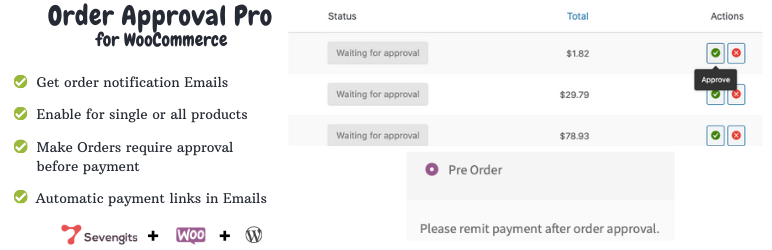
內容簡介
Order Approval for WooCommerce 外掛讓商店擁有者在付款前對訂單進行批准或拒絕,提供完整的 WooCommerce 銷售流程控制。此系統適合需要手動驗證訂單的商店,特別是貨到付款、高價商品及客製化訂單。
【主要功能】
• 支援手動批准或拒絕 WooCommerce 訂單
• 自動發送訂單批准或拒絕的電子郵件通知
• 支援多供應商功能(Dokan 和 WCFM)
• 提供安全的付款連結給客戶
• 適用於貨到付款及高價商品訂單
外掛標籤
開發者團隊
② 後台搜尋「Order Approval for Woocommerce」→ 直接安裝(推薦)
📦 歷史版本下載
原文外掛簡介
WooCommerce Order Approval plugin allows shop owners to approve or reject orders before payment is processed, giving complete control over the WooCommerce sales flow.
With this order approval system, customers can place an order without completing payment. The store owner or admin can manually review each order and decide whether to approve or reject it before payment.
Multivendor Support (Since 2.2.0)
Starting from version 2.2.0, multivendor support is included directly in the Order Approval for WooCommerce plugin. All existing features remain the same, with added support for Dokan and WCFM.Read more
To use multivendor functionality, select your preferred option (Dokan or WCFM) in the Order Approval settings and install the required plugin:
Use Dokan by installing the Dokan plugin
Use WCFM by installing WCFM Frontend Manager and WCFM Marketplace
Note: Only one multivendor plugin should be used at a time. Do not enable both Dokan and WCFM on the same site.
Sales process flow for new customer
The customer places an order, and no payment is processed initially.
The shop owner or admin reviews and approves or rejects the order manually.
The customer receives an email notification:
If the order is approved, the email includes a secure payment link to complete the payment.
If the order is rejected, a cancellation email is sent to the customer.
This plugin is ideal for Cash on Delivery (COD) orders, high-value purchases, custom orders, and stores that require manual order verification before payment.
Features
Order Approval Plugin – Free Version
Allows the shop owner to approve or reject all WooCommerce orders placed by customers after installation and activation.
Enables manual order approval before payment is processed, giving full control over the order workflow.
Automatically sends email notifications to customers whenever an order is approved or rejected.
When an order is approved, the customer receives an order approval email with a secure payment link to complete the purchase.
Supports all enabled WooCommerce payment gateways without additional configuration.
No complex settings required – simple, lightweight, and beginner-friendly.
Includes a blocked checkout feature to prevent payment until the order is approved.
Comes with an Order Edit feature, allowing store owners to modify order details easily before approval, ensuring better order management and control.
Order Approval Plugin – Pro
Includes all features available in the Free version.
Allows order approval for specific products, giving product-level control.
Enables category-wise order approval for better order management.
Supports tag-wise order approval, ideal for custom workflows.
Allows order approval based on category and tag combinations for advanced control.
Provides a blocked checkout feature, ensuring payment is restricted until approval.
Translation-ready, supporting multilingual WooCommerce stores.
Adds Approve / Reject buttons directly inside the admin email, enabling faster order actions.
Order Approval Pro
Docs
Demo
Support
How It Works
The customer places a WooCommerce order without completing payment, and the checkout payment is blocked until approval.
The order status remains pending approval until it is reviewed by the store owner or admin.
The store admin reviews the order from the WooCommerce Orders dashboard.
The admin manually approves or rejects the order using the built-in order approval controls.
The customer receives an automatic email notification based on the order status:
Approved– The customer receives an order approval email with a secure WooCommerce payment link to complete the payment.
Rejected– The customer receives an order cancellation email notification confirming the order rejection.
Addon Plugins
1. Dokan Order Approval
Free Version
Pro Version
Demo
The Dokan Order Approval plugin enables Dokan marketplace vendors to approve or reject customer orders before payment is processed, giving vendors full control over their orders.
2. Order Approval for MultiVendorX
Free Version
Pro Version
Demo
The Order Approval for MultiVendorX plugin allows marketplace vendors to approve or reject orders placed by customers before payment is processed.
This addon works as a combination of the MultiVendorX plugin and the SG Order Approval plugin, helping marketplace owners manage multi-vendor orders without collecting payment upfront.
3. Order Approval for WCFM
Free Version
Pro Version
Demo
The Order Approval for WCFM plugin enables WCFM marketplace vendors to manually approve or reject customer orders before payment is processed, ensuring better order verification and control.
Our other plugins
Sevengits is a leading WooCommerce custom plugin development company backed by a team of experienced professionals. We specialize in building scalable, secure, and innovative WooCommerce plugins, helping businesses unlock the full potential of their eCommerce stores.
Featured Plugins
Notiqoo – Free | Pro | Demo
A powerful WooCommerce WhatsApp messaging and automation plugin designed for seamless customer communication.
Checkout Location Picker for WooCommerce – Free | Pro | Demo
Enables customers to select their delivery location easily during checkout for accurate order fulfillment.
Map to Address – Free | Pro | Demo
Automatically converts map locations into address fields, simplifying address selection and reducing checkout errors.