內容簡介
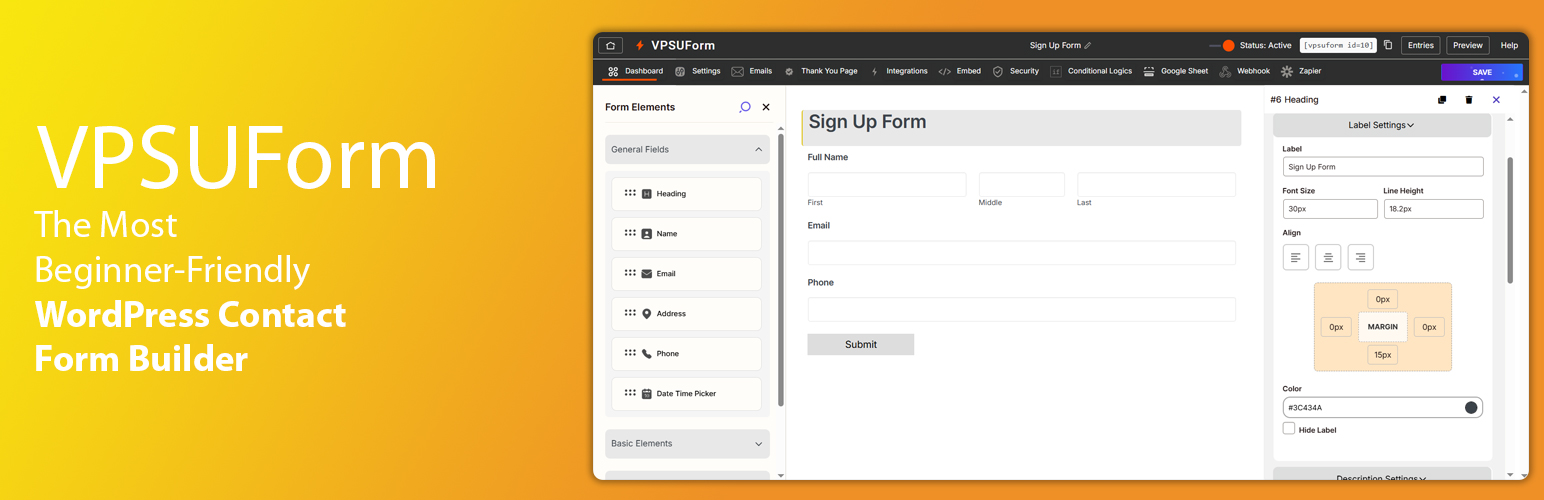
VPSUForm 是一款拖放式的 WordPress 表單建構器,超越基本聯絡表單,提供完整的電子郵件自動化系統、條件邏輯、垃圾郵件保護及與 Google Sheets 和 Zapier 的整合,所有功能均免費提供。
【主要功能】
• 拖放式表單建構器
• 電子郵件自動化與自動回覆
• 條件邏輯功能
• 多步驟表單設計
• 提交管理系統
• 垃圾郵件保護
外掛標籤
開發者團隊
② 後台搜尋「VPSUForm – Drag & Drop Contact Form Builder with Email Automation」→ 直接安裝(推薦)
📦 歷史版本下載
原文外掛簡介
VPSUForm is a drag-and-drop WordPress form builder that goes beyond basic contact forms. You get a full email automation system, conditional logic, spam protection, entries management, and integrations with Google Sheets, Zapier, and more — all in one free plugin.
No page builders. No add-on paywalls for core features. Just a fast, clean form builder that works.
👉 VPSUForm Website | Documentation | Support | YouTube Tutorials
See VPSUForm in action
What makes VPSUForm different?
Most form plugins give you a basic builder and charge for everything else. VPSUForm ships with email automation, conditional logic, multi-step forms, and Google Sheets integration out of the box — free.
It’s also genuinely lightweight. Forms load fast and don’t bloat your site with extra scripts.
Core Features
Drag & Drop Form Builder
Add, reorder, and configure fields visually. What you see in the builder is what your visitors see. No guessing.
Email Automation & Autoresponders
Set up automated email sequences triggered by form submissions. Send a welcome email instantly, a follow-up the next day, a reminder a week later — all without any third-party tool.
Conditional Logic
Show or hide fields based on what users select. Change which emails fire. Branch the form flow based on answers. Works on fields, sections, and email notifications.
Multi-Step Forms with Page Breaks
Break long forms into steps to reduce drop-off. Users see a progress indicator and can move through the form naturally.
Entries Manager
Every submission is stored in WordPress. Search, filter, view, and export entries to CSV anytime. You’re never locked out of your own data.
Spam Protection
Google reCAPTCHA v2/v3 and hCaptcha are both supported. Works on every form automatically.
Google Sheets Integration
New submissions get added to a Google Sheet in real time. Useful for teams who prefer spreadsheets over the WordPress dashboard.
Zapier & Webhooks
Send form data to thousands of apps — CRMs, email tools, Slack, Notion, and more — using Zapier or a direct webhook.
SMTP Support
Connect your own SMTP provider so emails actually land in inboxes instead of spam folders. Includes a test email tool to confirm it’s working.
File Uploads
Accept resumes, images, PDFs, and other attachments. Uploaded files are stored in WordPress media or your server’s upload folder.
E-Signature Field
Let users sign directly inside the form. Useful for consent forms, agreements, and approvals.
Geolocation Field
Capture the user’s current location as a form field.
CSV Export
Download all entries as a CSV for reporting, CRM import, or backup.
30+ Form Fields
Basic
Text, Paragraph, Dropdown, Divider, Title, Button
Contact
Name (First / Middle / Last), Email, Phone, Phone with Country Code, Address, Website/URL
Choice
Radio Buttons, Checkboxes, Range Slider, Rating, Net Promoter Score (NPS)
Advanced
Date, Time, Date/Time, Month, Week, Color Picker, Password, Hidden Field, Geolocation, E-Signature, Repeater
Media & Content
File Upload, Image, Video, Link, Terms & Conditions, Page Break
Anti-Spam
Google reCAPTCHA, hCaptcha
Form Templates Included
Start from a template and customize from there — faster than building from scratch every time.
Contact Form
Lead / Newsletter Signup
Event Registration
File Upload Form
Auction Item Registration
Volunteer Registration
Job Application
Support / Ticket Form
Who uses VPSUForm?
Small businesses — Contact forms, appointment requests, lead capture
Agencies & freelancers — Build client forms quickly, reuse templates across projects
Bloggers & creators — Newsletter signups, feedback forms, survey forms
eCommerce stores — Pre-order requests, returns, product questions
Non-profits & events — Registrations, volunteer signups, donation inquiries
Course creators — Onboarding forms, student applications, feedback collection
Security & Privacy
VPSUForm follows WordPress security best practices. All form data is stored in your WordPress database — nothing is sent to our servers. Use reCAPTCHA or hCaptcha to block spam. For GDPR or CCPA compliance, you control what data you collect and how long entries are kept.