內容簡介
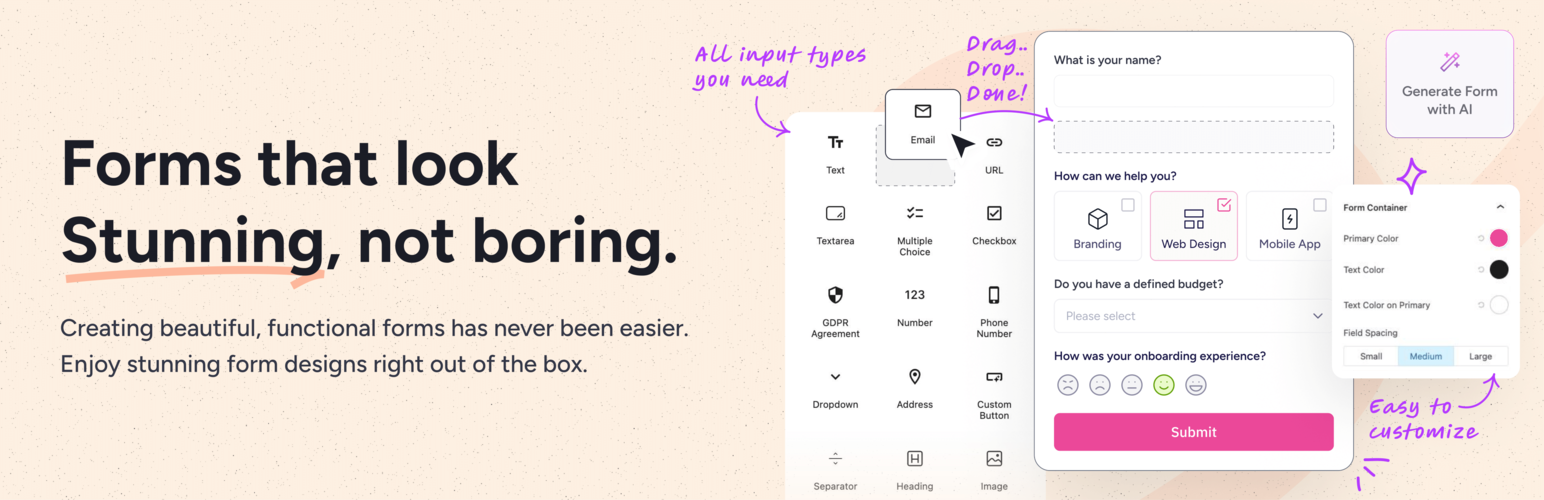
SureForms 是一款專為 WordPress 設計的 AI 表單生成器,能將簡單的提示轉換為可編輯的聯絡表單、支付表單、調查問卷等多種自訂表單。其直觀的操作方式讓使用者能在 Gutenberg 編輯器中輕鬆創建各類表單,無需外部 API 金鑰。
【主要功能】
• AI 自動生成表單,快速創建所需表單
• 支援多種表單類型,如聯絡、支付、報名等
• 直觀的拖放介面,輕鬆編輯表單佈局
• 無需外部介面,完全在 WordPress 控制台內操作
• 提供進階功能,如調查、測驗和計算器表單
外掛標籤
開發者團隊
② 後台搜尋「SureForms – Contact Form Builder, AI Forms, Payment Form, Survey & Quiz」→ 直接安裝(推薦)
📦 歷史版本下載
原文外掛簡介
THE AI FORM GENERATOR FOR WORDPRESS
SureForms is an AI form generator and WordPress form builder that turns a simple prompt into a ready-to-edit contact form, Stripe payment form, booking request form, quote form, lead form, application form, or other custom form. SureForms Business adds advanced form types such as surveys, quizzes, registration forms, calculators, multi-step forms, and conversational forms.
Unlike tools that generate code or move you into a separate interface, SureForms creates editable form blocks directly inside the WordPress block editor. No external API key is required, and you remain in control of every field, label, layout, notification, and setting.
Start with AI, choose a ready-made template, or build from scratch with drag and drop. Trusted by more than 500,000 websites, SureForms combines AI form generation with a familiar Gutenberg experience.
👉 Try the live demo of SureForms
CREATE THE FORM YOU NEED
Use SureForms Free to create:
Contact forms for enquiries, support, and customer communication
Stripe payment forms for products, services, donations, subscriptions, and event fees
Booking request forms, quote forms, lead forms, job application forms, and event RSVP forms
Newsletter forms, feedback forms, request forms, order forms, and other custom WordPress forms
SureForms Business adds advanced form types and workflows:
Registration forms, login forms, lost-password forms, and reset-password forms
Survey forms, feedback surveys, polls, and Net Promoter Score forms
Quiz forms for assessments, scored quizzes, and personality tests
Calculator forms for quotes, pricing, BMI, cost estimates, and custom formulas
Multi-step forms and conversational forms
GENERATE A COMPLETE FORM WITH AI
Describe the form you need in plain language, and SureForms AI creates a ready-to-edit form with suitable fields, labels, and structure. You can refine every part of the generated form inside the WordPress block editor.
Use the AI form builder to draft contact forms, Stripe payment forms, booking requests, quote forms, lead forms, application forms, and other custom forms in minutes. SureForms Business enables the advanced survey, quiz, registration, calculator, multi-step, and conversational workflows described below.
Why SureForms works differently as an AI form generator:
No external API key is required
AI form generation is available in the free plugin
Generated fields remain fully editable
Forms are created as native WordPress blocks inside Gutenberg
You can start with AI, use a template, or build from scratch
The generated form stays inside your WordPress website
POWERFUL FREE FEATURES IN SUREFORMS
The free version of SureForms is more than a basic contact form plugin. It includes the essential tools needed to build, publish, manage, and improve WordPress forms without installing multiple add-ons.
Native WordPress Drag and Drop Form Builder
SureForms uses the WordPress block editor as its form-building interface. Drag, drop, reorder, duplicate, and style fields using the same Gutenberg experience you already use to build pages and posts.
There is no separate proprietary form canvas to learn. Your form remains made of editable WordPress blocks and can be embedded using a block or shortcode.
AI Form Builder for WordPress
Generate a complete form from a simple prompt, then edit every field, label, placeholder, and setting. SureForms AI helps you move faster without locking the result inside a separate cloud dashboard.
Contact Forms and Custom Forms
Create simple contact forms or detailed custom forms for sales enquiries, customer support, feedback, applications, bookings, registrations, events, leads, and internal workflows.
Stripe Payment Forms
Accept secure Stripe payments from your WordPress forms without installing a separate payment add-on. Build donation forms, service payment forms, order forms, membership payment forms, and event registration forms.
Examples:
Donation Form
Photography Packages Payment Form
Monthly Membership Form
Web Design Quote and Payment Form
PayPal payments are available with SureForms Business.
Form Entries Inside WordPress
Store and manage form entries directly inside your WordPress dashboard. Review submissions, search entries, export data, and keep control of your form information without relying on a separate form-data service.
Email Notifications
Send customized email notifications after every form submission. Configure recipients, reply-to addresses, subject lines, message content, and smart form data for different workflows.
Confirmation Messages and Redirects
Show a custom success message after submission or redirect users to another page. This makes it easy to guide visitors toward downloads, thank-you pages, purchases, bookings, and next steps.
Instant Forms with Shareable Links
Publish a form with its own shareable URL without creating a separate WordPress page. Share Instant Forms through email, social media, messaging apps, QR codes, or campaigns.
Responsive Forms and Multi-Column Layouts
Create mobile-friendly forms that work across phones, tablets, and desktops. Arrange fields into flexible columns to make longer forms cleaner and easier to complete.
Real-Time Field Validation
Help users correct incomplete or invalid information before submitting a form. Inline validation improves data quality and reduces failed submissions.
Spam Protection
Protect forms with Google reCAPTCHA, hCaptcha, Cloudflare Turnstile, and honeypot protection. These options help block automated spam while keeping the form experience usable for real visitors.
GDPR-Friendly Forms
Add a GDPR agreement field and control how visitor information is collected. Form entries stay inside your WordPress website unless you intentionally connect an external integration.
Form Reports and Analytics
Review form activity through reports and visual insights in the WordPress dashboard. Understand submission patterns and identify forms that may need attention.
Styling Controls
Customize colors, typography, spacing, borders, field appearance, buttons, and layouts. SureForms forms are designed to work with your active WordPress theme while still giving you control over their appearance.
Form Import Tools
Move supported forms into SureForms instead of rebuilding everything manually. Imported forms remain editable inside the WordPress block editor.
Built-In Translations
SureForms includes built-in translations for:
German
Spanish
French
Italian
Dutch
Polish
Portuguese
SureForms is also translation-ready and works with multilingual tools such as WPML, Polylang, and TranslatePress.
Developer-Friendly Customization
Use clean APIs, hooks, and structured code to extend form behavior, connect custom workflows, or adapt SureForms for client projects.
SUREFORMS BUSINESS FEATURES
SureForms Business adds advanced workflows, fields, automation, and form types while keeping the same Gutenberg-native form-building experience.
Explore all SureForms features
Advanced Form Types
Conversational Forms:
Create chat-like forms that display one question at a time for a focused experience.
Multi-step Forms:
Break longer forms into manageable steps with progress indicators.
Quiz Forms:
Build scored quizzes, graded assessments, and personality tests with result output.
Conditional Logic Forms:
Show or hide fields and control notifications or confirmation messages based on user responses.
Calculator Forms:
Create quote forms, pricing calculators, BMI calculators, cost estimators, and formula-based forms with real-time values.
Survey and Poll Forms:
Collect structured feedback, run polls, and measure customer sentiment with reports and NPS fields.
Registration and Login Forms:
Create branded registration forms, login forms, lost-password forms, and reset-password flows using WordPress blocks.
Advanced Form Fields
SureForms Business adds fields for more complex forms:
Date Picker
Time Picker
File Upload
Signature
Rating
Range Slider
Repeater
Hidden Field
Custom HTML
Password Field
Advanced Workflows
PDF Generation:
Create downloadable PDFs from form submissions for records, applications, invoices, certificates, or sharing.
Save and Resume:
Let users save partially completed forms and return later.
Partial Entries:
Capture in-progress submissions so you can understand where users stop and follow up when appropriate.
Form Restrictions:
Restrict visibility or submissions by IP address, country, keywords, login status, password, date, or submission limits.
Custom Post Creation:
Create WordPress posts or custom post types directly from form submissions.
Conditional Emails and Confirmations:
Send different notifications or show different confirmation messages based on submitted values.
Dynamic Options:
Populate dropdown and multiple-choice options from post types, taxonomies, or user roles.
PayPal Payments:
Accept PayPal alongside Stripe for payment forms, donation forms, membership forms, bookings, and registration payments.
Native Integrations and Automation
Explore SureForms integrations
Connect SureForms with Google Sheets, Mailchimp, FluentCRM, HubSpot, Brevo, ActiveCampaign, Zoho CRM, Klaviyo, Airtable, Notion, Telegram, MailerLite, GetResponse, Campaign Monitor, Drip, MailPoet, Kit, Keap, and 25+ additional services.
Use Zapier to connect forms with thousands of apps, or send form data to custom API endpoints with webhooks.
Page Builder Styling
Customize SureForms directly inside:
Gutenberg Block Editor
Elementor
Bricks Builder
SureForms also works with Divi, Beaver Builder, and other popular WordPress page builders.
HOW SUREFORMS WORKS
Step 1: Install SureForms
In your WordPress dashboard, go to Plugins > Add New, search for “SureForms,” then install and activate the plugin.
Step 2: Create Your Form
Generate a form with AI, choose a ready-made template, or start from scratch using the drag and drop WordPress form builder.
Step 3: Customize the Form
Add fields, arrange columns, configure notifications, choose confirmation behavior, enable spam protection, and match the form to your website.
Step 4: Publish or Share
Embed the form on a page or post using a block or shortcode, or publish it as an Instant Form with a shareable link.
WHO CAN USE SUREFORMS?
Website Owners: Create contact forms, payment forms, booking forms, feedback forms, and other everyday forms without coding.
Businesses: Collect leads, payments, registrations, applications, and customer feedback.
Designers: Build forms that match a website using block-based styling controls.
Developers: Extend forms through APIs, hooks, custom CSS, and integrations.
No-Code Professionals: Create advanced workflows without building a custom application.
Agencies: Build and manage forms across client websites with a familiar WordPress workflow.
Educators and Course Creators: Create quizzes, assessments, registrations, and surveys.
Nonprofits: Build donation forms, volunteer forms, event forms, and application forms.
WORDPRESS THEMES, BUILDERS, AND PLUGINS
SureForms works with popular themes including Astra, Spectra One, Blocksy, Bricks, Flatsome, GeneratePress, Hestia, Kadence, and Neve.
It works with page builders including Gutenberg, Elementor, Bricks, Divi, and Beaver Builder.
SureForms is compatible with popular plugins and platforms including WooCommerce, Easy Digital Downloads, GiveWP, LearnDash, LifterLMS, MemberPress, Restrict Content Pro, SureCart, SureMembers, OttoKit, The Events Calendar, TutorLMS, Wishlist Member, and CartFlows.
CONNECT WITH SUREFORMS
Follow SureForms on Facebook for product news and feature updates.
Join the SureForms community to learn from other users and discuss workflows.
CONTRIBUTE TO SUREFORMS
Contribute to the public plugin repository on GitHub.
THIRD-PARTY SERVICES
SureForms may connect to third-party services only when the related feature is enabled:
ipinfo may show visitor IP information when IP logging is enabled. Terms and Privacy Policy
Google Fonts may load when a Google font is selected. Terms and Privacy Policy
ipapi may detect a visitor’s region for the phone field. Terms and Privacy Policy
Google reCAPTCHA may be used for spam prevention.
Stripe is used to process Stripe payment forms. Terms and Privacy Policy
BRANDING GUIDELINE
SureForms is a registered trademark. Please use the official product name “SureForms.”
Blocks
SureForms provides 16 blocks for all users, with additional advanced fields available in SureForms Business:
Address Field: Collect a full address with address lines, city, state, postal code, and country.
Phone Number Field: Collect international phone numbers with country code support and validation.
Email Field: Collect validated email addresses for contact forms, lead forms, and registrations.
Textarea Field: Capture long-form messages, comments, descriptions, or feedback.
Number Field: Collect numeric information with minimum, maximum, and step controls.
URL Field: Accept validated website or page URLs.
Dropdown Field: Add a single-select list with customizable options.
Custom Button Block: Add a styled submit or action button.
Text Field: Collect names, titles, short answers, and other single-line information.
Multiple Choice Field: Let users select one option from a list.
Checkbox Field: Add single or multiple checkbox options for preferences and agreements.
Separator: Divide a form into clear visual sections.
Heading: Add headings to organize longer forms.
Image: Add visual context, branding, or instructions.
Icon: Add icons for visual clarity and design.
GDPR Agreement Field: Add a consent checkbox for privacy-related agreements.