內容簡介
rotect 插件說明
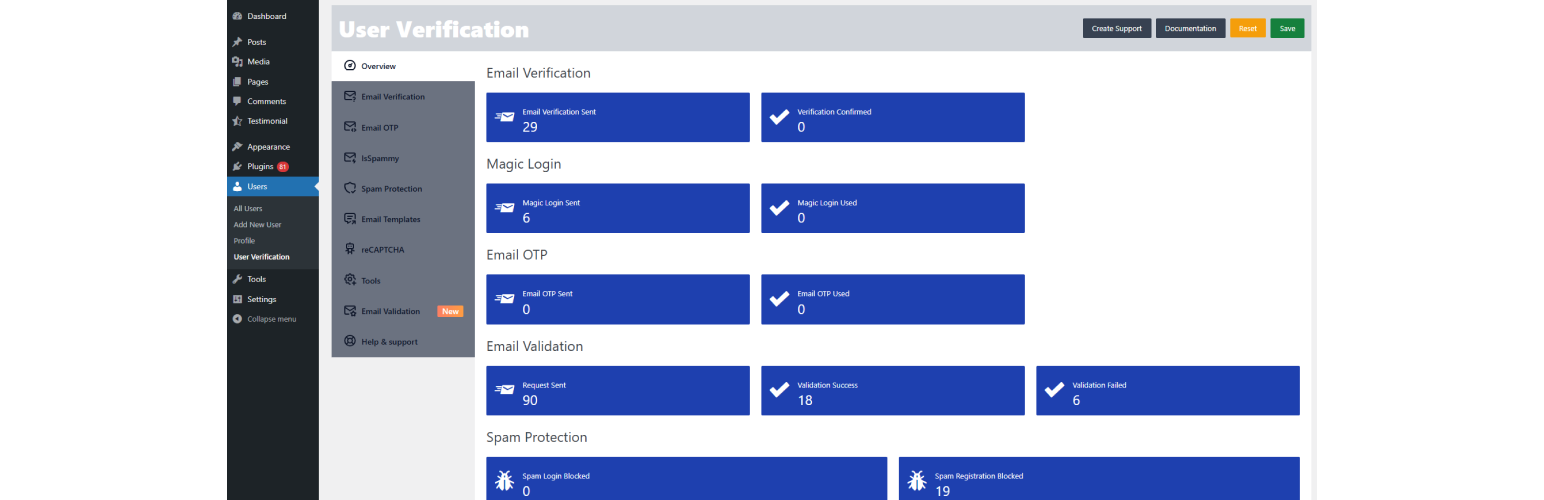
這個 WordPress 外掛可以防止垃圾使用者和阻止使用垃圾信箱的人進行即時訪問,使用者需要在登錄網站之前驗證他們的電子郵件。
由http://www.pickplugins.com提供的用戶驗證外掛程式
捐款
支援
文檔
第三方插件
WooCommerce
Ultimate Member
Paid Memberships Pro
MemberPress
WP 使用者管理員
Buddypress
ARMember
Youzify
AJAX 登錄和註冊模態彈出 DEV + 內置表單
Forminator
Login / Signup 彈出視窗
N-Media WP 會員註冊
Paid Member Subscriptions
Pie Register – 基本版
Profile Builder
ProfileGrid
ProfilePress
RegistrationMagic
User Meta Lite
使用者註冊
插件特色
WordPress 預設登錄的 OTP
每次使用者嘗試登錄您的 WordPress 網站,均需要通過郵件發送的 OTP 驗證,使用者仍可以從第三方登錄表單中使用其帳戶密碼。
阻止使用者名稱
WordPress 預設註冊會從電子郵件創建使用者名稱,在大多數情況下,某些使用者名稱看起來像 admin1 或 admin2,或者某些重要的使用者名稱可能會讓其他使用者感到困惑。有時壞人可能會從這種情況中獲取優勢,您可以使用模式來阻止以特定字符串開始,包含或以此結尾的使用者名稱。
阻止電子郵件域
您可以封鎖任何註冊時的電子郵件域,因此踢出垃圾或臨時電子郵件提供者的域名並享受無垃圾的用戶。您還可以設置允許的域名,以便使用者無法在不使用允許的域名的情況下註冊帳戶。
可自定義郵件模板
您可以根據自己的需要自定義電子郵件模板,提供了一些標籤,以製作動態電子郵件模板。
自動登錄
您可以設置在完成電子郵件驗證後自動登錄使用者的帳戶。
Google reCAPTCHA
通過使用 Google reCAPTCHA 預設登錄表單,預設註冊表單,預設密碼重置表單,預設評論表單和 WooCommerce 登錄表單,註冊表單,丟失密碼表單來保護各種表單。
WooCommerce 支援
User Verification 完全支持與 WooCommerce 一起使用,您可以通過 WooCommerce 註冊表單和結帳表單禁用註冊後自動登錄,使用者將無法通過 WooCommerce 登錄表單登錄,直到得到驗證。
Paid Membership Pro 支援
用戶驗證提供 Paid Membership Pro 外掛程式的支援。
MemberPress 支援
用戶驗證外掛程式也可以與 MemberPress 外掛程式一起使用,並添加了 MemberPress 外掛程式所需的支援,不需要任何設置。
Buddypress 支援
我們為 buddypress 外掛程式提供支援,並且它非常好用。
Ultimate Member
Ultimate Member 是製作個人資料和會員網站的最佳插件之一,我們為此插件加入了支援。
各種操作的自定義信息。
通過短縮代碼 [uv_resend_verification_form] 重新發送驗證金鑰表單。
可翻譯
垃圾郵件保護插件
外掛標籤
開發者團隊
② 後台搜尋「User Verification by PickPlugins」→ 直接安裝(推薦)
📦 歷史版本下載
原文外掛簡介
User Verification – Complete WordPress User Authentication & Security Plugin
User Verification by http://www.pickplugins.com
Donate
Support
Documentation
Secure Your WordPress Site with Advanced User Verification & Authentication
User Verification is a comprehensive WordPress security plugin that provides multiple layers of user authentication and spam protection to safeguard your website from unauthorized access and malicious registrations.
🔐 Key Features
Email Verification System
Mandatory Email Verification: Ensure all new users verify their email addresses before accessing your site
Customizable Verification Pages: Choose custom redirect pages for successful and failed verifications
Automatic Login: Seamlessly log users in after successful email verification
Role-Based Control: Exclude specific user roles (like Administrators) from verification requirements
Flexible Configuration: Enable/disable email verification with simple toggle controls
Magic Login (Passwordless Authentication)
🆕 NEW Feature: Enable secure passwordless login for enhanced user experience
Email-Based Authentication: Users receive login links directly in their inbox
Customizable Key Length: Set secure authentication key length (default: 6 characters)
Attempt Limits: Configure maximum login attempts for security (default: 3 attempts)
Custom Redirect Pages: Set specific pages for successful logins, failures, and magic login forms
Email Verification Integration: Require verified emails for magic login access
Easy Implementation: Simple shortcode [user_verification_magic_login_form] for frontend display
OTP (One-Time Password) Login
SMS/Email OTP: Secure one-time password authentication system
Configurable OTP Length: Customize OTP length (default: 6 digits)
Character Flexibility: Support for numbers, uppercase, lowercase, and special characters
Custom Success/Error Messages: Personalized user feedback for OTP processes
Post-Login Redirects: Direct users to specific pages after successful authentication
Easy Integration: Simple shortcode [user_verification_otp_login_form] implementation
Advanced Spam Protection
Domain Blocking: Block registrations from specific email domains
Domain Allowlist: Allow only approved email domains for registration
Username Protection: Block specific usernames from registration
Flexible Domain Management: Easy-to-use interface for managing blocked/allowed domains
reCAPTCHA Integration
Google reCAPTCHA v2: Complete bot protection with checkbox verification
Multiple Implementation Points: Add reCAPTCHA to login, registration, password reset, and comment forms
WooCommerce Ready: Full integration with WooCommerce forms
Easy Configuration: Simple setup with site key and secret key
User Management Tools
Unverified User Cleanup: Automatically delete unverified user accounts
Existing User Verification: Mark existing users as verified with customizable intervals
User Status Monitoring: Track verification status across your user base
Email Customization
Custom Email Templates: Personalize verification and notification emails
WPAutoP Support: Enable/disable automatic paragraph formatting in emails
Branded Communications: Add your logo and customize email appearance
Multiple Email Types: Templates for registration, verification, OTP, magic login, and activation
WooCommerce Compatibility
E-commerce Ready: Full integration with WooCommerce login, registration, and password reset forms
Customer Protection: Prevent fake customer registrations and protect customer data
Seamless Experience: Maintain smooth checkout process while ensuring security
🎯 Perfect For:
Membership Sites: Protect exclusive content with verified users only
E-commerce Stores: Prevent fake customer accounts and fraudulent orders
Corporate Websites: Ensure legitimate user registrations for business platforms
Community Forums: Maintain quality user base with verified members
Educational Platforms: Secure student and instructor account creation
Any WordPress Site: Enhance security for blogs, portfolios, and business websites
⚡ Easy Setup & Management
User-Friendly Interface: Intuitive admin dashboard for all configurations
Shortcode Ready: Simple shortcodes for frontend form implementation
One-Click Configuration: Enable/disable features with simple toggle switches
Comprehensive Documentation: Detailed setup guides and troubleshooting support
🔧 Technical Specifications
WordPress Compatibility: Works with latest WordPress versions
PHP 7.4+ Support: Modern PHP compatibility for optimal performance
Mobile Responsive: All forms and interfaces work perfectly on mobile devices
Translation Ready: Multi-language support for global websites
Developer Friendly: Clean code structure with hooks and filters for customization
📧 Default Email Configuration
Professional Setup: Comes with pre-configured professional email settings
Custom From Address: Set your preferred sender email (e.g., [email protected])
Branded Sender Name: Customize sender name (default: wordpress)
Template Variety: Multiple email templates for different verification scenarios
🚀 Why Choose User Verification?
Complete Security Solution: Multiple authentication methods in one plugin
Zero Spam Guarantee: Advanced filtering eliminates fake registrations
User Experience Focused: Smooth verification process that doesn’t frustrate legitimate users
Highly Customizable: Adapt every aspect to match your site’s needs
Regular Updates: Continuously updated with new features and security improvements
Professional Support: Dedicated support for setup and troubleshooting
Installation & Usage
Simply install the plugin, configure your preferred verification methods, and add the provided shortcodes to your pages. The plugin integrates seamlessly with WordPress default forms and popular plugins like WooCommerce.
Transform your WordPress site security today with User Verification – the most comprehensive user authentication plugin available.
External services
Spam Protection by [https://isspammy.com](http://isspammy.com)
isspammy.com is owned by PickPlugins and it’s used to protect spam users from login in, registering, commenting, posting reviews and etc. Once you mark a comment as spam it will send a request to isspammy.com and it will create a record for this mail and marked as spam, so later when the same email is used to post a comment it will block them as a spammer. isspammy.com is commited to keep user email private and only accessible when requested.
isspammy.com/privacy-policy/
isspammy.com/About Us/