內容簡介
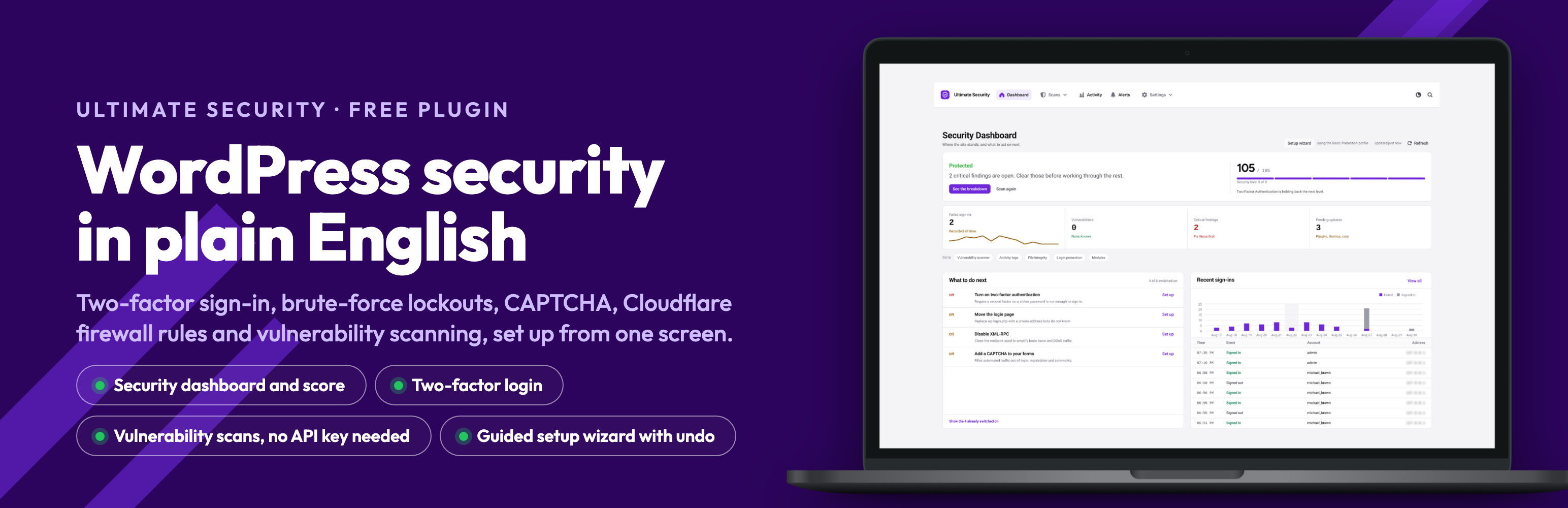
Ultimate Security 是一款專為 WordPress 設計的安全外掛,能有效防止駭客和機器人入侵,提供雙重驗證、密碼保護及漏洞掃描等功能,確保網站安全無虞。
【主要功能】
• 雙重驗證,增強登入安全性
• 阻擋密碼猜測攻擊,自動鎖定不當登入
• 隱藏登入頁面,防止機器人攻擊
• 垃圾郵件和機器人防護,支援 Google reCAPTCHA
• 漏洞掃描,及時發現安全問題
• 安全評分,提供網站保護狀況概覽
外掛標籤
開發者團隊
② 後台搜尋「Ultimate Security – Vulnerability Scanner, 2FA, and Login Protection」→ 直接安裝(推薦)
📦 歷史版本下載
原文外掛簡介
Stop hackers and bots from getting into your WordPress site. Ultimate Security adds two-factor login, blocks password-guessing attacks, stops spam bots and warns you about plugins with known security holes. A setup wizard picks the right settings for your kind of site, so you don’t have to understand every option.
Why site owners choose it
Free, with no account needed. Install it and it works. No sign-up and no usage tracking.
Set up in about 3 minutes. The wizard asks what kind of site you run, checks it, and shows every change before applying it. You can undo it all later.
Try before you enforce. Test Mode shows what would have been blocked, without blocking anyone.
You can’t lock yourself out for good. The wizard gives you an emergency link that switches the plugin off from any browser.
Protect your login
Two-factor login. After the password, users confirm with a code sent by email or shown in an authenticator app (Google Authenticator, Authy, Microsoft Authenticator and similar). Choose which user roles need it. Works on the WordPress, WooCommerce and Ultimate Member login forms. See at a glance on the Users screen who has two-factor on. Changing two-factor settings asks for a code first, and you are warned by email if someone keeps failing your two-factor check, because that means they know your password.
Stop password-guessing bots.
Lock out anyone who gets the password wrong too many times. Repeat offenders wait longer each time.
Permanently block addresses you never want to see again.
An administrator can send a locked-out user a 15-minute recovery link.
Works behind Cloudflare automatically. Site Health tells you if your host’s setup needs one extra step.
Hide your login page. Move wp-login.php to a private address so bots can’t find it.
Stronger passwords.
Set rules for length, letters, numbers and symbols, or pick a ready-made preset.
Stop people reusing old passwords, and ask for a new one on first login or after a set time.
Reject passwords that have appeared in known data leaks. The check never sends the password itself anywhere.
Works with password managers: they are told your rules, so the passwords they create are accepted, and the “Generate password” button follows your rules too.
Control who stays signed in.
Limit how many devices one account can use at once.
Sign people out automatically after a period of inactivity.
See who is signed in right now, and end any session with one click.
Block spam and bots on your forms
Add Google reCAPTCHA or Cloudflare Turnstile to your login, registration, password reset and comment forms, and to WooCommerce login, registration and checkout.
Check that your keys work before going live.
If the CAPTCHA service is down, your forms keep working.
Won’t clash with another CAPTCHA plugin on the same form.
Find security problems before hackers do
Vulnerability scanner. Checks WordPress, your plugins and your themes against a database of known security holes, and emails you when it finds one. It works without an API key; WPScan or Patchstack keys add extra coverage.
Runs on a schedule in the background.
Flags plugins that haven’t been updated in a long time.
Results show in the dashboard, Site Health and your plugins list.
Security score. One number that tells you how well protected your site is, and which fix to do next.
File check. Compares your WordPress core files with the official copies, so changed or added files stand out.
See what is happening. Security Fixes lists everything that needs attention, most serious first, with fixes you can preview before they run. Security Events shows recent sign-ins, failed sign-ins and lockouts. Troubleshoot checks the things your protections rely on, and Security Baseline tells you when a setting changes. The Application Passwords and API & Agent Access pages show which apps and AI tools can reach your site.
Safer updates. Choose when WordPress, plugins and themes update automatically. Set update days and quiet periods, delay updates by a few days, and get an email when something changes.
Advanced protection
Cloudflare firewall rules. If your site uses Cloudflare, connect your account and turn on ready-made rules from wp-admin: let good bots through, block bad crawlers and risky traffic, and block attacks on known WordPress flaws before you’ve had a chance to update. You can preview every rule before it goes live.
Security keys (salts). Change the secret keys in wp-config.php on demand or on a schedule, which signs everyone out and makes stolen login cookies useless. You get a warning before a scheduled change, and can restore a previous set.
Test Mode
Turn on your protections without blocking anyone, and review a log of what would have been blocked. Choose which user roles it covers. Visitors who aren’t signed in are still held to the login limit, and Test Mode switches itself off after seven days, so a forgotten test never leaves your site unprotected.
Moving from another plugin
Import your two-factor and login settings from Wordfence Login Security. Preview it first and undo it if you change your mind.
Copy your settings to another site, or keep a backup, as a file.
Detects WooCommerce, Ultimate Member, page builders, form, caching and SEO plugins, and warns you if another security plugin is already doing the same job.
Privacy
No usage tracking. The plugin contacts an outside service only when you switch on a feature that needs one, and each is listed under External Services below.
For developers
wp ultimate-security template list
wp ultimate-security template apply [--dry-run]
wp ultimate-security template undo
wp ultimate-security export [--file=
wp ultimate-security import
wp ultimate-security status
wp ultimate-security unlock
wp ultimate-security 2fa status
wp ultimate-security 2fa disable
wp ultimate-security captcha off
wp ultimate-security login-url reset
Video guides
Set up an authenticator app
Two-factor login by email
Hide your login page
Set strong password rules
Limit login sessions
Manage plugin and theme updates
Change your security keys after a breach
Spot changed WordPress files
Understand Site Health reports
Dashboard walkthrough
Move your Wordfence two-factor settings
Learn more
Website — features and articles.
Documentation — setup guides, troubleshooting and how-tos.
YouTube — all video guides.
External Services
This plugin connects to the following third-party services, and only when you use the related feature:
Google reCAPTCHA
When: reCAPTCHA protection is enabled. The reCAPTCHA script is then loaded in your visitors’ browsers on the protected forms.
Data sent: the visitor’s reCAPTCHA response token, your site secret key, and the visitor’s IP address for verification.
Endpoints: https://www.google.com/recaptcha/api.js (browser script, with a preconnect to https://www.gstatic.com) and https://www.google.com/recaptcha/api/siteverify (server-side verification).
Terms: https://policies.google.com/terms — Privacy: https://policies.google.com/privacy
Cloudflare Turnstile
When: Cloudflare Turnstile protection is enabled. The Turnstile script is then loaded in your visitors’ browsers on the protected forms.
Data sent: the visitor’s Turnstile response token, your site secret key, and the visitor’s IP address for verification.
Endpoints: https://challenges.cloudflare.com/turnstile/v0/api.js (browser script) and https://challenges.cloudflare.com/turnstile/v0/siteverify (server-side verification).
Terms: https://www.cloudflare.com/website-terms/ — Privacy: https://www.cloudflare.com/privacypolicy/
WPVulnerability
When: the Vulnerability Scanner runs. This is the default vulnerability database and requires no API key.
Data sent: your WordPress version and the slugs of your installed plugins and themes.
Endpoint: https://www.wpvulnerability.net/
Privacy: https://www.wpvulnerability.net/
WPScan
When: the Vulnerability Scanner runs and you have configured a WPScan API key.
Data sent: your WPScan API key, your WordPress version, and the slugs of your installed plugins and themes.
Endpoint: https://wpscan.com/api/v3/
Terms: https://wpscan.com/terms-of-service/ — Privacy: https://wpscan.com/privacy-policy/
Patchstack
When: the Vulnerability Scanner runs and you have configured a Patchstack API key.
Data sent: your Patchstack API key, your WordPress version, and the slugs of your installed plugins and themes.
Endpoint: https://patchstack.com/database/api/v2/
Terms: https://patchstack.com/terms-of-service/ — Privacy: https://patchstack.com/privacy-policy/
WordPress.org Plugin and Theme Information API
When: the Vulnerability Scanner checks whether an extension has been abandoned, and when the Update Manager gathers update information.
Data sent: the slugs of your installed plugins and themes (no user data).
Endpoints: https://api.wordpress.org/plugins/info/1.2/ and https://api.wordpress.org/themes/info/1.2/
Privacy: https://wordpress.org/about/privacy/
WordPress.org Core Version Check
When: the Update Manager checks for available WordPress core updates.
Data sent: a standard WordPress core version-check request (no user data).
Endpoint: https://api.wordpress.org/core/version-check/1.7/
Privacy: https://wordpress.org/about/privacy/
WordPress.org Core Checksums
When: you run the WordPress core file-integrity check.
Data sent: your WordPress version and locale, in order to retrieve the official file checksums for comparison.
Endpoint: https://api.wordpress.org/core/checksums/1.0/
Privacy: https://wordpress.org/about/privacy/
WordPress.org Secret-Key (Salt) API
When: you rotate WordPress security keys and salts, on demand or on a schedule.
Data sent: a request for randomly generated salt strings (no site or user data).
Endpoint: https://api.wordpress.org/secret-key/1.1/salt/
Privacy: https://wordpress.org/about/privacy/
Cloudflare API
When: you connect Cloudflare or preview, deploy, remove or analyse WAF rules.
Data sent: your Cloudflare credentials or API token, the selected zone and rule data, and the API requests needed for verification, deployment and analytics.
Endpoint: https://api.cloudflare.com/client/v4/
Terms: https://www.cloudflare.com/website-terms/ — Privacy: https://www.cloudflare.com/privacypolicy/
Have I Been Pwned (Pwned Passwords)
When: the “refuse compromised passwords” password-policy option is enabled and a password is set or changed.
Data sent: the first 5 characters of the SHA-1 hash of the password (a k-anonymity range query). The password itself is never sent.
Endpoint: https://api.pwnedpasswords.com/range/
Privacy: https://haveibeenpwned.com/Privacy
Feedback and support email
When: only when an administrator explicitly submits contact, migration, or deactivation feedback. Choosing “Skip & Deactivate” sends nothing.
Destination: [email protected], delivered through the site’s configured WordPress email service.
Privacy: https://www.wpultimatesecurity.com/privacy-policy/